Commit 25ac53
2026-05-25 22:07:24 lisa: SD C04: add Brainstorming, Mind Mapping, Design Sketches how-to pages; link from checkpoint Completes the four C4-1 ideation-tool guides. StudyStreak through-line throughout; Brainstorming/Mind Mapping right-sized (familiar), Design Sketches fuller with an annotated low-fi wireframe modelling the identify/explain/justify ladder. Mind map uses a verified mermaid flowchart. All four now linked from the checkpoint design-pack table. Co-Authored-By: Claude Opus 4.7 (1M context) <noreply@anthropic.com>| /dev/null .. sd/C04/Brainstorming.md | |
| @@ 0,0 1,93 @@ | |
| + | > **DRAFT** — under teacher review. |
| + | |
| + | # Brainstorming |
| + | |
| + | The Hamilton and Alexandra College · Year 12 · 2026 |
| + | |
| + | Brainstorming is one of the four ideation tools in your [C4-1 design pack](/sd/C04/C4-1%20Checkpoint%20-%20Design%20Pack). You already know *what* it is — the skill that scores marks is doing it **well**: chase quantity, switch your judgement off, then find the themes. |
| + | |
| + | --- |
| + | |
| + | ## What makes a good brainstorm |
| + | |
| + | - **Quantity over quality** — wild, silly, half-formed ideas are all welcome. Volume is the point. |
| + | - **No judging during the session** — don't filter, don't say "that won't work." Capture *everything*. |
| + | - **Build on ideas** — one idea sparks the next. |
| + | - **Timebox it** — 10–15 minutes of fast output beats an hour of overthinking. |
| + | - **Then group into themes** — the raw list is only useful once you've organised it. |
| + | |
| + | --- |
| + | |
| + | ## How to run yours |
| + | |
| + | 1. Write your **project goal** as a "How might we…?" question at the top of the page. |
| + | 2. Set a **timer for 10–15 minutes**. |
| + | 3. **Dump every idea.** No filtering, no editing, no "that's silly." |
| + | 4. When the timer stops, **group related ideas** and circle the **2–3 strongest themes** to carry into your mind map. |
| + | |
| + | Use a mini-whiteboard, A3 paper, or Excalidraw in Obsidian — whatever lets you write fast. |
| + | |
| + | --- |
| + | |
| + | ## StudyStreak example |
| + | |
| + | **How might we help students keep studying without burning out?** |
| + | |
| + | *Raw dump (timer on — no filtering):* |
| + | |
| + | > pomodoro timer · streak counter · a plant that grows as you study · mood check-in · "you've done enough today" nudge · lock-out after 9pm · study-with-friends room · badges · confetti · gentle reminder to take a break · one-tap "start studying" · weekly wind-down summary · soundscapes · leaderboard · screen-time guardrails · reward downtime, not just study |
| + | |
| + | *Then group into themes (and circle the strongest):* |
| + | |
| + | - 🟢 **Gentle motivation** — streak counter, growing plant, weekly summary ✅ |
| + | - 🟢 **Low-friction logging** — one-tap start, pomodoro timer ✅ |
| + | - **Wellbeing guardrails** — break reminders, "done enough" nudge, 9pm lock-out |
| + | - ~~Competition~~ — leaderboard, badges, confetti *(crossed out — clashes with the calm, non-gamified feeling)* |
| + | |
| + | Notice the last group got **rejected on purpose** — that decision is exactly the kind of thing your C4-1 annotations should justify. |
| + | |
| + | --- |
| + | |
| + | ## Common mistakes |
| + | |
| + | - **Filtering as you go** — it kills your volume. Judge *after* the timer, not during. |
| + | - **Stopping at five ideas** — push past the obvious ones; the good stuff usually comes later. |
| + | - **Skipping the grouping step** — an ungrouped list isn't finished work. |
| + | |
| + | --- |
| + | |
| + | ## Your turn |
| + | |
| + | 1. Write your "How might we…?" question. |
| + | 2. Timer on — 10–15 minutes, maximum ideas, zero filtering. |
| + | 3. Group your ideas; circle 2–3 themes. |
| + | 4. Note one idea you **rejected** and why (great annotation material). |
| + | |
| + | Commit your raw list **and** your themes to GitHub, and add them to your printed design pack. |
| + | |
| + | --- |
| + | |
| + | ## Check Your Understanding |
| + | |
| + | 1. Why is the rule "quantity over quality"? |
| + | >| ### Answer |
| + | >| Volume is where good ideas hide — the obvious ones come first, the strong ones come after you've pushed past them. Judging early stops the flow. |
| + | |
| + | 2. What two things do you do *after* the timer stops? |
| + | >| ### Answer |
| + | >| Group related ideas into themes, and circle the 2–3 strongest to carry forward (into your mind map). |
| + | |
| + | 3. Why is it useful to note an idea you *rejected*? |
| + | >| ### Answer |
| + | >| Naming what you considered and rejected — and why — is exactly the justify-level thinking C4-1 annotations reward. |
| + | |
| + | --- |
| + | |
| + | ## See also |
| + | |
| + | - [Mind Mapping](/sd/C04/Mind%20Mapping) — the next step: give your brainstorm themes some shape |
| + | - [Mood Boards](/sd/C04/Mood%20Boards) · [C4-1 Checkpoint — Your Design Pack](/sd/C04/C4-1%20Checkpoint%20-%20Design%20Pack) |
| + | |
| + | --- |
| + | |
| + | ← Back to [C04 Home](/sd/C04/C04-home) · [VCE Software Development Hub](/sd/VCE%20Software%20Development%20Hub) |
| sd/C04/C4-1 Checkpoint - Design Pack.md .. | |
| @@ 19,9 19,9 @@ | |
| |---|---|---|---| | |
| | 1 | **Design-ideas list** | A rough list: what features it could have, what it could look like, how users might interact, what existing apps inspire you | ☁️ GitHub | | |
| | 2 | **Mood board** ([how-to](/sd/C04/Mood%20Boards)) | Visual look-and-feel — colours, typography, UI patterns, screenshots of apps that inspire you | ☁️ GitHub | | |
| - | | 3 | **Brainstorm** | A timed (10–15 min) burst — quantity over quality, no filtering — then group the ideas into themes | ☁️ GitHub | |
| - | | 4 | **Mind map** | Your solution at the centre; branch out to feature areas → specific functions → design choices | ☁️ GitHub | |
| - | | 5 | **Design sketches** | 2–3+ annotated screen layouts — focus on layout, navigation flow, key interactions | ☁️ GitHub | |
| + | | 3 | **Brainstorm** ([how-to](/sd/C04/Brainstorming)) | A timed (10–15 min) burst — quantity over quality, no filtering — then group the ideas into themes | ☁️ GitHub | |
| + | | 4 | **Mind map** ([how-to](/sd/C04/Mind%20Mapping)) | Your solution at the centre; branch out to feature areas → specific functions → design choices | ☁️ GitHub | |
| + | | 5 | **Design sketches** ([how-to](/sd/C04/Design%20Sketches)) | 2–3+ annotated screen layouts — focus on layout, navigation flow, key interactions | ☁️ GitHub | |
| | — | **Complete design pack** | Steps 1–5 compiled and annotated | 🖨️ Portfolio | | |
| Each ideation tool is a **different lens on the same design problem** — not five copies of the same idea. Quick and clear beats polished: *ideas, not art.* | |
| /dev/null .. sd/C04/Design Sketches.md | |
| @@ 0,0 1,88 @@ | |
| + | > **DRAFT** — under teacher review. |
| + | |
| + | # Design Sketches |
| + | |
| + | The Hamilton and Alexandra College · Year 12 · 2026 |
| + | |
| + | Design sketches are the fourth ideation tool in your [C4-1 design pack](/sd/C04/C4-1%20Checkpoint%20-%20Design%20Pack). Your mood board set the *feel* and your mind map sorted the *features* — now you decide **where things go on the screen**. |
| + | |
| + | > [!TIP] |
| + | > **You don't need to be able to draw.** A sketch is rough boxes and labels. Clarity beats art — quick lines are enough. |
| + | |
| + | --- |
| + | |
| + | ## What is a design sketch? |
| + | |
| + | A quick, rough drawing of a screen — often called a **wireframe**. It shows: |
| + | |
| + | - the **layout** — where the title, buttons, menus, lists and text sit |
| + | - the **navigation** — how a user moves from one screen to the next |
| + | |
| + | A sketch is **not** the final design and **not** finished art. It answers one question: *"What goes where, and how does the user get around?"* |
| + | |
| + | ## Keep it low-fi |
| + | |
| + | Rough is the point. Grey boxes and labels are fast to draw and fast to change, so you can try several layouts before committing. Sketch **2–3 different screens** (e.g. the home screen, the main action screen, a list/settings screen) and show how they connect. |
| + | |
| + | --- |
| + | |
| + | ## Annotations are what earn the marks |
| + | |
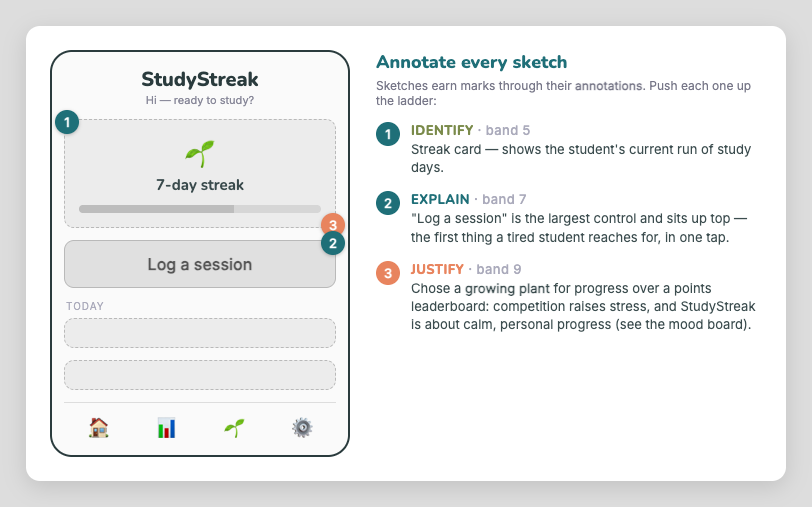
| + | A bare sketch sits at the bottom of the rubric. **Annotations** lift it — and the same identify → explain → justify ladder from your other design work applies here: |
| + | |
| + |  |
| + | |
| + | - **Identify** (band 5) — name what each element *is*. |
| + | - **Explain** (band 7) — its appearance *and* what it does / why it's placed there. |
| + | - **Justify** (band 9) — *why this choice over an alternative*, linked to your users and SRS. |
| + | |
| + | The justify-level callout above ("a growing plant over a leaderboard, because competition raises stress") is the kind of reasoning that separates 7–8 from 9–10. |
| + | |
| + | --- |
| + | |
| + | ## Tools |
| + | |
| + | - **Excalidraw in Obsidian** (see IT to install) — has **wireframing libraries** (a UX/wireframe kit and a Lo-Fi kit) so you can drag in ready-made screen parts. |
| + | - **Paper and pencil** is completely fine — take a photo and commit it. |
| + | |
| + | > [!IMPORTANT] |
| + | > If you paste a **real app's screenshot** into a sketch as reference, you must **credit it** — crediting assets is compulsory (see the format on the [Mood Boards](/sd/C04/Mood%20Boards) page). Your own drawn wireframes need no credit. |
| + | |
| + | --- |
| + | |
| + | ## Your turn |
| + | |
| + | 1. Choose **2–3 key screens** of your software. |
| + | 2. Sketch simple layouts — boxes and labels, low-fi. |
| + | 3. **Label** important elements (search bar, save button, list…). |
| + | 4. Show the **navigation** between screens. |
| + | 5. **Annotate** — and push at least one annotation to the *justify* level (name the alternative you rejected and why). |
| + | |
| + | Commit your sketches to GitHub and add them to your printed design pack. |
| + | |
| + | --- |
| + | |
| + | ## Check Your Understanding |
| + | |
| + | 1. What two things does a design sketch show? |
| + | >| ### Answer |
| + | >| The **layout** (where elements go) and the **navigation** (how the user moves between screens). |
| + | |
| + | 2. Why sketch low-fi (rough) rather than detailed? |
| + | >| ### Answer |
| + | >| Rough sketches are fast to draw and fast to change, so you can try several layouts before committing — and you focus on layout/flow, not pixels. |
| + | |
| + | 3. Which annotation depth separates a 7–8 sketch from a 9–10 one? |
| + | >| ### Answer |
| + | >| **Justify** — explaining *why* a choice was made over an alternative, linked to your users/SRS (not just identifying or describing the element). |
| + | |
| + | --- |
| + | |
| + | ## See also |
| + | |
| + | - [Mind Mapping](/sd/C04/Mind%20Mapping) — the step before this one |
| + | - [Mood Boards](/sd/C04/Mood%20Boards) · [Brainstorming](/sd/C04/Brainstorming) · [C4-1 Checkpoint — Your Design Pack](/sd/C04/C4-1%20Checkpoint%20-%20Design%20Pack) |
| + | |
| + | --- |
| + | |
| + | ← Back to [C04 Home](/sd/C04/C04-home) · [VCE Software Development Hub](/sd/VCE%20Software%20Development%20Hub) |
| /dev/null .. sd/C04/Design Sketches/annotated-wireframe.png | |
| /dev/null .. sd/C04/Mind Mapping.md | |
| @@ 0,0 1,96 @@ | |
| + | > **DRAFT** — under teacher review. |
| + | |
| + | # Mind Mapping |
| + | |
| + | The Hamilton and Alexandra College · Year 12 · 2026 |
| + | |
| + | Mind mapping is one of the four ideation tools in your [C4-1 design pack](/sd/C04/C4-1%20Checkpoint%20-%20Design%20Pack). If brainstorming is letting ideas fly, **mind mapping is where you give them shape** — take your messy brainstorm and organise it around your project. |
| + | |
| + | --- |
| + | |
| + | ## What it is, and why |
| + | |
| + | A mind map starts with your **project at the centre** and branches outward into related areas. It helps you: |
| + | |
| + | - **Structure and group** loose ideas |
| + | - **Spot patterns and connections** between features |
| + | - See the **big picture** of your solution at a glance |
| + | |
| + | It's the natural step *after* a brainstorm: the brainstorm gives you the raw ideas, the mind map sorts them. |
| + | |
| + | --- |
| + | |
| + | ## How to build one |
| + | |
| + | 1. Put your **project name in the centre**. |
| + | 2. Add **4–6 main branches** — common ones: *Users · Key features · Visual style · Technology · Wellbeing/Goals · Problems to solve*. |
| + | 3. Add **sub-branches** that expand each one. |
| + | 4. Use colour or grouping if it helps you think. |
| + | |
| + | Use Excalidraw in Obsidian (see IT to install), or paper and markers. |
| + | |
| + | --- |
| + | |
| + | ## StudyStreak example |
| + | |
| + | ```mermaid |
| + | flowchart LR |
| + | C(("StudyStreak")) |
| + | C --- U["Users"] |
| + | C --- F["Features"] |
| + | C --- V["Visual style"] |
| + | C --- W["Wellbeing"] |
| + | C --- T["Technology"] |
| + | U --- U1["senior students"] |
| + | U --- U2["busy · easily stressed"] |
| + | F --- F1["one-tap log a session"] |
| + | F --- F2["streak + growing plant"] |
| + | F --- F3["weekly wind-down summary"] |
| + | V --- V1["calm palette"] |
| + | V --- V2["rounded cards · whitespace"] |
| + | W --- W1["break reminders"] |
| + | W --- W2["protect downtime"] |
| + | T --- T1["phone app"] |
| + | T --- T2["data stored on device"] |
| + | ``` |
| + | |
| + | See how the **Features** and **Wellbeing** branches grew straight out of the brainstorm themes? That's the mind map doing its job — turning a list into a structure. |
| + | |
| + | --- |
| + | |
| + | ## Your turn |
| + | |
| + | 1. Project name in the centre. |
| + | 2. Add your 4–6 main branches. |
| + | 3. Expand each with sub-branches — pull the strongest ideas from your brainstorm. |
| + | 4. Look for connections you hadn't noticed. |
| + | |
| + | Commit your mind map to GitHub and add it to your printed design pack. |
| + | |
| + | --- |
| + | |
| + | ## Check Your Understanding |
| + | |
| + | 1. What goes in the **centre** of a mind map? |
| + | >| ### Answer |
| + | >| Your project (the software solution). Everything branches out from there. |
| + | |
| + | 2. How does a mind map relate to your brainstorm? |
| + | >| ### Answer |
| + | >| It's the next step — it takes the loose brainstorm ideas and gives them structure, grouping them under main branches. |
| + | |
| + | 3. Name three main branches you might use. |
| + | >| ### Answer |
| + | >| Any of: Users, Key features, Visual style, Technology, Wellbeing/Goals, Problems to solve. |
| + | |
| + | --- |
| + | |
| + | ## See also |
| + | |
| + | - [Brainstorming](/sd/C04/Brainstorming) — the step before this one |
| + | - [Design Sketches](/sd/C04/Design%20Sketches) — turn your mapped features into screen layouts |
| + | - [Mood Boards](/sd/C04/Mood%20Boards) · [C4-1 Checkpoint — Your Design Pack](/sd/C04/C4-1%20Checkpoint%20-%20Design%20Pack) |
| + | |
| + | --- |
| + | |
| + | ← Back to [C04 Home](/sd/C04/C04-home) · [VCE Software Development Hub](/sd/VCE%20Software%20Development%20Hub) |