Commit 8b5e15
2026-04-19 17:40:43 lisa: sd: add 6 key-concept explainer pages (PSM, T/V/E, Critical Path, T.E.L.O.S., Roadmap vs Gantt, AI Disclosure) + Hub links| /dev/null .. sd/AI Disclosure.md | |
| @@ 0,0 1,76 @@ | |
| + | # AI Disclosure and Authentic Work |
| + | |
| + | Using AI on your SAT is allowed — not disclosing it isn't. This page explains what to log, why it matters, and how validation catches students who skipped this step. |
| + | |
| + | --- |
| + | |
| + | ```mermaid |
| + | flowchart TD |
| + | A[You need to do C01 work] --> B[Use AI — ask it something] |
| + | B --> C[Read the output carefully] |
| + | C --> D{Is it right for\nyour project?} |
| + | D -- Yes, mostly --> E[Keep what fits,\nrewrite the rest] |
| + | D -- No / generic --> F[Reject or heavily\nrewrite it] |
| + | E --> G[Open AI-disclosure-log.md\nAdd an entry: prompt · output · kept · changed] |
| + | F --> G |
| + | G --> H[Commit to GitHub] |
| + | H --> I[Validation — locked conditions\nNo AI. No phone. No internet.] |
| + | I --> J{Can you explain\nyour decisions?} |
| + | J -- Yes --> K[You pass the\nauthenticity test] |
| + | J -- No --> L[Gap between your brief\nand your understanding shows] |
| + | ``` |
| + | |
| + | --- |
| + | |
| + | ## Why disclose? |
| + | |
| + | Your teacher compares what you wrote with what you say. A strong brief paired with vague answers under questioning signals that the brief doesn't reflect your thinking. A logged AI interaction, by contrast, shows you engaged critically — you read it, decided what to keep, and can explain why. |
| + | |
| + | The assessment is designed so a student who outsourced their thinking cannot fake it at validation. Presentation, writing test, and interview all happen under locked conditions (no AI, no internet, no phone). Your log is also your study notes: it records what you actually decided, so you can recall and defend it. |
| + | |
| + | ## What to log |
| + | |
| + | Every C01 AI interaction gets an entry in `AI-disclosure-log.md` in your `C01/` GitHub folder: |
| + | |
| + | ```markdown |
| + | ## Entry — [Date] — [Task it relates to] |
| + | |
| + | **What I asked the AI:** |
| + | [Paste or summarise your prompt] |
| + | |
| + | **What it produced:** |
| + | [Paste the key output, or summarise if long] |
| + | |
| + | **What I kept:** |
| + | [What went into your work unchanged or nearly unchanged] |
| + | |
| + | **What I changed or rejected:** |
| + | [What you rewrote, cut, or decided not to use — and why] |
| + | ``` |
| + | |
| + | Common C01 uses that must be logged: drafting any part of your design brief, generating Gantt chart task lists, understanding PSM stages, generating Mermaid or Excalidraw code, reviewing your "Why monitor" response. |
| + | |
| + | Commit the log each time you add an entry — the git history shows you kept it current, not that you backfilled it the night before. |
| + | |
| + | ## The AI-first workflow |
| + | |
| + | The flowchart above is the expected workflow. AI is a starting point, not a final answer. What matters at validation is that you can explain every decision in your brief — why you framed the problem that way, why you chose those users, why that language. If AI suggested something and you kept it, you should be able to say *why* it was right for your specific project, not just that "AI said so." |
| + | |
| + | ## At validation: where authenticity is tested |
| + | |
| + | C1 uses three separate assessment formats — presentation, writing test, and interview — all conducted under locked conditions. No AI. No phone. No laptop beyond what's permitted. A student whose brief was largely AI-generated cannot answer probing questions like "What makes your solution original?" or "What would you do if your chosen library stopped being maintained?" with any specificity. Your spoken answers are compared against your written work; consistency across both is what earns marks. |
| + | |
| + | ## Common mistakes |
| + | |
| + | - Writing "I used AI to help" with no detail about what you asked or what changed — this is not a valid entry and suggests you have something to hide. |
| + | - Backfilling the log in one batch before submission — the commit timestamps will show it; add entries as you go. |
| + | - Logging that you "kept everything" without explanation — if you kept the full AI output unchanged, explain concretely why it was exactly right for your project. |
| + | - Forgetting that paraphrasing counts — if AI wrote 300 words and you reduced it to 80, that still needs an entry. |
| + | |
| + | ## See also |
| + | |
| + | - [Problem-Solving Methodology](/sd/Problem-Solving%20Methodology) |
| + | |
| + | --- |
| + | |
| + | ← Back to [VCE Software Development Hub](/sd/VCE%20Software%20Development%20Hub) |
| /dev/null .. sd/Critical Path.md | |
| @@ 0,0 1,87 @@ | |
| + | # Critical Path |
| + | |
| + | Identifying the critical path is the difference between a level 9–10 project plan and a screenshot of a Gantt chart — it is the one concept the C1-3 interview tests hardest on planning. |
| + | |
| + | {{Video|src=https://www.youtube.com/watch?v=HbynnR0VN10}} |
| + | |
| + | ## What is the critical path? |
| + | |
| + | The **critical path** is the longest chain of **dependent** tasks from the start to the end of a project. It determines the **minimum possible duration** of the project. A **dependency** exists when one task (the *successor*) cannot start until another task (the *predecessor*) is finished. Any delay on a critical path task directly delays the whole project — there is no buffer. |
| + | |
| + | Tasks that sit off the critical path have **slack time** (also called *float*): the amount of time they can be delayed without pushing back the project end date. Understanding which tasks have slack — and how much — is what separates a plan you can reason about from a plan that is just a list of dates. |
| + | |
| + | ## Worked example |
| + | |
| + | The diagram below models a small software project. Tasks on the critical path are highlighted in red; all durations are in days. |
| + | |
| + | ```mermaid |
| + | flowchart LR |
| + | classDef cp fill:#e53935,color:#fff,stroke:#b71c1c |
| + | classDef off fill:#1565c0,color:#fff,stroke:#0d47a1 |
| + | |
| + | S(["Start"]):::cp |
| + | A["Survey users\n3 days"]:::cp |
| + | B["Write SRS\n5 days"]:::cp |
| + | C["Design UI\n4 days"]:::cp |
| + | D["Design data model\n3 days"]:::off |
| + | E["Code core features\n8 days"]:::cp |
| + | F["Write user docs\n3 days"]:::off |
| + | G["Beta test\n4 days"]:::cp |
| + | EN(["End"]):::cp |
| + | |
| + | S --> A |
| + | A --> B |
| + | B --> C |
| + | B --> D |
| + | C --> E |
| + | D --> E |
| + | E --> F |
| + | E --> G |
| + | F --> EN |
| + | G --> EN |
| + | ``` |
| + | |
| + | **Path durations (all durations in days):** |
| + | |
| + | | Path | Tasks | Total | |
| + | |------|-------|-------| |
| + | | **Critical** | Start → Survey users → Write SRS → Design UI → Code core features → Beta test → End | **24 days** | |
| + | | Off-critical (data model branch) | … → Write SRS → Design data model → Code core features → … | 23 days | |
| + | | Off-critical (user docs branch) | … → Code core features → Write user docs → End | 23 days | |
| + | |
| + | **Walkthrough:** |
| + | |
| + | - Both *Design UI* and *Design data model* are predecessors of *Code core features* — Code cannot start until **both** are done. Design UI takes 4 days (done at day 12 after Survey + SRS); Design data model takes 3 days (done at day 11). Code must wait for day 12, so the UI branch controls when Code can start. |
| + | - The critical path runs: Survey users (3) → Write SRS (5) → Design UI (4) → Code core features (8) → Beta test (4) = **24 days total**. |
| + | - *Design data model* finishes at day 11 but Code cannot start until day 12 — it has **1 day of slack**. |
| + | - *Write user docs* (3 days) runs in parallel with Beta test (4 days) after Code core features. It finishes one day before Beta test, giving it **1 day of slack**. |
| + | |
| + | ## Slack time |
| + | |
| + | **Slack time** is how much a task can slip without delaying the project end date. To calculate it: |
| + | |
| + | > Slack = Latest Start Time − Earliest Start Time |
| + | |
| + | Or equivalently: how long the critical path is, minus the total duration of the chain that includes this task. If the result is zero, the task is on the critical path. |
| + | |
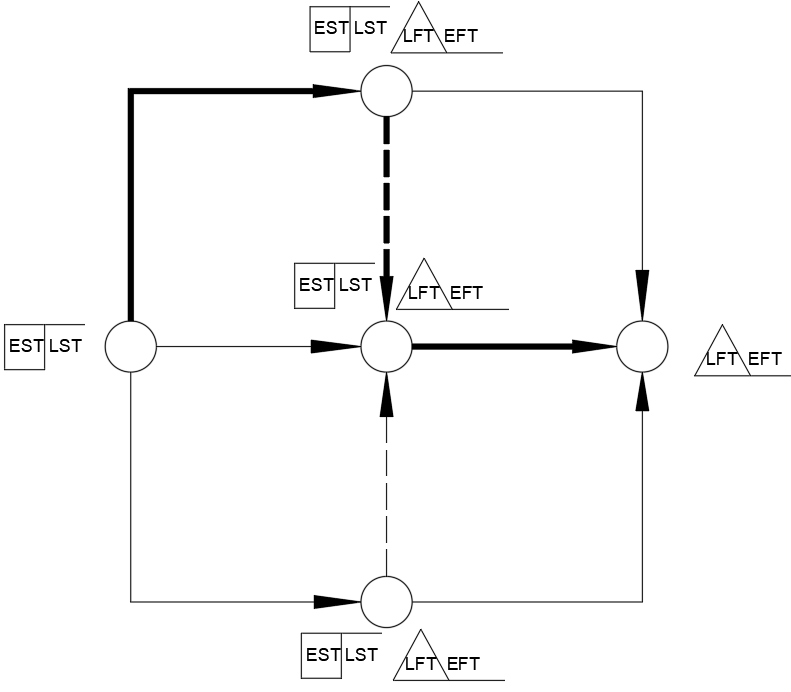
| + | Example from the diagram above: *Design data model* has an earliest start of day 8 (after Survey users + Write SRS). Code core features must start no later than day 12 (so that the 24-day critical path is not extended). Design data model takes 3 days, so its latest start is day 9. Slack = Latest Start − Earliest Start = 9 − 8 = **1 day**. |
| + | |
| + |  |
| + | *Image by Gcd822, CC BY-SA 4.0, via [Wikimedia Commons](https://commons.wikimedia.org/wiki/File:CPM_with_EST,_LST,_EFT,_LFT.png).* |
| + | |
| + | ## Why it matters at validation |
| + | |
| + | The C1-3 interview rubric explicitly requires level 9–10 students to *document dependencies and the critical path* (`C012-Roadmap-vs-Gantt.md`). A screenshot of a Roadmap View with no annotations cannot evidence this — you must add dependency arrows, highlight the critical path, and label slack time on non-critical tasks before your interview. |
| + | |
| + | "Trace your critical path" is a Tier 4 interview question. The expected response is to point to your annotated plan and explain: which tasks form the chain, why each dependency exists, what the minimum project duration is, and which tasks have slack. Saying "I think these tasks are the most important ones" is not an answer — the critical path is defined by **dependency chains and duration**, not importance (`C013-Milestones-and-Dependencies.md`). |
| + | |
| + | > Common mistake: confusing "important tasks" with "critical path tasks." Some important tasks have slack and are not on the critical path. Some critical path tasks are routine — they are critical because of where they sit in the dependency chain, not because they are difficult. |
| + | |
| + | ## See also |
| + | |
| + | - [Problem-Solving Methodology](/sd/Problem-Solving%20Methodology) |
| + | - [Roadmap View vs Gantt Chart](/sd/Roadmap%20View%20vs%20Gantt%20Chart) |
| + | |
| + | --- |
| + | |
| + | ← Back to [VCE Software Development Hub](/sd/VCE%20Software%20Development%20Hub) |
| /dev/null .. sd/Critical Path/CPM_with_EST,LST,EFT,LFT.png | |
| /dev/null .. sd/Problem-Solving Methodology.md | |
| @@ 0,0 1,75 @@ | |
| + | # Problem-Solving Methodology |
| + | |
| + | Your SAT is structured around PSM — the four-stage framework VCAA uses to assess how you approach software development. Knowing the stage names and their activities isn't optional; they come up in the C1-2 writing test and the C1-3 interview. |
| + | |
| + | --- |
| + | |
| + | ```mermaid |
| + | flowchart LR |
| + | A["**1. Analysis**\n─────────────\nSolution requirements\nSolution constraints\nScope of solution"] |
| + | B["**2. Design**\n─────────────\nSolution design\nEvaluation criteria"] |
| + | C["**3. Development**\n─────────────\nManipulation (coding)\nValidation\nTesting\nDocumentation"] |
| + | D["**4. Evaluation**\n─────────────\nSolution evaluation\nEvaluation strategy"] |
| + | |
| + | A --> B --> C --> D |
| + | ``` |
| + | |
| + | --- |
| + | |
| + | ## The four stages |
| + | |
| + | ### Analysis |
| + | |
| + | You figure out **what** needs to be built — not how. This stage produces your Software Requirements Specification (SRS) and analytical diagrams (context diagram, DFD, use case diagram). Three activities: |
| + | |
| + | - **Solution requirements** — what the software must do |
| + | - **Solution constraints** — limits on time, hardware, budget, or legal factors |
| + | - **Scope of solution** — what is in and out of the project |
| + | |
| + | ### Design |
| + | |
| + | You work out **how** to build it — before you write a single line of code. Two activities: |
| + | |
| + | - **Solution design** — mock-ups, data dictionary, IPO charts, pseudocode, and other detailed design artefacts |
| + | - **Evaluation criteria** — the measurable standards you'll use later to judge whether requirements were actually met (e.g., "90% of beta testers can complete onboarding in under 2 minutes") |
| + | |
| + | > Common mistake: evaluation criteria belong here, in Design — not in Evaluation. You set the goalposts now; you check the score later. |
| + | |
| + | ### Development |
| + | |
| + | You build, check, and record. Four activities: |
| + | |
| + | - **Manipulation (coding)** — writing the software from your designs |
| + | - **Validation** — checking that input data is reasonable and accurate before processing |
| + | - **Testing** — checking that the software works correctly (unit tests, alpha, beta) |
| + | - **Documentation** — internal comments and any user-facing documentation |
| + | |
| + | > Common mistake: validation ≠ testing. Validation is about data; testing is about functionality. |
| + | |
| + | ### Evaluation |
| + | |
| + | You measure the solution against the criteria you set in Design. Two activities: |
| + | |
| + | - **Solution evaluation** — how well does the finished product meet the requirements? |
| + | - **Evaluation strategy** — how did you collect evidence? (surveys, observation, usage data) |
| + | |
| + | > Common mistake: don't describe whether the app "works" here — that's testing. Evaluation asks whether it *meets the needs* of users and clients. |
| + | |
| + | --- |
| + | |
| + | ## Why this matters at validation |
| + | |
| + | The C1-2 writing test asks you to apply PSM concepts to your specific project — expect questions like "which PSM stage does task X belong to?" or "why must evaluation criteria be set before development begins?" Your project plan (set up in `C012-Add-Tasks-and-Timeline.md`) must have tasks mapped to each PSM stage with realistic dates. The marker checks that your task list reflects all four stages, not just Development. |
| + | |
| + | At the C1-3 interview you bring your annotated project plan (see `C013-Annotate-Project-Plan.md`) and explain where you are in the PSM cycle, what's on your critical path, and how you've adapted the plan when things changed. Being able to name the stage, name the activity, and point to evidence in your GitHub Projects board is what separates a strong response from a vague one. |
| + | |
| + | --- |
| + | |
| + | ## See also |
| + | |
| + | - [Testing vs Validation vs Evaluation](/sd/Testing%20vs%20Validation%20vs%20Evaluation) — disambiguation of three similar-sounding terms within PSM |
| + | - [Critical Path](/sd/Critical%20Path) |
| + | |
| + | --- |
| + | |
| + | ← Back to [VCE Software Development Hub](/sd/VCE%20Software%20Development%20Hub) |
| /dev/null .. sd/Roadmap View vs Gantt Chart.md | |
| @@ 0,0 1,64 @@ | |
| + | # Roadmap View vs Gantt Chart |
| + | |
| + | Your GitHub Projects Roadmap View **is** a legitimate Gantt chart — but it is missing three things that separate a 7–8 from a 9–10 on C1-3. This page explains what those are and how to add them. |
| + | |
| + | --- |
| + | |
| + | ## Watch first (3 min) |
| + | |
| + | [Use GitHub Roadmap to sequence tasks in a timeline view — GitHub on YouTube](https://www.youtube.com/watch?v=jV7Vdav7N3U) |
| + | |
| + | --- |
| + | |
| + | ## Side-by-side: what you get vs what you still need to add |
| + | |
| + | | Feature | Roadmap View (automatic) | Annotated Gantt (you add this) | |
| + | |---|---|---| |
| + | | Task bars on a timeline | Yes | — | |
| + | | Start and end dates per task | Yes | — | |
| + | | PSM stage grouping (Analysis / Design / Development / Evaluation) | Yes (via Status field) | — | |
| + | | **Dependency arrows** (predecessor → successor) | **No** | Draw arrows manually | |
| + | | **Critical path highlight** | **No** | Colour or label each CP task | |
| + | | **Slack time on non-critical tasks** | **No** | Write float next to bar | |
| + | | **Milestone diamond symbols** | **No** (milestones look like tasks) | Add diamond label or symbol | |
| + | |
| + | --- |
| + | |
| + | ## What Roadmap View gives you automatically |
| + | |
| + | - Every issue or task rendered as a horizontal bar, scaled to its start and end dates. |
| + | - A scrollable month-by-week timeline (configurable to week or quarter). |
| + | - Grouping by Status field, so your PSM stages (Analysis, Design, Development, Evaluation) appear as lanes. |
| + | - A public URL you can share with your teacher as live evidence. |
| + | |
| + | This satisfies the C1-2 rubric wording — **"Prepares a Gantt chart using software that documents all stages and activities"** — provided all your tasks are entered and dated. |
| + | |
| + | ## What Roadmap View does NOT render |
| + | |
| + | - **Dependency arrows** — no lines showing "B can't start until A finishes." You can note a dependency in a task description, but nothing is drawn on the timeline. |
| + | - **Critical path highlight** — the longest chain of dependent tasks (which determines your minimum project duration) is not identified or coloured. You must trace it yourself. |
| + | - **Slack time** — tasks that are not on the critical path can slip by some number of days without delaying the project. Roadmap View does not calculate or display this margin. |
| + | - **Milestone diamonds** — milestones look identical to regular task bars unless you explicitly distinguish them with a label or symbol. |
| + | |
| + | ## Why VCAA cares |
| + | |
| + | The C1-3 level descriptor at **9–10** reads: |
| + | |
| + | > *Documents the dependencies and the critical path. Discusses how the progress of the project will be monitored and documented.* |
| + | |
| + | A bare Roadmap View screenshot shows tasks and dates — that evidence stops at 7–8. To reach 9–10 you must make dependency arrows, the critical path, and slack time **visible on the artefact itself**. The examiner cannot see something that is only in your head. |
| + | |
| + | ## How to close the gap |
| + | |
| + | Export a full screenshot of your Roadmap View, then open it in **Excalidraw** (browser-based, free — excalidraw.com), **Preview** markup on macOS, or print and annotate by hand. Draw an arrow from the end of each predecessor task to the start of its successor; highlight every task on the critical path in a distinct colour; write the float (e.g. "+5 days slack") next to each non-critical task; and label all milestones with a diamond or bold text. Save the result as `project-plan-annotated.pdf` and commit it to your `C01/` folder — this is the document you bring to the interview. |
| + | |
| + | For step-by-step instructions, see [C012-Roadmap-vs-Gantt.md](../../applied-computing-au/vic/unit3-4/sat/C01-2026/C012-Roadmap-vs-Gantt.md) (how to annotate) and [C013-Annotate-Project-Plan.md](../../applied-computing-au/vic/unit3-4/sat/C01-2026/C013-Annotate-Project-Plan.md) (monitoring layer — planned vs actual — added on top). |
| + | |
| + | ## See also |
| + | |
| + | - [Critical Path](/sd/Critical%20Path) |
| + | - [Problem-Solving Methodology](/sd/Problem-Solving%20Methodology) |
| + | |
| + | --- |
| + | |
| + | ← Back to [VCE Software Development Hub](/sd/VCE%20Software%20Development%20Hub) |
| /dev/null .. sd/T.E.L.O.S. Feasibility.md | |
| @@ 0,0 1,87 @@ | |
| + | # T.E.L.O.S. Feasibility |
| + | |
| + | At levels 7–10 of C1-1, feasibility stops being a formality and starts earning marks. A brief that just lists "Technical: yes, we can do it" scores in the 3–4 band. One that names a specific constraint and argues your project clears it — or flags where it doesn't — is what the higher bands look like. |
| + | |
| + | ```mermaid |
| + | mindmap |
| + | root((Feasibility)) |
| + | Technical |
| + | Can you build it with named tools? |
| + | Economic |
| + | What does it cost — time, licences, hosting? |
| + | Legal |
| + | Does it respect copyright, privacy, data rules? |
| + | Operational |
| + | Will real users actually adopt it? |
| + | Scheduling |
| + | Can an MVP ship in the available weeks? |
| + | ``` |
| + | |
| + | --- |
| + | |
| + | ## What T.E.L.O.S. means |
| + | |
| + | Each letter is an angle for testing whether your project is actually achievable. You don't need all five — address at least three, and choose the ones with real stakes for your project. |
| + | |
| + | ### Technical |
| + | |
| + | Can you build what you're proposing with the languages and tools you've named? Point to specific evidence: a library that handles the hard part, hardware that's already available, or a known workaround for a likely obstacle. |
| + | |
| + | > **Example:** "Python's `sqlite3` module handles local data storage without a separate database server. NiceGUI runs as a local web app, so no school firewall changes are needed." |
| + | |
| + | ### Economic |
| + | |
| + | What does the project cost? Developer time (yours) counts even if you're not charging. No paid licences doesn't automatically mean zero cost — name any ongoing costs like hosting. |
| + | |
| + | > **Example:** "Development cost is my own time, which is part of the SAT workload. Python and NiceGUI are open source with no licence fees. Cloud hosting on Hetzner VPS would cost approximately $5–10 AUD/month if required, which is within the client's budget." |
| + | |
| + | ### Legal |
| + | |
| + | Is the project legal? Does it comply with copyright (for any assets you use), and with privacy law if the software collects or stores user data? For most student projects in Victoria, the relevant instruments are the *Privacy Act 1988* (Cwlth) and the *Privacy and Data Protection Act 2014* (Vic) — but only if you're handling personal information. |
| + | |
| + | > **Example:** "The system stores student quiz responses. These are personal data under the Privacy Act 1988. Data will be stored in JSON files on a controlled local server with no third-party access. No student names are required — responses are identified by session only." |
| + | |
| + | If your project handles no personal data and uses only freely licensed assets, say so explicitly — that *is* your legal feasibility statement. |
| + | |
| + | ### Operational |
| + | |
| + | Will the people you've identified as users actually use it? Consider training time, technical confidence, and whether the system fits the workflow it's meant to support. |
| + | |
| + | > **Example:** "The teacher (primary user) manages the system independently via a web dashboard. First-run configuration takes approximately 10 minutes; no ongoing technical skill is required. Students access quizzes through a browser — no installation needed on student devices." |
| + | |
| + | ### Scheduling |
| + | |
| + | Can you deliver a working version in the time you have? An MVP scope, a rough week-by-week breakdown, and an honest note about what gets cut if time runs short is more credible than "yes, it fits in the semester." |
| + | |
| + | > **Example:** "Weeks 1–2: data model and core quiz logic. Weeks 3–5: user interface and session management. Weeks 6–8: flashcard mode and testing. Weeks 9–10: refinement and documentation. If time is short, flashcard mode is deferred to a post-MVP iteration." |
| + | |
| + | --- |
| + | |
| + | ## How to write it in your brief |
| + | |
| + | Don't list — argue. For each angle you address, name the specific constraint your project faces, then state whether your project clears it and why. A sentence like *"Python is free so my project is economically feasible"* is generic — it applies to every student's project and earns nothing. A sentence like *"No paid licences are required; the only potential cost is $5–10/month cloud hosting, which the client has agreed to fund"* names a real constraint and resolves it. See the feasibility section of [C011-Draft-Design-Brief](../applied-computing-au/vic/unit3-4/sat/C01-2026/C011-Draft-Design-Brief.md) and the [NiceQuiz brief](../applied-computing-au/vic/unit3-4/sat/Criterion01/nicequiz-design-brief.md) for worked examples at brief length. |
| + | |
| + | --- |
| + | |
| + | ## Common mistakes |
| + | |
| + | - **"Python is free so my project is economically feasible"** — too generic. Name something specific: a licence you don't need, a cost that does exist, or a budget figure the client confirmed. |
| + | - **Listing T.E.L.O.S. without addressing it** — a heading followed by three words scores nothing. Each angle needs a named constraint and a resolution. |
| + | - **Ignoring legal** — even student projects have privacy implications if they collect user data. If yours doesn't, say so. If it does, name the relevant law and how you'll comply. |
| + | - **Treating scheduling as one sentence** — "It fits in the semester" is not a schedule. Give a rough week-by-week breakdown and name what's in scope for the MVP. |
| + | |
| + | --- |
| + | |
| + | ## Further viewing |
| + | |
| + | - [Types of Feasibility Study — Legal, Economic, Technical, Operational, Scheduling](https://www.youtube.com/watch?v=pFT--htDQMU) — covers all five T.E.L.O.S. angles (verify runtime before sharing in class) |
| + | |
| + | --- |
| + | |
| + | ## See also |
| + | |
| + | - [Problem-Solving Methodology](/sd/Problem-Solving%20Methodology) — feasibility is part of Analysis |
| + | |
| + | --- |
| + | |
| + | ← Back to [VCE Software Development Hub](/sd/VCE%20Software%20Development%20Hub) |
| /dev/null .. sd/Testing vs Validation vs Evaluation.md | |
| @@ 0,0 1,71 @@ | |
| + | # Testing vs Validation vs Evaluation |
| + | |
| + | Confusing these three terms in the C1-2 writing test or C1-3 interview drops marks instantly — they belong to the same PSM stage (Development) except Evaluation, which is its own stage entirely. |
| + | |
| + | --- |
| + | |
| + | ```mermaid |
| + | flowchart TB |
| + | subgraph DEV["PSM Stage 3 — Development"] |
| + | direction LR |
| + | T["**Testing**\n──────────\nDoes the program\nwork correctly?\n\nExample: enter 25\nin age field →\ncorrect output"] |
| + | V["**Validation**\n──────────\nIs the input\nreasonable?\n\nExample: reject −3\nas an age before\nprocessing starts"] |
| + | end |
| + | subgraph EVAL["PSM Stage 4 — Evaluation"] |
| + | direction LR |
| + | E["**Evaluation**\n──────────\nDoes the solution\nmeet its criteria?\n\nExample: does the\nfinished app satisfy\nall requirements?"] |
| + | end |
| + | DEV --> EVAL |
| + | ``` |
| + | |
| + | --- |
| + | |
| + | ## Testing |
| + | |
| + | Testing checks that the program **runs correctly** — given an input, does it produce the expected output? You write test cases before or during coding and run them as you build. Testing catches bugs: wrong calculations, broken logic, features that don't behave as designed. It happens inside the **Development** stage. |
| + | |
| + | **Example:** You enter `25` into an age field and expect the program to calculate a result based on that age. If the output matches what you designed, the test passes. If the program crashes or returns the wrong value, testing has found a bug to fix. |
| + | |
| + | ## Validation |
| + | |
| + | Validation checks that **data entered by the user is reasonable or acceptable** before the program processes it. It runs at the point of input — not after — and prevents garbage data from reaching the rest of the program. Like testing, validation is part of the **Development** stage. |
| + | |
| + | **Example:** The same age field should reject `−3` — that is not a valid age. Validation code checks for this (e.g. `if age < 0: display error`) and stops the bad value from being used in any calculation. The program hasn't "crashed" without validation; it just silently produces a wrong answer. |
| + | |
| + | > Key distinction: testing checks whether the *program* works; validation checks whether the *data* is acceptable. |
| + | |
| + | ## Evaluation |
| + | |
| + | Evaluation judges whether the **completed solution meets the evaluation criteria** set during the Design stage and addresses the original problem. It is its own PSM stage — Stage 4 — separate from Development. You are not checking individual inputs or features here; you are assessing the solution as a whole against measurable standards. |
| + | |
| + | **Example:** "Does the finished app allow 90% of beta testers to complete onboarding in under 2 minutes?" That criterion was written in Design. Evaluation collects evidence (surveys, observation, usage data) and checks whether the criterion was met. |
| + | |
| + | > Common mistake: saying your solution "works" as part of Evaluation. Whether it works is testing. Evaluation asks whether it *meets user needs and requirements*. |
| + | |
| + | --- |
| + | |
| + | ## Quick reference |
| + | |
| + | | Term | PSM stage | What it checks | Example | |
| + | |------|-----------|----------------|---------| |
| + | | Testing | Development | Program runs correctly | Entering `25` in age field → correct output | |
| + | | Validation | Development | Input is reasonable/acceptable | Rejecting `−3` as an age before processing | |
| + | | Evaluation | Evaluation | Solution meets evaluation criteria | "Does it satisfy all functional requirements?" | |
| + | |
| + | --- |
| + | |
| + | ## Why it matters at validation |
| + | |
| + | The C1-2 writing test and C1-3 interview both probe PSM knowledge directly. A question like "which Development activities does your project plan include?" expects you to name validation, testing, and documentation separately — not lump them together. At the C1-3 interview, you may be asked to point to evidence of each activity in your GitHub Projects board. If your plan only shows "testing" with no separate validation tasks, that signals a gap. At Stage 4, markers also check that you are measuring against your Design-stage criteria, not just describing whether the app runs. |
| + | |
| + | See `C013-Annotate-Project-Plan.md` for guidance on annotating your plan so each PSM activity is visible to the interviewer. |
| + | |
| + | --- |
| + | |
| + | ## See also |
| + | |
| + | - [Problem-Solving Methodology](/sd/Problem-Solving%20Methodology) |
| + | |
| + | --- |
| + | |
| + | ← Back to [VCE Software Development Hub](/sd/VCE%20Software%20Development%20Hub) |
| sd/VCE Software Development Hub.md .. | |
| @@ 26,6 26,17 @@ | |
| - [C03 Resources](/sd/Resources/C03-Resources) | |
| - [C04 Resources](/sd/Resources/C04-Resources) | |
| + | ## Key concepts |
| + | |
| + | Short explainers with diagrams and videos for the concepts you'll be quizzed on at validation: |
| + | |
| + | - [Problem-Solving Methodology](/sd/Problem-Solving%20Methodology) — the four stages (Analysis, Design, Development, Evaluation) and their activities |
| + | - [Testing vs Validation vs Evaluation](/sd/Testing%20vs%20Validation%20vs%20Evaluation) — three similar-sounding terms that mean different things |
| + | - [Critical Path](/sd/Critical%20Path) — the longest chain of dependent tasks; how to find it and why it matters for C1-3 |
| + | - [T.E.L.O.S. Feasibility](/sd/T.E.L.O.S.%20Feasibility) — Technical, Economic, Legal, Operational, Scheduling — the feasibility framework for your design brief |
| + | - [Roadmap View vs Gantt Chart](/sd/Roadmap%20View%20vs%20Gantt%20Chart) — what GitHub Projects renders, what it doesn't, and how to close the gap |
| + | - [AI Disclosure](/sd/AI%20Disclosure) — how to log AI use so your work stays authentic |
| + | |
| --- | |
| *Wiki maintained by Jeremy Chen and Cloudy. Suggestions welcome — ask Mr Chen.* | |