
Design Sketches
The Hamilton and Alexandra College · Year 12 · 2026
Design sketches are the fourth ideation tool in your C4-1 design pack. Your mood board set the feel and your mind map sorted the features — now you decide where things go on the screen.
You don't need to be able to draw. A sketch is rough boxes and labels. Clarity beats art — quick lines are enough.
What is a design sketch?
A quick, rough drawing of a screen — often called a wireframe. It shows:
- the layout — where the title, buttons, menus, lists and text sit
- the navigation — how a user moves from one screen to the next
A sketch is not the final design and not finished art. It answers one question: "What goes where, and how does the user get around?"
Keep it low-fi
Rough is the point. Grey boxes and labels are fast to draw and fast to change, so you can try several layouts before committing. Sketch 2–3 different screens (e.g. the home screen, the main action screen, a list/settings screen) and show how they connect.
Annotations are what earn the marks
A bare sketch sits at the bottom of the rubric. Annotations lift it — and the same identify → explain → justify ladder from your other design work applies here:
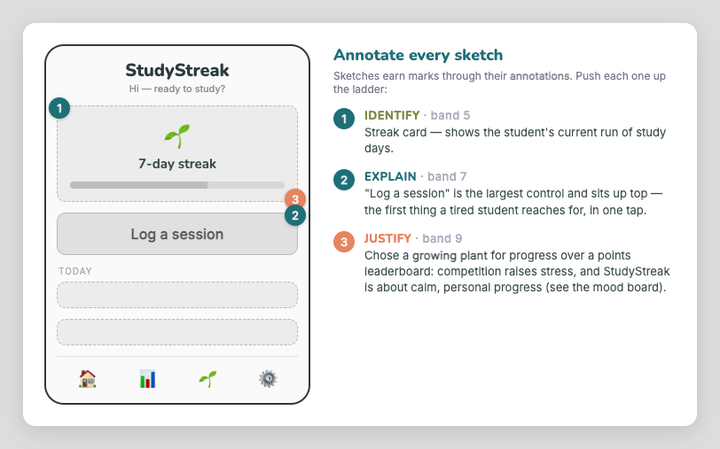
- Identify (band 5) — name what each element is.
- Explain (band 7) — its appearance and what it does / why it's placed there.
- Justify (band 9) — why this choice over an alternative, linked to your users and SRS.
The justify-level callout above ("a growing plant over a leaderboard, because competition raises stress") is the kind of reasoning that separates 7–8 from 9–10.
Tools
- Excalidraw in Obsidian (see IT to install) — has wireframing libraries (a UX/wireframe kit and a Lo-Fi kit) so you can drag in ready-made screen parts.
- Paper and pencil is completely fine — take a photo and commit it.
If you paste a real app's screenshot into a sketch as reference, you must credit it — crediting assets is compulsory (see the format on the Mood Boards page). Your own drawn wireframes need no credit.
Your turn
- Choose 2–3 key screens of your software.
- Sketch simple layouts — boxes and labels, low-fi.
- Label important elements (search bar, save button, list…).
- Show the navigation between screens.
- Annotate — and push at least one annotation to the justify level (name the alternative you rejected and why).
Commit your sketches to GitHub and add them to your printed design pack.
Check Your Understanding
- What two things does a design sketch show?
Answer
The layout (where elements go) and the navigation (how the user moves between screens).
- Why sketch low-fi (rough) rather than detailed?
Answer
Rough sketches are fast to draw and fast to change, so you can try several layouts before committing — and you focus on layout/flow, not pixels.
- Which annotation depth separates a 7–8 sketch from a 9–10 one?
Answer
Justify — explaining why a choice was made over an alternative, linked to your users/SRS (not just identifying or describing the element).
See also
- Mind Mapping — the step before this one
- Mood Boards · Brainstorming · C4-1 Checkpoint — Your Design Pack
← Back to C04 Home · VCE Software Development Hub