
DRAFT — under teacher review.
Data Dictionary
The Hamilton and Alexandra College · Year 12 · 2026
A data dictionary documents every piece of data your software stores — what each field is called, what type it is, how big it is, and what a valid value looks like. It is the design tool that turns "we'll store some student details" into a precise specification someone could actually build a database from.
When do you use a data dictionary?
You use a data dictionary for your data sources — the data your software stores and reads back. In a real system that is almost always a database; in your SAT it might be a database, a file, or a structured collection in code. If your solution stores data, it needs a data dictionary.
The picture below shows the idea. The top table is the actual data; the bottom table is the data dictionary that describes it — the name of each column, its data type, its size, and what it means.
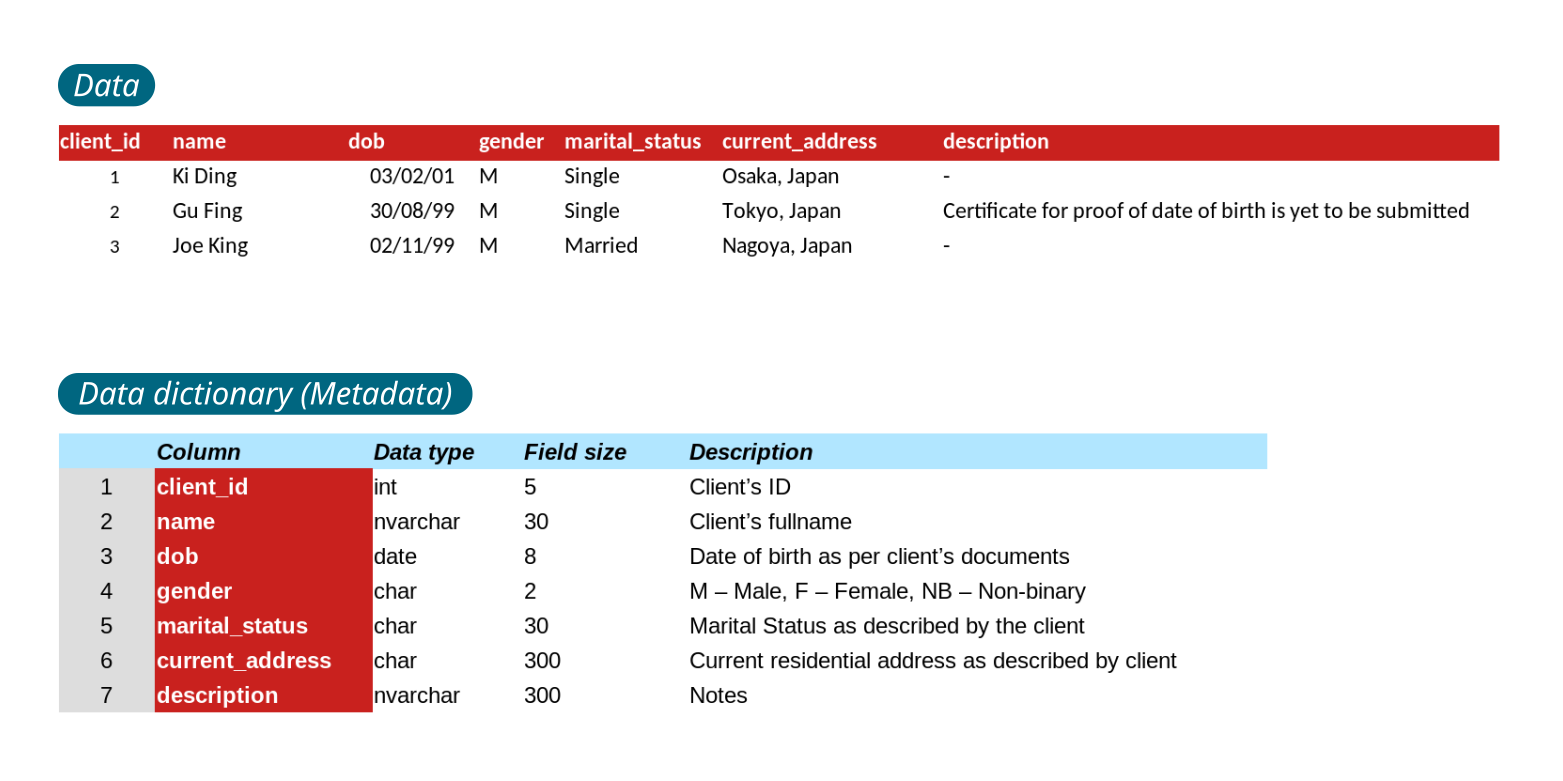
The data dictionary is metadata: data about your data.
Video 1 — What is a data dictionary?
🎯 Watch for: how every column in the stored data gets one row in the dictionary, and how the dictionary fixes the type and size of each field before any data is entered.
This video (and the two below) are from an AU teacher pitched at NSW HSC Software Design & Development. The concept is identical to VCE — just note the course name differs.
The headings to include
A strong data dictionary uses these columns:
| Heading | What it records |
|---|---|
| Field name | the variable / column name |
| Data type | Integer, Text, Boolean, Date/time, Float |
| Data format | the storage/display pattern (e.g. 999999, YYYY-MM-DD) |
| Size | the maximum length |
| Description | what the field is for |
| Example | a sample valid value |
| Validation | the rule that keeps the value valid |
The three you can never leave out: field name, data type, description. Size, format, example and validation make a dictionary strong — but a dictionary without name, type and description is not a dictionary at all.
A worked example
Here is a data dictionary for the student records a school timetable app might store:
| Field name | Data type | Data format | Size | Description | Example | Validation |
|---|---|---|---|---|---|---|
studentID |
Integer | 999999 |
6 | Unique ID for each student | 123456 | Required; exactly 6 digits |
firstName |
Text | Xxxxxxxxxx |
50 | Student's given name | Jane | Required; letters only |
lastName |
Text | Xxxxxxxxxx |
50 | Student's family name | Smith | Required; letters only |
DOB |
Date/time | YYYY-MM-DD |
8 | Date of birth | 2009-07-19 | Required; valid date; not in the future |
yearLevel |
Integer | NN |
2 | Current year level | 11 | Required; between 7 and 12 |
email |
Text | xxx@xxx |
100 | School email for notifications | jsmith@hac.vic.edu.au | Required; valid email format |
isBoarder |
Boolean | true/false |
1 | Whether the student boards | false | Required; true or false |
Notice that Data type and Data format are two different columns — that is the trap in the next section.
"Data format" is not "data type"
This is the single most common data-dictionary mistake.
Data type is the kind of data — Integer, Text, Boolean, Date/time, Float.
Data format is the storage or display pattern — the exact shape a valid value takes.
If you write Integer in the Format column, you have answered the wrong question. The format strings use a small set of symbols:
| Symbol | Meaning |
|---|---|
9 or N |
one digit (0–9) |
X |
one uppercase letter |
x |
one lowercase letter |
YYYY MM DD |
four-digit year, two-digit month, two-digit day |
So studentID has type Integer but format 999999 ("exactly six digits"); DOB has type Date/time but format YYYY-MM-DD ("ISO date, not DD/MM/YYYY"). The type tells you what kind; the format tells you what a valid value looks like.
External reference: Ryan's Tutorials — Data Dictionary shows a "Format for Display" column with this N/X notation (AU, secondary-pitched).
Video 2 — Data dictionaries in code
🎯 Watch for: how the same idea applies when the data lives inside a program (objects, structures), not just a database table.
The VCAA levels
The level descriptors build upward:
- Level 3 — reference to data types (Integer, Text, Boolean, Date/time, Float).
- Level 5 — data types and data structures (arrays, records — not just single variables).
- Level 7 — data types, data structures and data sources (where does each value come from: user input, a database, a calculation?).
You cannot skip levels — a dictionary with no data structures cannot reach Level 5.
Activity — your turn
- Build a data dictionary for the student data your own system stores. Use all seven headings above. Aim for at least five fields.
- Then watch one student's attempt:
🎯 Watch for: which fields they included, and whether their Format column is really a format — or just a repeated data type.
- Write down: what do you agree with, and what would you change? Be specific — name the field and the column.
Common mistakes
Mistake 1: Format = Type
Format: Integer
Write the pattern instead: 999999, NN, YYYY-MM-DD. If you cannot write a pattern, you have probably copied the Type column.
Mistake 2: Missing data sources at Level 7
Every field at Level 7 needs a source — "user input", "calculated from DOB", "retrieved from the student database". Blank does not score.
Mistake 3: Vague sizes
Size: large
Size is a number — the maximum characters or digits the field can hold.
Check Your Understanding
- What are the three headings every data dictionary must include?
...
Field name, data type, and description. Size, format, example and validation make it stronger, but those three are the minimum that makes it a data dictionary.
emailhas data type Text. What might its format be, and why is that different information?
...
A format such as xxx@xxx (or name@domain) shows the shape a valid email takes — text before an @, a domain after it. The type "Text" only says it is characters; the format says how those characters must be arranged.
- Your dictionary lists variables and arrays but no data sources. Which VCAA level can you reach, and which is out of reach?
...
You can reach Level 5 (types and structures). Level 7 needs data sources as well — add a source for every field to unlock it.
Extension — a data dictionary you can play with
ScotRail's station announcements are stitched together from a database of pre-recorded phrases. This tool lets you assemble your own announcement from those stored fragments:
Try assembling a sentence, then think about how it works: each phrase is one record in a data source. If you wrote the data dictionary for that data source, what fields would it need — the phrase text? an audio-file reference? a category? That is the same design tool you just practised, behind a real system.
Credits
- Data table / data-dictionary illustration — mrAnmol, via Wikimedia Commons (CC0).
See also
- Object Descriptions and Class Diagrams — each class attribute is a data-dictionary field
- IPO Charts — Process Means Steps
- VCAA Pseudocode — Not Python
- C05 Resources
← Back to C05 Home · VCE Software Development Hub