Commit 50ea2e
2026-08-16 22:03:23 lisa: sd: add C08 reference (debugging & alpha testing) — 9 pages ported from C08-Reference-Godot; hub link Co-Authored-By: Claude Fable 5 <noreply@anthropic.com>| /dev/null .. sd/C08/C08-home.md | |
| @@ 0,0 1,44 @@ | |
| + | <!-- Generated from applied-computing-au vic/unit3-4/sat/C08-2026/C08-Reference-Godot by port-reference-godot-to-wiki.py — do not hand-edit; re-run the port. --> |
| + | # C08 — Skills in Debugging and Alpha Testing the Software Solution |
| + | |
| + | The Hamilton and Alexandra College · Year 12 · 2026 |
| + | |
| + | Study material for **VCE Software Development, Unit 4 Outcome 1, Criterion 8** — *Skills in debugging and alpha testing the software solution* — for students building their SAT in **Godot / GDScript**. |
| + | |
| + | C08 has two indicators, each worth 50% of the criterion and each validated by its own instrument: |
| + | |
| + | | | Indicator | Checkpoint (build this first) | Validation | |
| + | |---|---|---|---| |
| + | | **C8-1** | Testing & debugging | **Alpha testing plan** — testing table + debugging documentation + corrections | **Debug & Testing Screen Recording** — you record yourself running a failing test, finding the fault with the debugger, fixing it and re-running to pass | |
| + | | **C8-2** | Design modifications & contingencies | **Annotated design mod portfolio** — before/after annotations + updated evaluation criteria + contingency plan | **Design Mod Viva** — 8 minutes one-on-one, defending *why* you changed what you changed | |
| + | |
| + | The checkpoint is the gateway: arrive with a genuine plan and portfolio, and the validation is a walk-through of work you already own. |
| + | |
| + | ## Pages |
| + | |
| + | **Debugging (C8-1)** |
| + | |
| + | - [Godot Debugging Tools](/sd/C08/Godot%20Debugging%20Tools) — the 90-second tour: Output panel, Debugger panel, and what each is for |
| + | - [Debugging with Breakpoints in Godot](/sd/C08/Debugging%20with%20Breakpoints%20in%20Godot) — set, step, inspect: the hands-on workflow |
| + | |
| + | **Alpha testing (C8-1)** |
| + | |
| + | - [Software Testing Hierarchy](/sd/C08/Software%20Testing%20Hierarchy) — where alpha testing sits, and alpha vs beta |
| + | - [Types of Test Data](/sd/C08/Types%20of%20Test%20Data) — the six kinds your testing table must visit |
| + | - [Testing Tables and Corrections](/sd/C08/Testing%20Tables%20and%20Corrections) — the table structure that climbs the rubric |
| + | |
| + | **Design modifications (C8-2)** |
| + | |
| + | - [Modifying Designs with Annotations](/sd/C08/Modifying%20Designs%20with%20Annotations) — before/after annotations and the change log |
| + | - [Updating Evaluation Criteria](/sd/C08/Updating%20Evaluation%20Criteria) — revising your C4 matrix as the project evolves |
| + | - [Contingency Planning](/sd/C08/Contingency%20Planning) — risks, likelihood, mitigations, test methods |
| + | |
| + | ## Rubric at a glance |
| + | |
| + | **C8-1 (testing & debugging):** 1–2 lists test data → 3–4 testing table (incomplete) + debugging statements → 5–6 expected output stated + validation-check inputs + breakpoints → 7–8 expected vs actual across a range of test cases + corrective actions documented → 9–10 complete list of actions for failed tests, all modules function correctly. |
| + | |
| + | **C8-2 (design mods & contingencies):** 1–2 identifies designs requiring modification → 3–4 outlines the modifications using annotations → 5–6 documents evaluation-criteria updates → 7–8 explains *why* → 9–10 documents contingencies and solutions to mitigate them. |
| + | |
| + | Both ladders are cumulative — a level counts only when everything below it is also solid. |
| + | |
| + | Full task details, requirements checklists and scoring grids are in the assessment packages in your class repo (`S-C08`). |
| /dev/null .. sd/C08/Contingency Planning.md | |
| @@ 0,0 1,38 @@ | |
| + | <!-- Generated from applied-computing-au vic/unit3-4/sat/C08-2026/C08-Reference-Godot by port-reference-godot-to-wiki.py — do not hand-edit; re-run the port. --> |
| + | # Contingency Planning |
| + | |
| + | *The 9–10 rung of C8-2: contingencies documented, and solutions to mitigate them documented. Specific beats plentiful.* |
| + | |
| + | **Definition.** A contingency is something that could still go wrong with your project, paired with the mitigation you'd apply if it did. This isn't about evaluation scores — it's about whether your software will **actually work as promised** in your SRS. |
| + | |
| + | ## What a contingency table looks like |
| + | |
| + | | Potential issue | Evaluation factor | Likelihood | Mitigation strategy | |
| + | |---|---|---|---| |
| + | | School network fails during demonstration | Efficiency (speed of processing) | Medium | Offline mode with local data storage | |
| + | | Users forget login details | Effectiveness (usability) | High | Password reset + clear instructions | |
| + | | Different screen sizes break the layout | Effectiveness (accessibility) | High | Responsive design, flexible containers | |
| + | | Software crashes on large datasets | Effectiveness (accuracy) | Low | Input validation and error handling | |
| + | |
| + | **Likelihood:** **HIGH** — likely during normal use (typing mistakes, typical hardware) · **MEDIUM** — needs specific conditions (unusual input, particular devices) · **LOW** — exceptional circumstances only. |
| + | |
| + | ## The 4-step analysis |
| + | |
| + | Take one requirement from your SRS and: |
| + | |
| + | 1. **Identify what can go wrong** — decompose it: *"scores (0–100)"* → what if someone enters 150? letters? nothing? |
| + | 2. **Rate the risk** — likelihood plus one sentence of *why that likelihood*. |
| + | 3. **Create a mitigation plan** — prevent the problem (validation), handle it gracefully (clear error message), guide the user (keep their input visible to fix), and check the cost (validation must be instant). |
| + | 4. **Design your test method** — how you'll prove the mitigation works: can't submit invalid data, message is clear, tested with someone who hasn't used it before. |
| + | |
| + | Do this once for a **functional** requirement and once for a **non-functional** one (e.g. a speed target: test on the *school's* older computers, not just your laptop, and build in a performance buffer). |
| + | |
| + | ## Success tips |
| + | |
| + | 1. **Be specific** — "make it faster" isn't a plan; "reduce clicks from 8 to 3" is. |
| + | 2. **Test early** — don't discover the school-computer problem on demo day. |
| + | 3. **Plan for real users** — people who didn't build it will use it differently. |
| + | 4. **Focus on high-likelihood risks first.** |
| + | 5. **Document your testing** — evidence of mitigation attempts is what the 9–10 band reads. |
| + | |
| + | One well-planned mitigation with evidence beats five vague strategies. The blank template is in your class repo: `S-C08/C082-Contingency-Plan-Template.md`. |
| /dev/null .. sd/C08/Debugging with Breakpoints in Godot.md | |
| @@ 0,0 1,55 @@ | |
| + | <!-- Generated from applied-computing-au vic/unit3-4/sat/C08-2026/C08-Reference-Godot by port-reference-godot-to-wiki.py — do not hand-edit; re-run the port. --> |
| + | # Debugging with Breakpoints in Godot |
| + | |
| + | *Pause your game at any line, look inside, step forward. This is the level 5–6 skill on the C8-1 ladder — and the heart of the fix cycle in your screen recording.* |
| + | |
| + | **Watch:** [Debugging Tips You MUST Know as a Godot Developer](https://www.youtube.com/watch?v=PB6YPnRAyjE) (DevWorm, 5:27 — breakpoints from 03:15), then do **Try this now** below on your own project. |
| + | |
| + | ## What a breakpoint does |
| + | |
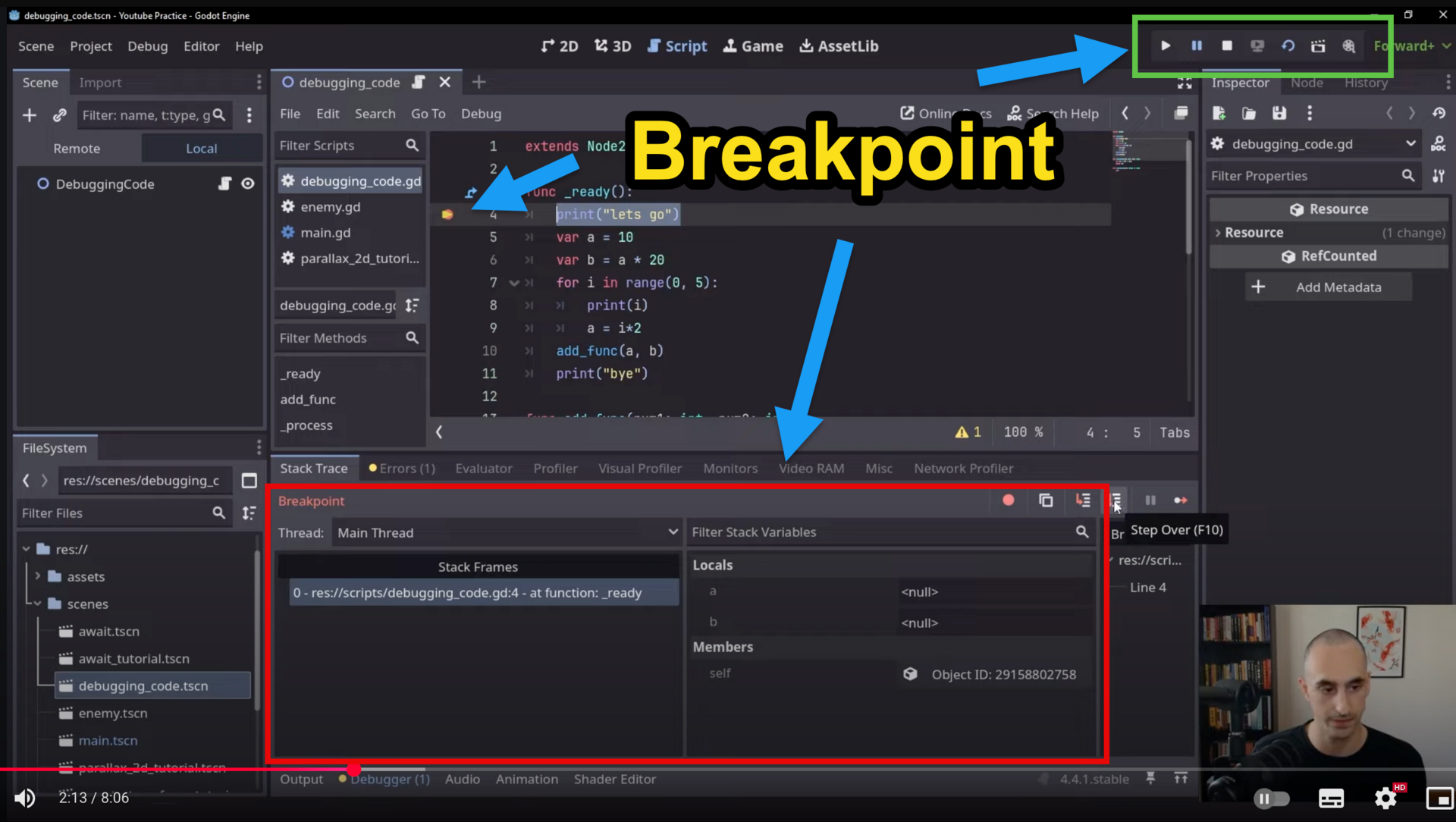
| + | A breakpoint pauses your running game at a chosen line of code so you can check what values variables have, which lines have run, and whether the code is doing what you expect — instead of guessing. |
| + | |
| + |  |
| + | |
| + | ## The workflow |
| + | |
| + | 1. **Set** — open your `.gd` script and click in the gutter left of the line number where you want to pause. A red dot appears. |
| + | 2. **Run** — press F5. The game stops at your breakpoint; an arrow in the gutter marks the line about to run, and the **Debugger** panel opens at the bottom. |
| + | 3. **Inspect** — open **Locals** in the Debugger: every variable in the current function with its current value. |
| + | 4. **Step** — move through the code with the controls below, watching Locals after each step. |
| + | 5. **Fix and re-run** — change the faulty line, run again, watch the test pass. |
| + | |
| + | | Button | Key | What it does | Use when | |
| + | |---|---|---|---| |
| + | | **Step Over** | F10 | Runs just this line, then moves to the next (skips into functions) | Going line by line | |
| + | | **Step Into** | F11 | Follows the call *inside* a function on this line | You suspect the function itself | |
| + | | **Continue** | F8 | Keeps running until the next breakpoint | Done inspecting here | |
| + | |
| + | ## Check the Locals window (most important) |
| + | |
| + | ```gdscript |
| + | var sum = 0 |
| + | sum += 1 |
| + | ``` |
| + | |
| + | After stepping over `sum += 1`, Locals shows `sum = 1`. Use it to spot mistakes: is a variable supposed to be `10` but shows `0`? Did a value change when you didn't expect it to? **Check Locals after every Step Over.** |
| + | |
| + | Other tabs earn their keep too: **Stack Frames** shows which function you're in and what called it; **Breakpoints** lists every red dot so you can clear the ones you're done with; **Output** shows your `print()` messages. |
| + | |
| + | ## The detective loop |
| + | |
| + | 1. Set a breakpoint where you think the problem is. |
| + | 2. Run — it pauses. |
| + | 3. Check Locals — do the values match what you expect? |
| + | 4. Step Over (F10) line by line; Step Into (F11) when a function is the suspect. |
| + | 5. Ask: *why is this variable not changing? Is this function running at all?* |
| + | |
| + | ## Try this now (5 minutes) |
| + | |
| + | 1. Open a script in your SAT project. |
| + | 2. Set a breakpoint on a line inside a function that runs every game (e.g. in `_ready()`). |
| + | 3. Run the game — it pauses. |
| + | 4. Look at Locals: what values do you see? |
| + | 5. Press F10 and watch the values change. |
| + | |
| + | **In your recording:** set a breakpoint inside the failing feature from your testing table, step to the faulty line, narrate what Locals shows, fix it, and re-run to pass — one unbroken take. |
| /dev/null .. sd/C08/Debugging with Breakpoints in Godot/godot_breakpoint.png | |
| /dev/null .. sd/C08/Godot Debugging Tools.md | |
| @@ 0,0 1,45 @@ | |
| + | <!-- Generated from applied-computing-au vic/unit3-4/sat/C08-2026/C08-Reference-Godot by port-reference-godot-to-wiki.py — do not hand-edit; re-run the port. --> |
| + | # Godot Debugging Tools — GDScript |
| + | |
| + | *The 90-second tour of what Godot gives you for debugging. For the hands-on breakpoint workflow, see [Debugging with Breakpoints in Godot](/sd/C08/Debugging%20with%20Breakpoints%20in%20Godot).* |
| + | |
| + | **Definition.** *Debugging* is finding and fixing the errors in your program: syntax errors (won't run), logic errors (runs, but the result is wrong) and run-time errors (crashes while running). The C8-1 rubric looks for **debugging statements** at level 3–4 and **breakpoints** at level 5–6 — used on your own project, not described in the abstract. |
| + | |
| + | ## Print debugging — the "debugging statements" |
| + | |
| + | Everything prints to the **Output** panel at the bottom of the editor. |
| + | |
| + | ```gdscript |
| + | print("DEBUG: balance = ", balance) # always prints |
| + | print_debug("reached _apply_fare()") # adds the script and line number |
| + | push_warning("fare table is empty") # yellow warning in the Debugger |
| + | push_error("negative balance!") # red error in the Debugger (does not stop the game) |
| + | ``` |
| + | |
| + | A debugging statement earns its keep when it answers a question: *what value does this variable hold? did this line run at all? in what order?* Comment it out once answered — the added-then-removed print in your git history is itself debugging evidence. |
| + | |
| + | ## The Debugger panel |
| + | |
| + | Opens at the bottom when your game hits a breakpoint or crashes on an error. |
| + | |
| + | | Where to look | What it shows | |
| + | |---|---| |
| + | | **Stack Trace / Stack Frames** | which function called which — where you are and how execution got there | |
| + | | **Locals** | every variable in the current function and its value *right now* | |
| + | | **Breakpoints** | every red dot in your project — jump to, disable or delete them | |
| + | | **Errors** | run-time errors and warnings, with clickable locations | |
| + | |
| + | ## Breakpoints |
| + | |
| + | Click in the gutter left of a line number — a red dot appears. Run the scene; the game pauses on that line and the Debugger opens, with **Continue**, **Step Over** and **Step Into** buttons. Breakpoints survive editor restarts, and the `breakpoint` keyword in GDScript sets one from code. Full workflow: [Debugging with Breakpoints in Godot](/sd/C08/Debugging%20with%20Breakpoints%20in%20Godot). |
| + | |
| + | ## Two more worth knowing |
| + | |
| + | - **Remote scene tree** — while the game runs, the Scene dock gains a **Remote** tab showing the *live* node tree; click any node to inspect (and even edit) its properties in real time. |
| + | - **Debug menu** (top of the editor) — *Visible Collision Shapes* draws your collision shapes in the running game; *Synchronize Script Changes* hot-reloads script edits without restarting. |
| + | |
| + | ## Watch |
| + | |
| + | **Debugging Tips You MUST Know as a Godot Developer** (DevWorm, 5:27) — <https://www.youtube.com/watch?v=PB6YPnRAyjE> — advanced print statements at 02:23, breakpoints at 03:15. |
| + | |
| + | Full detail: [Overview of debugging tools — official Godot docs](https://docs.godotengine.org/en/stable/tutorials/scripting/debug/overview_of_debugging_tools.html) |
| /dev/null .. sd/C08/Modifying Designs with Annotations.md | |
| @@ 0,0 1,40 @@ | |
| + | <!-- Generated from applied-computing-au vic/unit3-4/sat/C08-2026/C08-Reference-Godot by port-reference-godot-to-wiki.py — do not hand-edit; re-run the port. --> |
| + | # Modifying Designs with Annotations |
| + | |
| + | *C8-2's first rungs: identify the design that needed changing (1–2) and annotate the before/after (3–4). The **why** is what lifts you higher — capture it as you go.* |
| + | |
| + | ## Ideation vs representation |
| + | |
| + | Brainstorming, mind maps, mood boards and sketches **generate** ideas. Mock-ups, data dictionaries, object descriptions, IPO charts and pseudocode **document** designs. C8-2 modifications happen to the representation methods — the five below. |
| + | |
| + | ## The five design representations you can modify |
| + | |
| + | | Method | Purpose | A modification looks like | |
| + | |---|---|---| |
| + | | **Mock-up / annotated diagram** | how the interface looks and works | layout, controls or navigation changed, with notes | |
| + | | **Data dictionary** | every data element: name, type, size, scope, purpose | a variable's type, range or purpose revised | |
| + | | **Object description** | classes/objects: properties, methods, relationships | a property added, a method split, a relationship changed | |
| + | | **IPO chart** | input → process → output for one function | a step added or an output redefined | |
| + | | **Pseudocode** | the planned logic | a branch or loop restructured before recoding | |
| + | |
| + | ## What a good annotation shows |
| + | |
| + | - The **before** and the **after**, side by side — a screenshot of only the final version is not an annotation; the change has to be visible. |
| + | - **What** changed, marked directly on the design (arrow, highlight, callout). |
| + | - **Why** — pinned to the specific test result or feedback that triggered it. |
| + | |
| + | ## The change log |
| + | |
| + | Track modifications as they happen: |
| + | |
| + | | Date | Design element changed | Reason for change | Impact on project | Evidence | |
| + | |---|---|---|---|---| |
| + | | 15/03 | Added right panel for grades | Better UX — see individual results | Improved usability, clearer data display | Screenshot in OneNote | |
| + | |
| + | **Evidence examples:** git commit, OneNote page, photo of a sketch, annotated screenshot, design file save. |
| + | |
| + | ## The causal chain (where 7–8 lives) |
| + | |
| + | > test result → design problem → modification → improvement |
| + | |
| + | In the viva you will be asked for the **specific test result** that drove each change, and it has to line up with your git history, dev log and C8-1 testing table. "I changed the layout" is 3–4; "TC004 showed the update silently failing, which meant the form design hid the save state, so I added the confirmation panel — now the failure is impossible to miss" is 7–8. |
| /dev/null .. sd/C08/Software Testing Hierarchy.md | |
| @@ 0,0 1,55 @@ | |
| + | <!-- Generated from applied-computing-au vic/unit3-4/sat/C08-2026/C08-Reference-Godot by port-reference-godot-to-wiki.py — do not hand-edit; re-run the port. --> |
| + | # Software Testing Hierarchy |
| + | |
| + | *Where your C8 work sits in the testing world — and why it's called **alpha** testing.* |
| + | |
| + | ## The hierarchy |
| + | |
| + | ``` |
| + | 1. Development Phase Tests (early, internal) |
| + | ├── Unit Testing (α) |
| + | └── Integration Testing (α) |
| + | |
| + | 2. Pre-Release Tests (later, internal/external) |
| + | ├── System Testing (α/β) |
| + | └── User Acceptance Testing (UAT) (β) |
| + | |
| + | 3. Post-Release Tests (after launch) |
| + | ├── Regression Testing |
| + | ├── Performance Testing |
| + | └── Security Testing |
| + | ``` |
| + | |
| + | | Test | What it checks | |
| + | |---|---| |
| + | | **Unit** | one component in isolation — a single function returns the right value | |
| + | | **Integration** | components working together — the "Add Student" form updates the database *and* the timetable | |
| + | | **System** | the entire product end to end, against all requirements | |
| + | | **UAT** | real users doing real tasks — is it usable, does it meet their needs? | |
| + | | **Regression** | after a fix or update, do the old features still work? | |
| + | | **Performance** | speed, scalability, stability under load | |
| + | | **Security** | vulnerabilities — can data be accessed that shouldn't be? | |
| + | |
| + | ## Alpha vs beta |
| + | |
| + | - **Alpha (α)** — *internal*: the developers (or company insiders) test, in a controlled environment. **Your C8 work is alpha testing** — you test your own SAT against your own testing table. |
| + | - **Beta (β)** — *external*: real users test in their real environment. **That's Criterion 9** — beta testing with your actual users comes next. |
| + | |
| + | It's not about location — it's about **who** is testing and **how**. |
| + | |
| + | ## Check Your Understanding |
| + | |
| + | Alpha or beta? |
| + | |
| + | 1. A dev team spends a week testing its own new timetable app with fake student data. |
| + | 2. A games company invites 1,000 players worldwide to play an early build for two weeks. |
| + | 3. Company staff and their families use a new app feature for a month before public release. |
| + | 4. Fifty teachers use a quiz platform with their real classes for a semester and report back. |
| + | 5. A bank hires an external professional testing company (not real customers) to systematically test its new app. *(tricky)* |
| + | |
| + | >| ### Answer |
| + | >| 1. **Alpha** — internal team, controlled environment (system testing). |
| + | >| 2. **Beta** — real external users in their own environments (UAT). |
| + | >| 3. **Alpha** — still inside the company, before release. |
| + | >| 4. **Beta** — the real target users, in real classrooms. |
| + | >| 5. **Alpha** — professional testers are not real users; it's controlled, systematic testing. |
| /dev/null .. sd/C08/Testing Tables and Corrections.md | |
| @@ 0,0 1,44 @@ | |
| + | <!-- Generated from applied-computing-au vic/unit3-4/sat/C08-2026/C08-Reference-Godot by port-reference-godot-to-wiki.py — do not hand-edit; re-run the port. --> |
| + | # Testing Tables and Corrections |
| + | |
| + | *The testing table is the artefact the whole C8-1 rubric reads from: one row per test, and for every failed test, what you did about it.* |
| + | |
| + | **Definition.** A testing table documents each test case: the exact input you ran, the output you **expected**, the output you **actually** got, and — when the two disagree — the **corrective action** you took. Expected-vs-actual across a range of data is the 7–8 discriminator; a complete list of corrective actions for every failed test is the 9–10 one. |
| + | |
| + | ## The structure |
| + | |
| + | | Column | What goes in it | |
| + | |---|---| |
| + | | Test Case ID | TC001, TC002, … | |
| + | | Test Description | what this row proves, in one phrase | |
| + | | Input Data | the exact value(s) entered | |
| + | | Expected Output | the specific output — never just "works" | |
| + | | Actual Output | what really happened, even when it matches | |
| + | | Pass/Fail | one word | |
| + | | Error Type | S / L / R / V (below) | |
| + | | Corrective Action / Notes | for every Fail: what you changed, and the re-run result | |
| + | |
| + | **Error types:** **S**yntax · **L**ogic · **R**un-time · **V**alidation |
| + | |
| + | ## A worked slice |
| + | |
| + | | Test ID | Description | Input | Expected | Actual | Result | Corrective action | |
| + | |---|---|---|---|---|---|---| |
| + | | TC001 | Valid login | saleh / OoeiO9! | Access granted, menu screen | Access granted, menu screen | Pass | — | |
| + | | TC002 | Wrong password | saleh / saleh | Error message | **Access granted!** | Fail | Login branch never compared the password — added the check; re-run: error shows ✅ | |
| + | | TC004 | Update existing profile | (edit form) | Profile updated, back to menu | Profile did not update | Fail | Save wrote to a copy, not the record — fixed reference; re-run: Pass ✅ | |
| + | |
| + | The Fail rows are where the marks live: *fault → fix → re-run result*, written next to the row. That same fix cycle, performed live, is what your screen recording must show. |
| + | |
| + | ## Rules that keep the table honest |
| + | |
| + | - **Write Expected before you run.** An expected output copied from the actual output tests nothing. |
| + | - **Never delete a failed row.** The fail plus its corrective action *is* the evidence — a table of green Passes scores lower than one showing real fixes. |
| + | - **Cover the range:** valid, boundary, invalid, wrong, absent — see [Types of Test Data](/sd/C08/Types%20of%20Test%20Data). |
| + | - **At least one row per validation rule** in your code: the empty field, the out-of-range value, the wrong type — with the input that should trigger it. |
| + | |
| + | ## Going further — automated tests |
| + | |
| + | A unit test is a testing-table row written as code, so it re-runs itself after every change (in Godot: the **GUT** addon). A passing automated suite is strong "all modules function correctly" evidence for 9–10 — but the documented table stays the required artefact. |
| + | |
| + | The blank template is in your class repo: `S-C08/C081-Alpha-Testing-Plan-Template.md`. |
| /dev/null .. sd/C08/Types of Test Data.md | |
| @@ 0,0 1,101 @@ | |
| + | <!-- Generated from applied-computing-au vic/unit3-4/sat/C08-2026/C08-Reference-Godot by port-reference-godot-to-wiki.py — do not hand-edit; re-run the port. --> |
| + | # Types of Test Data — GDScript |
| + | |
| + | *A testing table is only as strong as the range of data it feeds in. Six kinds — and a table that reaches 7–8 visits them all.* |
| + | |
| + | ## The six types |
| + | |
| + | | Type | Meaning | Age-checker example | |
| + | |---|---|---| |
| + | | **Valid** | normal values that should work | 20, 25 | |
| + | | **Valid but unusual** | uncommon but acceptable | a 65-year-old student | |
| + | | **Invalid** | breaks the rules | 15, 17 | |
| + | | **Boundary** | at the exact limit | 17, 18, 19 | |
| + | | **Wrong** | wrong format or type | `"twenty"`, -5 | |
| + | | **Absent** | missing entirely | `""`, `null` | |
| + | |
| + | ## Story 1 — the age checker |
| + | |
| + | Students must be 18 or older to enrol: |
| + | |
| + | ```gdscript |
| + | func check_age(age): |
| + | if age >= 18: |
| + | return "Eligible for enrolment" |
| + | return "Too young - must be 18+" |
| + | ``` |
| + | |
| + | Fill in an appropriate age for each row, then run them: |
| + | |
| + | | Test ID | Description | Test data type | Input | Expected output | Actual output | Result | |
| + | |---|---|---|---|---|---|---| |
| + | | TC001 | Valid adult age | Valid | age = | "Eligible for enrolment" | "Eligible for enrolment" | ✅ Pass | |
| + | | TC002 | Older student | Valid but unusual | age = | "Eligible for enrolment" | "Eligible for enrolment" | ✅ Pass | |
| + | | TC003 | Under-age student | Invalid | age = | "Too young - must be 18+" | "Too young - must be 18+" | ✅ Pass | |
| + | | TC004 | Minimum age boundary | Boundary | age = | "Eligible for enrolment" | "Eligible for enrolment" | ✅ Pass | |
| + | | TC005 | Just under boundary | Boundary | age = | "Too young - must be 18+" | "Too young - must be 18+" | ✅ Pass | |
| + | | TC006 | Text instead of number | Wrong | age = "twenty" | Error message | **Game crashes** | ❌ Fail | |
| + | | TC007 | Missing age | Absent | age = null | Error message | **Game crashes** | ❌ Fail | |
| + | |
| + | >| ### Answer |
| + | >| | Test ID | Suggested age | Reasoning | |
| + | >| |---|---|---| |
| + | >| | TC001 | 20 | normal adult student | |
| + | >| | TC002 | 65 | unusual but perfectly valid | |
| + | >| | TC003 | 13 | clearly under the minimum | |
| + | >| | TC004 | 18 | exactly at the boundary — minimum valid | |
| + | >| | TC005 | 17 | one below the boundary | |
| + | |
| + | The last two rows are the lesson: `"twenty" >= 18` is an invalid `String`-vs-`int` comparison, so the game **crashes** instead of returning an error message. **Wrong** and **Absent** data are exactly the rows that expose missing validation checks — and every crash they cause belongs in your table as a Fail with a corrective action. |
| + | |
| + | ## Story 2 — the GPA calculator (practice) |
| + | |
| + | A GPA calculator that validates its inputs and decides graduation eligibility (needs GPA ≥ 2.0 *and* ≥ 120 credits): |
| + | |
| + | ```gdscript |
| + | func calculate_gpa(student_id, grades: Array, credits: Array): |
| + | if not str(student_id).is_valid_int() or str(student_id).length() != 8: |
| + | return {"error": "Invalid student ID"} |
| + | if grades.size() != credits.size(): |
| + | return {"error": "Grades and credits must match"} |
| + | var total_points := 0.0 |
| + | var total_credits := 0 |
| + | for i in grades.size(): |
| + | if grades[i] < 0 or grades[i] > 100: |
| + | return {"error": "Grade %s out of range" % grades[i]} |
| + | var points := 0.0 |
| + | if grades[i] >= 80: points = 4.0 |
| + | elif grades[i] >= 70: points = 3.0 |
| + | elif grades[i] >= 60: points = 2.0 |
| + | total_points += points * credits[i] |
| + | total_credits += credits[i] |
| + | if total_credits == 0: |
| + | return {"error": "No credits provided"} |
| + | var gpa := total_points / total_credits |
| + | if gpa >= 2.0 and total_credits >= 120: |
| + | return {"status": "graduate", "gpa": snapped(gpa, 0.01)} |
| + | return {"status": "not ready", "gpa": snapped(gpa, 0.01)} |
| + | ``` |
| + | |
| + | > [!NOTE] |
| + | > **No answer key for this table.** The blank rows are open-ended — you choose the input data. Run your own inputs through the code above and record what actually happens. |
| + | |
| + | | Test ID | Test data type | Input | Expected output | Actual output | Result | |
| + | |---|---|---|---|---|---| |
| + | | TC001 | Valid | ID=12345678, grades=[85,90], credits=[3,3] | {"status": "graduate", "gpa": 4.0} | {"status": "not ready", "gpa": 4.0} | ❌ Fail | |
| + | | TC002 | Valid | | | | | |
| + | | TC003 | Valid but unusual | ID=87654321, grades=[60,80], credits=[60,60] | {"status": "graduate", "gpa": 3.5} | {"status": "graduate", "gpa": 3.0} | ❌ Fail | |
| + | | TC004 | Valid but unusual | | | | | |
| + | | TC005 | Invalid | ID=11111111, grades=[50,40], credits=[3,3] | {"status": "not ready", "gpa": 0.0} | {"status": "not ready", "gpa": 0.0} | ✅ Pass | |
| + | | TC006 | Invalid | | | | | |
| + | | TC007 | Boundary | ID=22222222, grades=[70,70], credits=[60,60] | {"status": "graduate", "gpa": 2.0} | {"status": "graduate", "gpa": 3.0} | ❌ Fail | |
| + | | TC008 | Boundary | | | | | |
| + | | TC009 | Wrong | ID="ABCD1234", grades=[80], credits=[3] | {"error": "Invalid student ID"} | {"error": "Invalid student ID"} | ✅ Pass | |
| + | | TC010 | Wrong | | | | | |
| + | | TC011 | Absent | ID=55555555, grades=[], credits=[] | {"error": "No credits provided"} | {"error": "No credits provided"} | ✅ Pass | |
| + | | TC012 | Absent | | | | | |
| + | |
| + | > [!WARNING] |
| + | > **Testing reveals issues on both sides.** TC001: only 6 credits, but graduation needs 120+ — the *expected output* was wrong. TC003: the calculated GPA is 3.0 (60→2.0, 80→4.0, equal credits), not 3.5 — expected output wrong again. TC007: GPA is 3.0, not 2.0 — same. |
| + | |
| + | **Key learning:** testing exposes errors in your *expected outputs* (test-design mistakes) as well as in the code. Working out the expected value **before** you run is what makes a testing table a test, not a transcript. |
| /dev/null .. sd/C08/Updating Evaluation Criteria.md | |
| @@ 0,0 1,38 @@ | |
| + | <!-- Generated from applied-computing-au vic/unit3-4/sat/C08-2026/C08-Reference-Godot by port-reference-godot-to-wiki.py — do not hand-edit; re-run the port. --> |
| + | # Updating Evaluation Criteria |
| + | |
| + | *Your C4 evaluation matrix was written before you built anything. Level 5–6 of C8-2 is showing the criteria evolved **with** the project — and 7–8 is explaining why.* |
| + | |
| + | ## The factors (VCAA) |
| + | |
| + | Every criterion must belong to one factor. |
| + | |
| + | **Efficiency** — how well the solution uses resources: |
| + | |
| + | - **Cost of data and file manipulation** — resources required to handle data operations |
| + | - **Functionality** — features that align with user requirements, without unnecessary complexity |
| + | - **Speed of processing** — how quickly the software performs and responds |
| + | |
| + | **Effectiveness** — how well the solution achieves its intended results: **accessibility · accuracy · attractiveness · clarity · communication of message · completeness · maintainability · readability · relevance · timeliness · usability**. |
| + | |
| + | ## Three steps |
| + | |
| + | 1. **Revisit your C4 criteria.** List them, organised by factor, and compare what you planned against what you actually built: technical discoveries, creative solutions, scope adjustments. |
| + | 2. **Revise with what development taught you.** Real examples of honest revisions: |
| + | - *Speed of processing:* page loads within **4** seconds on the school network (revised from 2 — measured on real hardware) |
| + | - *Usability:* login within **15** seconds on mobile (revised from 30 — users were faster than expected) |
| + | - *Accessibility:* touch targets minimum **44 px** for tablets (**new** criterion — user testing revealed it) |
| + | 3. **Keep the reason beside each change.** A criterion that moved without a documented trigger (test result, user feedback, IT requirement) can't survive the viva's causal-reasoning gate. |
| + | |
| + | Loosening a target isn't failure — an unmeasured target is. The mark of a real evaluation criterion is that it changed when the evidence said it should. |
| + | |
| + | ## Four levels of evaluation matrix |
| + | |
| + | | Level | What it adds | |
| + | |---|---| |
| + | | 1 — Basic | every FR/NFR rated 0–2 in a checklist | |
| + | | 2 — Factor-based | criteria grouped under the efficiency/effectiveness factors above | |
| + | | 3 — Prioritised | factor weights (e.g. Accuracy 30%, Maintainability 5%) reflecting *your* project's priorities | |
| + | | 4 — Your own | mix, tweak or redesign — clear, systematic, meaningful | |
| + | |
| + | The full worked matrices for all four levels are in your class repo: `S-C08/C082-Evaluation-Matrices-Update.md`. |
| sd/VCE Software Development Hub.md .. | |
| @@ 26,6 26,7 @@ | |
| - [C05 — Skills in Producing Detailed Designs](/sd/C05/C05-home) | |
| - [C06 — Skills in Using the Features of the Programming Language](/sd/C06/C06-home) | |
| - [C07 — Skills in Developing the Software Solution](/sd/C07/C07-home) | |
| + | - [C08 — Skills in Debugging and Alpha Testing the Software Solution](/sd/C08/C08-home) |
| ## Tools | |