Commit ce5b8c
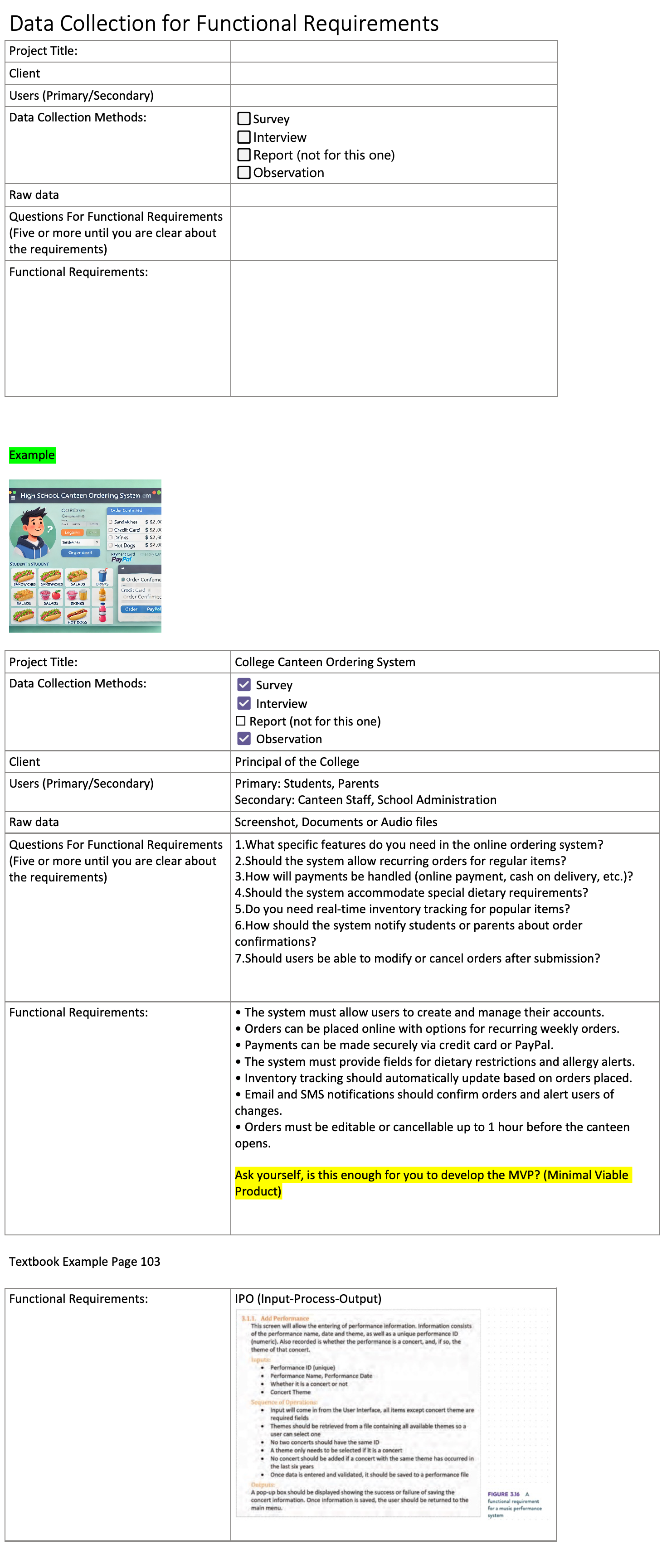
2026-04-19 16:06:03 cloudy-jc: Wiki: reorganise into dt7/ and sd/ subdirs (per-course namespaces) Moves all current pages into per-course subdirectories so each cohort gets a clean namespace with its own URL prefix and natural sidebar grouping: dt7/ Year 7 Digital Technologies (9 pages + 2 attachment folders) sd/ VCE Software Development (was SAT/, with C01 + Resources) New top-level structure: Home.md ← lobby (2 doors) dt7/Year 7 Hub.md ← Y7 cohort landing sd/VCE Software Development Hub.md ← VCE cohort landing dt7/* and dt7/<page>/ ← Y7 pages + attachments sd/* and sd/C01/ ← VCE pages + attachments Link rewrites: - All [[Page]] cross-links qualified to [[dt7/Page]] for the moved Y7 pages - All image refs /<page>/img.png updated to /dt7/<page>/img.png - Every Y7 leaf page now ends with "← Back to [[dt7/Year 7 Hub]]" Home.md rewritten as a minimal lobby with 2 entries; the per-cohort hubs do all the curation work. Why dt7/ + sd/: Jeremy expects more courses (Y8, Y9, etc). Subdir layout scales; OtterWiki sidebar will auto-group by directory tree. Cost: 5 way2.cc shortlinks (ca2-ca6) need their target URLs updated to /dt7/<page> paths. Following commit handles that via the way2.cc admin API. ca7-caa point at YouTube directly and don't need touching. Co-Authored-By: Claude Opus 4.7 (1M context) <noreply@anthropic.com>| 2026 Digital Technologies - Year 7 - Term 2.md .. /dev/null | |
| @@ 1,4 0,0 @@ | |
| - | # 2026 Digital Technologies - Year 7 - Term 2 |
| - | |
| - | |
| - | [[Workshop 1 Hardware and Networks]] |
| Home.md .. | |
| @@ 1,35 1,10 @@ | |
| - | # Welcome to the EduSpace Wiki |
| + | # EduSpace Wiki |
| - | Online resources for **Hamilton College Digital Technologies** classes — extras that don't fit in the printed booklets, deeper explainers, photo galleries, and interactive tools. |
| + | Pick your class: |
| - | --- |
| - | |
| - | ## Year 7 — Digital Technologies (2026) |
| - | |
| - | - [[2026 Digital Technologies - Year 7 - Term 2]] — term overview |
| - | - [[Workshop 1 Hardware and Networks]] — booklet companion: video explainers, interactive tools, hardware photos, deeper Q&A |
| - | |
| - | ### Workshop 1 video companions |
| - | |
| - | Each inspiration video in the booklet has its own page with "what to watch for" and Have-a-Go questions: |
| - | |
| - | - [[Tom Scott - Fetch Execute Cycle]] *(way2.cc/ca7)* |
| - | - [[Crash Course - Binary]] *(way2.cc/ca8)* |
| - | - [[Vox - Undersea Cables]] *(way2.cc/ca9)* |
| - | - [[Raspberry Pi Foundation - What Is A Raspberry Pi]] *(way2.cc/caa)* |
| - | |
| - | ### Workshop 1 deeper-dive pages |
| - | |
| - | - [[GPU vs CPU]] — why AI runs on GPUs, with a paintball-gun demo |
| - | - [[FreeCAD Extension]] — for students who've outgrown TinkerCAD (links into Workshop 2 in coming weeks) |
| - | - [[Robot Marathon]] — fun robotics videos, ties to Workshop 2 |
| - | |
| - | --- |
| - | |
| - | ## VCE Software Development (Year 12) |
| - | |
| - | - [[2026 Software Development Project|SAT]] |
| + | - **[[dt7/Year 7 Hub|🔍 Year 7 Digital Technologies]]** — Hamilton College, 2026 |
| + | - **[[sd/VCE Software Development Hub|💻 VCE Software Development]]** — Year 12, 2026 |
| --- | |
| - | *Wiki kept up by Jeremy Chen and Cloudy. Suggestions welcome — open an issue at [git.jeremychen.au/jeremy/eduspace-wiki](https://git.jeremychen.au/jeremy/eduspace-wiki) or talk to your teacher.* |
| + | *Wiki maintained by Jeremy Chen and Cloudy. Suggestions welcome — ask your teacher.* |
| /dev/null .. dt7/2026 Digital Technologies - Year 7 - Term 2.md | |
| @@ 0,0 1,7 @@ | |
| + | # 2026 Digital Technologies - Year 7 - Term 2 |
| + | |
| + | |
| + | [[dt7/Workshop 1 Hardware and Networks]] |
| + | |
| + | |
| + | ← Back to [[dt7/Year 7 Hub|Year 7 Hub]] |
| Crash Course - Binary.md .. dt7/Crash Course - Binary.md | |
| @@ 1,6 1,6 @@ | |
| # Crash Course — Binary | |
| - | *A companion page to [[Workshop 1 Hardware and Networks]]. Inspiration video referenced in the Workshop 1 booklet as `way2.cc/ca8`.* |
| + | *A companion page to [[dt7/Workshop 1 Hardware and Networks]]. Inspiration video referenced in the Workshop 1 booklet as `way2.cc/ca8`.* |
| You spent part of Workshop 1 squinting at a circuit board and converting numbers to and from binary. The conversions might have felt like a maths puzzle disconnected from the hardware. This video closes that gap. | |
| @@ 46,6 46,9 @@ | |
| --- | |
| - | See also: [[Workshop 1 Hardware and Networks]] · [[Tom Scott - Fetch Execute Cycle]] · [[GPU vs CPU]] |
| + | See also: [[dt7/Workshop 1 Hardware and Networks]] · [[dt7/Tom Scott - Fetch Execute Cycle]] · [[dt7/GPU vs CPU]] |
| *Last updated: April 2026.* | |
| + | |
| + | |
| + | ← Back to [[dt7/Year 7 Hub|Year 7 Hub]] |
| FreeCAD Extension.md .. dt7/FreeCAD Extension.md | |
| @@ 1,6 1,6 @@ | |
| # FreeCAD Extension (Year 7 Robotics) | |
| - | *An extension to [[Workshop 1 Hardware and Networks]]'s sibling, Workshop 2: Robotics & Smart Devices.* |
| + | *An extension to [[dt7/Workshop 1 Hardware and Networks]]'s sibling, Workshop 2: Robotics & Smart Devices.* |
| So you've finished your Sphero hat in TinkerCAD and you want to know what the "grown-up" 3D tools look like. This page is for you. It's optional. Your Workshop 2 booklet does not need any of this. | |
| @@ 14,7 14,7 @@ | |
| FreeCAD is free, open source, and runs on Windows, Mac, Linux and Raspberry Pi. There is no account to make and nothing to pay for. | |
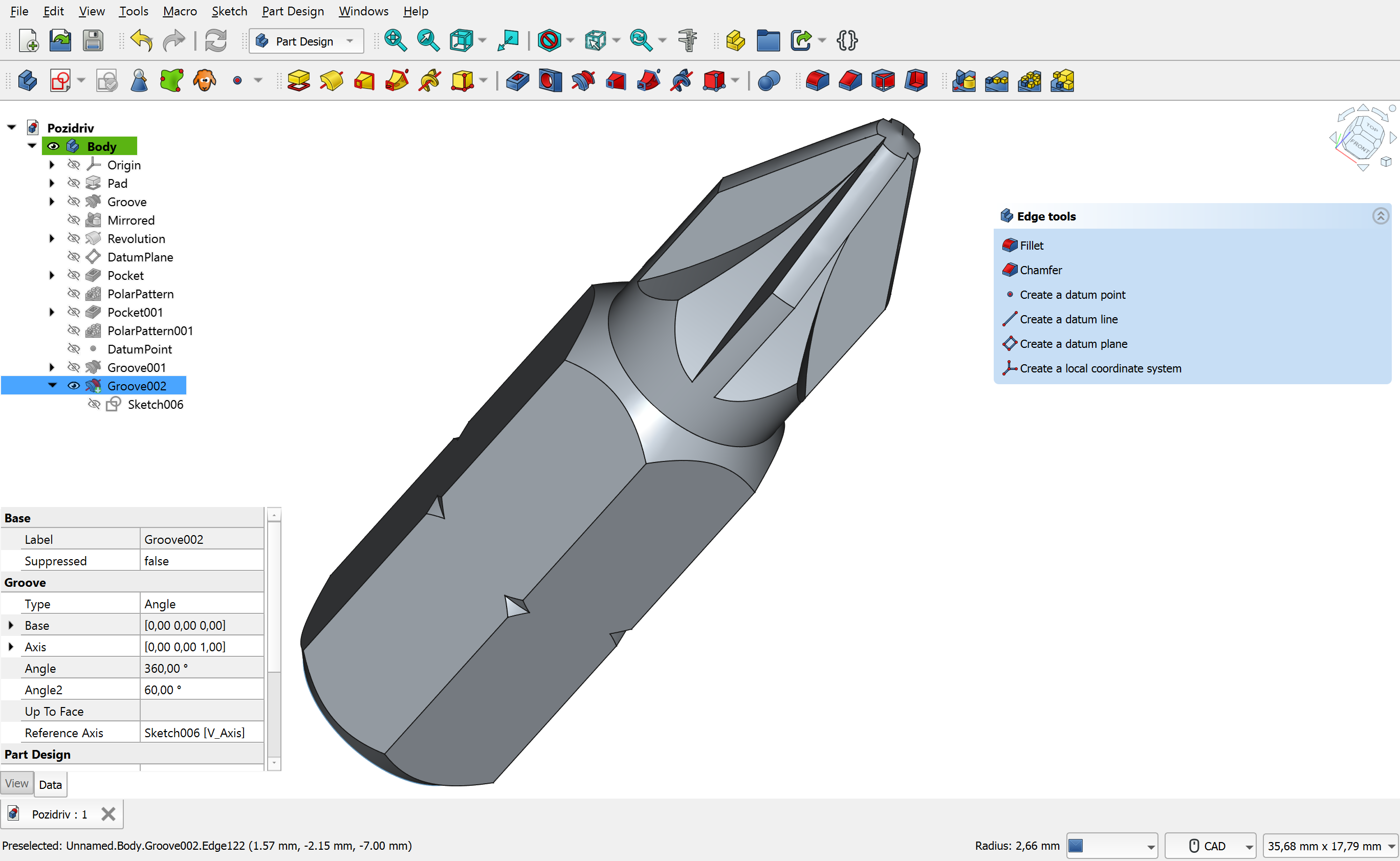
| - |  |
| + | 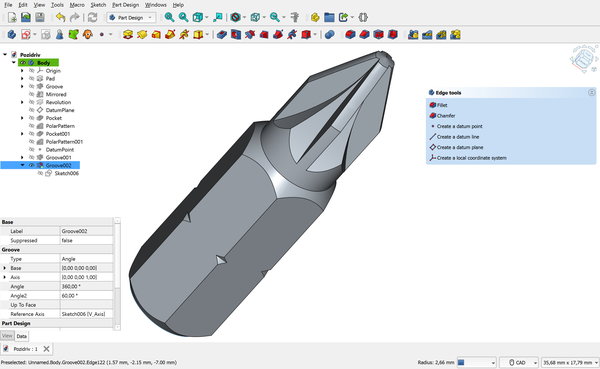 |
| *FreeCAD 1.0 in the Part Design workbench. The tree on the left shows every step used to build the model. Image by Maxwxyz, [CC BY 4.0](https://creativecommons.org/licenses/by/4.0/), via [Wikimedia Commons](https://commons.wikimedia.org/wiki/File:FreeCAD_1.0_Light_PartDesign_Pozidriv.png?width=600).* | |
| @@ 46,7 46,7 @@ | |
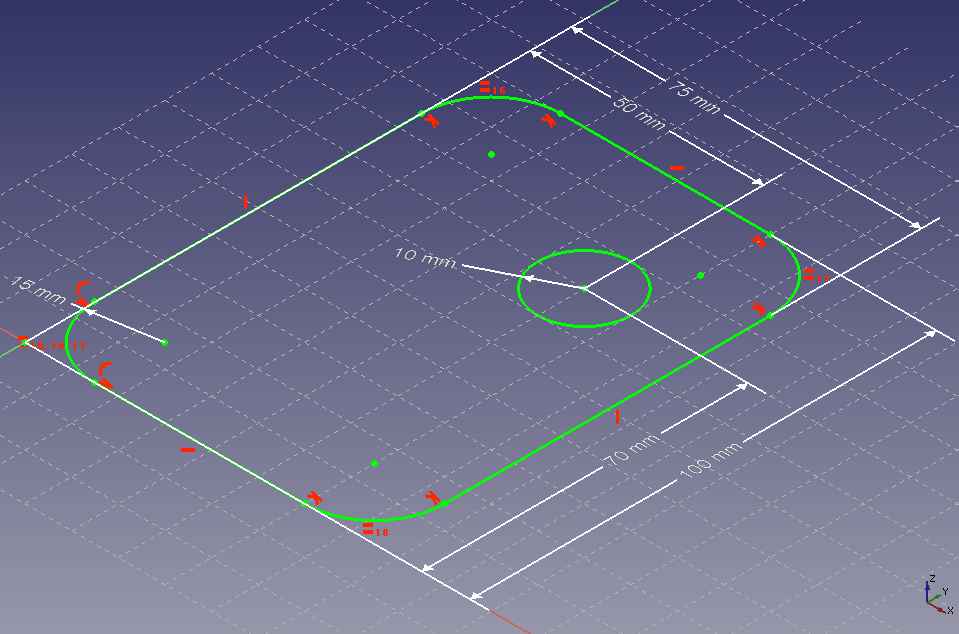
| Create a new sketch on the XY plane. Draw a circle, then add a **diameter constraint** and type the number — say, 80 mm for a hat that sits over a 72 mm Sphero. Constraints are what make FreeCAD parametric: the circle isn't just "about that big", it's exactly 80 mm, and FreeCAD remembers that rule. ([Sketcher docs](https://wiki.freecad.org/Sketcher_Workbench)) | |
| - |  |
| + | 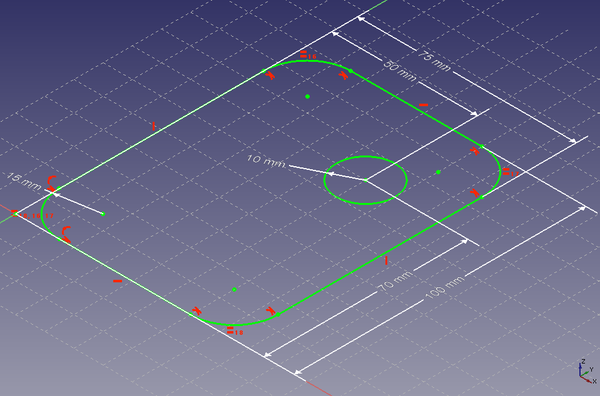 |
| *A sketch with constraints. The white dimension arrows lock the shape to exact measurements. CC0, via [Wikimedia Commons](https://commons.wikimedia.org/wiki/File:FreeCAD_PartDesign_Sketch.png?width=600).* | |
| @@ 54,7 54,7 @@ | |
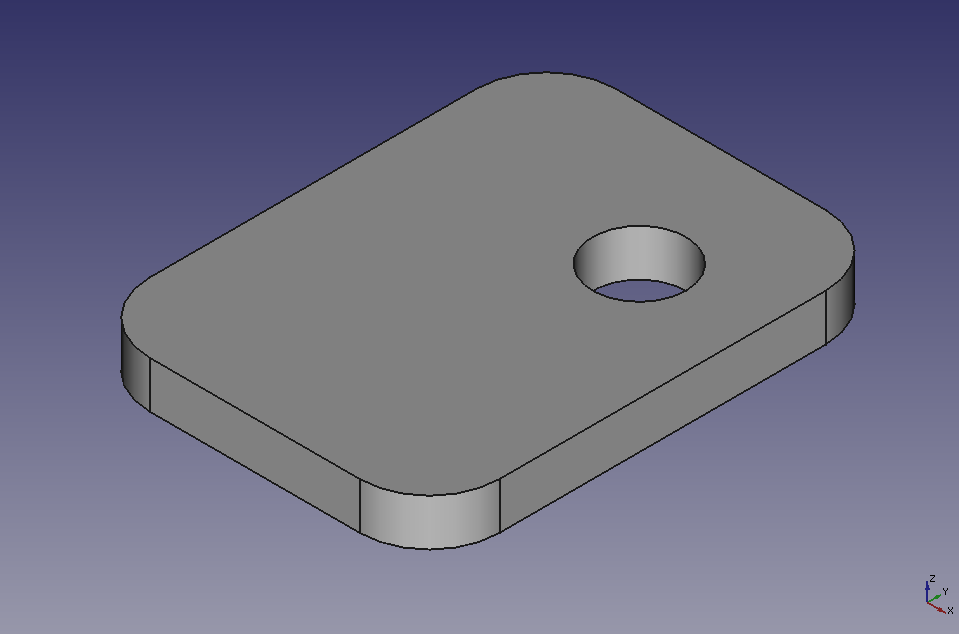
| Close the sketch, then use **Pad** to push it upwards by 10 mm. You now have a solid puck — a flat cylinder. ([Pad docs](https://wiki.freecad.org/PartDesign_Pad)) | |
| - |  |
| + | 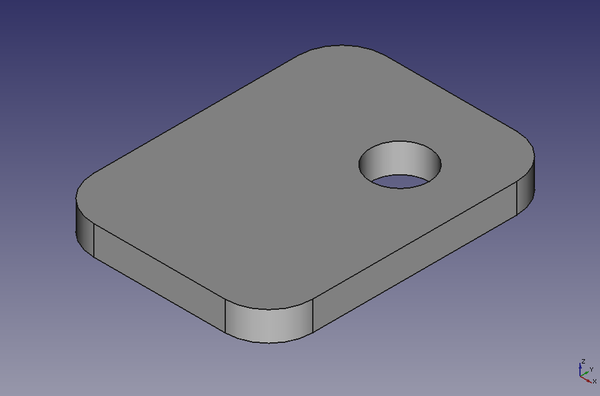 |
| *After padding the sketch, you get a solid 3D shape. CC0, via [Wikimedia Commons](https://commons.wikimedia.org/wiki/File:FreeCAD_PartDesign_Pad.png?width=600).* | |
| @@ 83,3 83,6 @@ | |
| --- | |
| *This is an extension page — not required for the Workshop 2 core task. TinkerCAD is fine for everything in the booklet. Last updated: April 2026.* | |
| + | |
| + | |
| + | ← Back to [[dt7/Year 7 Hub|Year 7 Hub]] |
| FreeCAD Extension/freecad-interface.png .. dt7/FreeCAD Extension/freecad-interface.png | |
| FreeCAD Extension/freecad-pad.png .. dt7/FreeCAD Extension/freecad-pad.png | |
| FreeCAD Extension/freecad-sketch.png .. dt7/FreeCAD Extension/freecad-sketch.png | |
| GPU vs CPU.md .. dt7/GPU vs CPU.md | |
| @@ 1,6 1,6 @@ | |
| # GPU vs CPU | |
| - | *A companion page to [[Workshop 1 Hardware and Networks]].* |
| + | *A companion page to [[dt7/Workshop 1 Hardware and Networks]].* |
| When you cracked open a laptop in Workshop 1, you spotted the CPU — the brain of the computer. It fetches instructions, does the maths, and keeps everything running. A modern CPU has a handful of very fast, very clever cores (usually 4 to 16). It can juggle lots of different jobs, but it tackles them roughly one at a time per core. | |
| @@ 47,6 47,9 @@ | |
| --- | |
| - | See also: [[Workshop 1 Hardware and Networks]] |
| + | See also: [[dt7/Workshop 1 Hardware and Networks]] |
| *Last updated: April 2026.* | |
| + | |
| + | |
| + | ← Back to [[dt7/Year 7 Hub|Year 7 Hub]] |
| Raspberry Pi Foundation - What Is A Raspberry Pi.md .. dt7/Raspberry Pi Foundation - What Is A Raspberry Pi.md | |
| @@ 1,6 1,6 @@ | |
| # Raspberry Pi Foundation — What is a Raspberry Pi? | |
| - | *A companion page to [[Workshop 1 Hardware and Networks]]. Inspiration video referenced in the Workshop 1 booklet as `way2.cc/caa`.* |
| + | *A companion page to [[dt7/Workshop 1 Hardware and Networks]]. Inspiration video referenced in the Workshop 1 booklet as `way2.cc/caa`.* |
| In Workshop 1 you booted a Raspberry Pi, plugged things into it, and probably typed your first terminal command. This video zooms out: what is the Pi for, who builds them, and *why is a credit-card-sized computer running everything from weather stations to the International Space Station*? | |
| @@ 46,6 46,9 @@ | |
| --- | |
| - | See also: [[Workshop 1 Hardware and Networks]] · [[Tom Scott - Fetch Execute Cycle]] · [[Crash Course - Binary]] · [[Vox - Undersea Cables]] |
| + | See also: [[dt7/Workshop 1 Hardware and Networks]] · [[dt7/Tom Scott - Fetch Execute Cycle]] · [[dt7/Crash Course - Binary]] · [[dt7/Vox - Undersea Cables]] |
| *Last updated: April 2026.* | |
| + | |
| + | |
| + | ← Back to [[dt7/Year 7 Hub|Year 7 Hub]] |
| Robot Marathon.md .. dt7/Robot Marathon.md | |
| @@ 1,6 1,6 @@ | |
| # Robot Marathon | |
| - | *An extension page for [[Workshop 2 Robotics and Smart Devices]].* |
| + | *An extension page for [[dt7/Workshop 2 Robotics and Smart Devices]].* |
| In April 2025, Beijing hosted the world's first humanoid robot half-marathon. Twenty-one bipedal robots lined up alongside 12,000 human runners for a 21-kilometre race. The robots had sensors, batteries, and months of engineering behind them. The humans had legs and a decent breakfast. | |
| @@ 50,6 50,9 @@ | |
| --- | |
| - | See also: [[Workshop 2 Robotics and Smart Devices]] |
| + | See also: [[dt7/Workshop 2 Robotics and Smart Devices]] |
| *This is an extension page — not required for Workshop 2. Last updated: April 2026.* | |
| + | |
| + | |
| + | ← Back to [[dt7/Year 7 Hub|Year 7 Hub]] |
| Tom Scott - Fetch Execute Cycle.md .. dt7/Tom Scott - Fetch Execute Cycle.md | |
| @@ 1,6 1,6 @@ | |
| # Tom Scott — The Fetch-Execute Cycle | |
| - | *A companion page to [[Workshop 1 Hardware and Networks]]. Inspiration video referenced in the Workshop 1 booklet as `way2.cc/ca7`.* |
| + | *A companion page to [[dt7/Workshop 1 Hardware and Networks]]. Inspiration video referenced in the Workshop 1 booklet as `way2.cc/ca7`.* |
| When you opened the laptop in Workshop 1 and pointed at the CPU, you saw a quiet little square of silicon. That square is doing one thing, billions of times a second, and it's the same thing every CPU has done since the 1940s: **fetch, decode, execute, repeat**. | |
| @@ 43,6 43,9 @@ | |
| --- | |
| - | See also: [[Workshop 1 Hardware and Networks]] · [[GPU vs CPU]] |
| + | See also: [[dt7/Workshop 1 Hardware and Networks]] · [[dt7/GPU vs CPU]] |
| *Last updated: April 2026.* | |
| + | |
| + | |
| + | ← Back to [[dt7/Year 7 Hub|Year 7 Hub]] |
| Vox - Undersea Cables.md .. dt7/Vox - Undersea Cables.md | |
| @@ 1,6 1,6 @@ | |
| # Vox — The Hidden Network of Undersea Cables | |
| - | *A companion page to [[Workshop 1 Hardware and Networks]]. Inspiration video referenced in the Workshop 1 booklet as `way2.cc/ca9`.* |
| + | *A companion page to [[dt7/Workshop 1 Hardware and Networks]]. Inspiration video referenced in the Workshop 1 booklet as `way2.cc/ca9`.* |
| When you watched a YouTube video on a Raspberry Pi during Workshop 1, the data didn't arrive by magic and didn't really arrive by Wi-Fi either. Wi-Fi got the request from the Pi to the classroom router. After that, almost every byte travelled along a real, physical cable — and most of those cables sit on the ocean floor. | |
| @@ 46,6 46,9 @@ | |
| --- | |
| - | See also: [[Workshop 1 Hardware and Networks]] · [[Tom Scott - Fetch Execute Cycle]] · [[Crash Course - Binary]] |
| + | See also: [[dt7/Workshop 1 Hardware and Networks]] · [[dt7/Tom Scott - Fetch Execute Cycle]] · [[dt7/Crash Course - Binary]] |
| *Last updated: April 2026.* | |
| + | |
| + | |
| + | ← Back to [[dt7/Year 7 Hub|Year 7 Hub]] |
| Workshop 1 Hardware and Networks.md .. dt7/Workshop 1 Hardware and Networks.md | |
| @@ 38,10 38,10 @@ | |
| Each video referenced in the printed booklet has its own companion page with the embed, "what to watch for" prompts, and Have-a-Go questions. Open these when you want to go deeper on a topic. | |
| - | - **[[Tom Scott - Fetch Execute Cycle]]** *(booklet shortlink: way2.cc/ca7)* — A relay computer the size of a wardrobe, running the same fetch-decode-execute loop as your laptop CPU. Hear it clack. |
| - | - **[[Crash Course - Binary]]** *(way2.cc/ca8)* — Carrie Anne Philbin walks you from "binary is just two states" to ASCII, RGB, and why a kilobyte is 1024 bytes. |
| - | - **[[Vox - Undersea Cables]]** *(way2.cc/ca9)* — 99% of the world's internet runs through cables thinner than a garden hose, sitting on the ocean floor. |
| - | - **[[Raspberry Pi Foundation - What Is A Raspberry Pi]]** *(way2.cc/caa)* — The official 4-minute tour: Pi family, the $35 charity backstory, real-world projects from weather stations to the ISS. |
| + | - **[[dt7/Tom Scott - Fetch Execute Cycle]]** *(booklet shortlink: way2.cc/ca7)* — A relay computer the size of a wardrobe, running the same fetch-decode-execute loop as your laptop CPU. Hear it clack. |
| + | - **[[dt7/Crash Course - Binary]]** *(way2.cc/ca8)* — Carrie Anne Philbin walks you from "binary is just two states" to ASCII, RGB, and why a kilobyte is 1024 bytes. |
| + | - **[[dt7/Vox - Undersea Cables]]** *(way2.cc/ca9)* — 99% of the world's internet runs through cables thinner than a garden hose, sitting on the ocean floor. |
| + | - **[[dt7/Raspberry Pi Foundation - What Is A Raspberry Pi]]** *(way2.cc/caa)* — The official 4-minute tour: Pi family, the $35 charity backstory, real-world projects from weather stations to the ISS. |
| --- | |
| @@ 64,7 64,7 @@ | |
| ### CPU | |
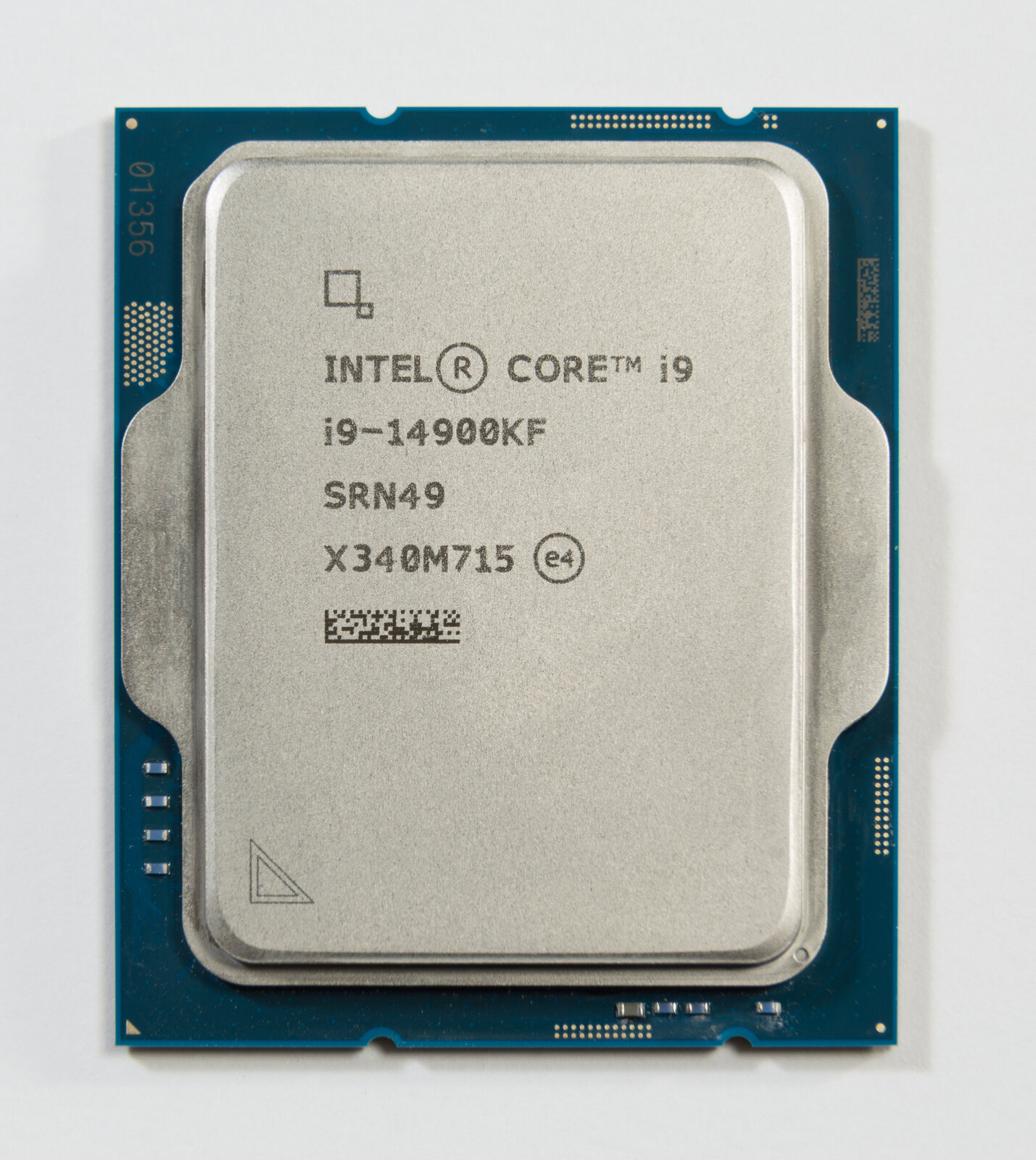
| - |  |
| + | 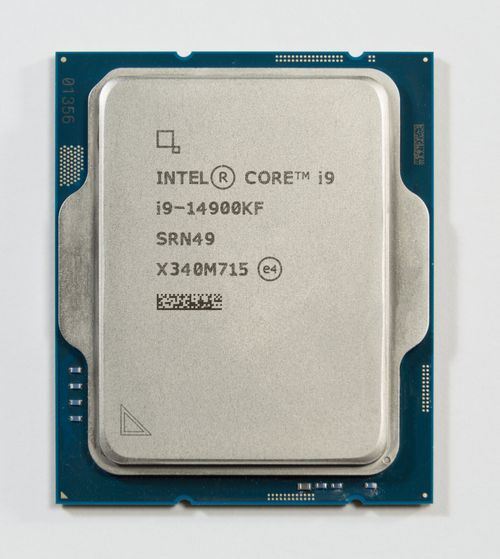 |
| *An Intel Core i9-14900KF. Image by Pstrahl, [CC BY-SA 4.0](https://creativecommons.org/licenses/by-sa/4.0/), via [Wikimedia Commons](https://commons.wikimedia.org/wiki/File:Intel%20i9-14900KF%20CPU.jpg).* | |
| @@ 72,7 72,7 @@ | |
| ### RAM | |
| - |  |
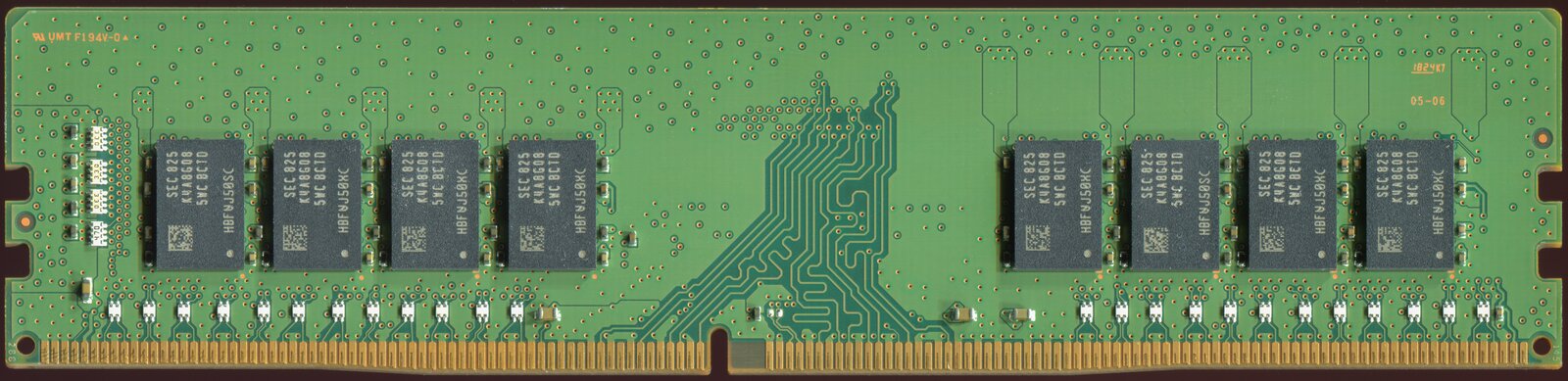
| + | 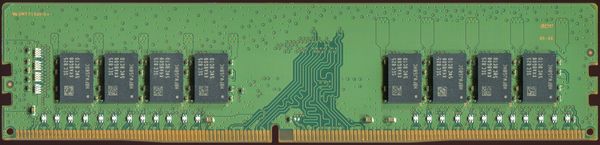 |
| *A 16 GiB DDR4 SDRAM stick (Samsung M378A2K43CB1-CTD). Image by PantheraLeo1359531, [CC BY 4.0](https://creativecommons.org/licenses/by/4.0/), via [Wikimedia Commons](https://commons.wikimedia.org/wiki/File:16%20GiB-DDR4-RAM-Riegel%20RAM019FIX%20Small%20Crop%2090%20PCNT.png).* | |
| @@ 80,13 80,13 @@ | |
| ### Storage: SSD vs HDD | |
| - |  |
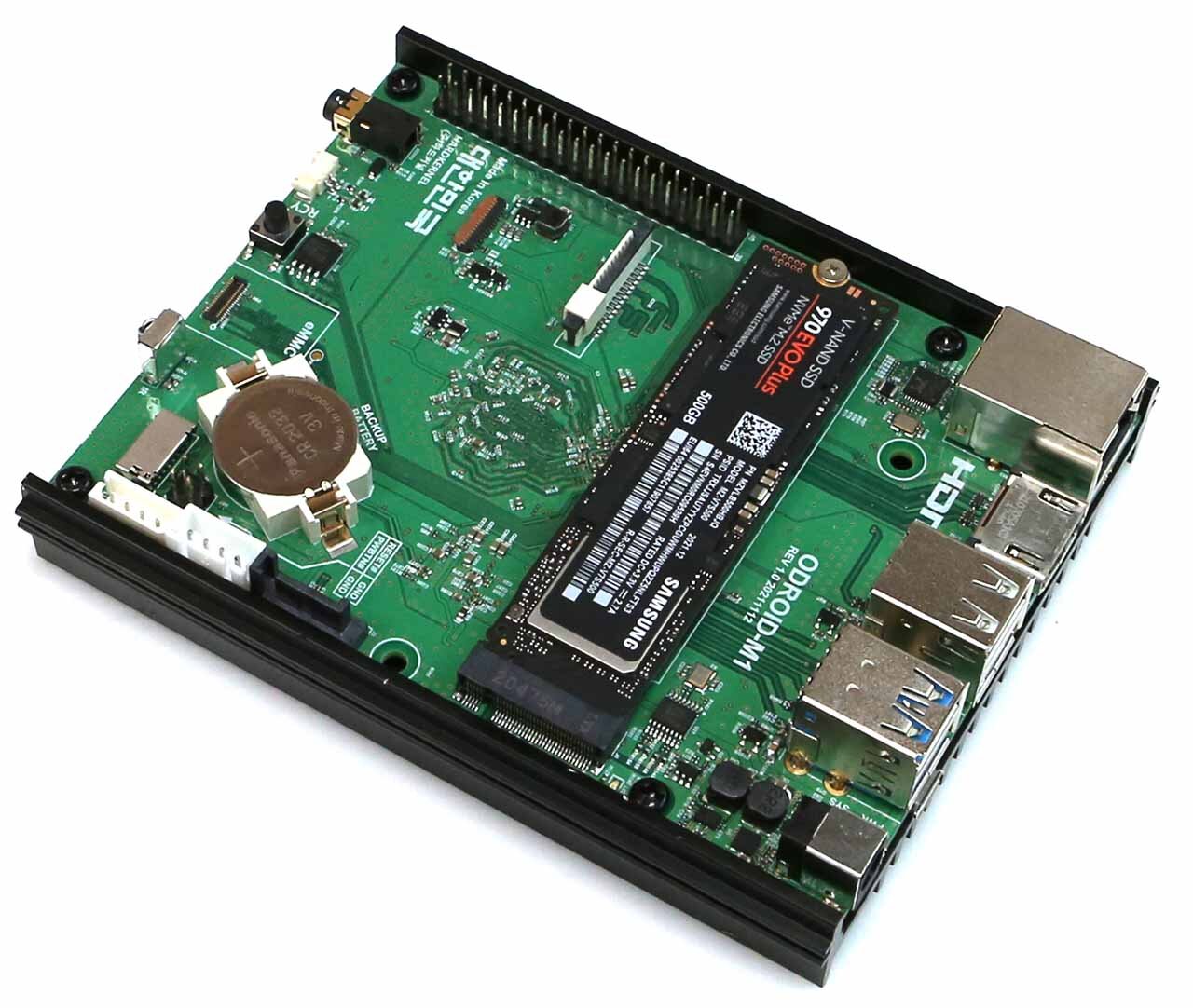
| + | 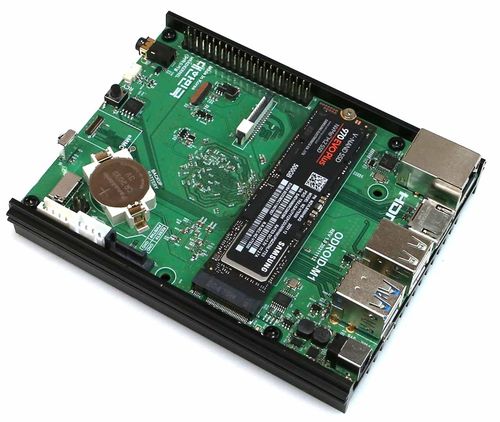 |
| *A Samsung 970 EVO Plus NVMe M.2 SSD — the green stick, about the size of a pack of gum. Image by Hardkernel, [CC BY-SA 4.0](https://creativecommons.org/licenses/by-sa/4.0/), via [Wikimedia Commons](https://commons.wikimedia.org/wiki/File:Odroid%20M1%20with%20Samsung%20970%20EVO%20Plus%20NVME%20drive.jpg).* | |
| **SSD (Solid State Drive)** — No moving parts. Data stored on memory chips. Fast, silent, expensive. | |
| - |  |
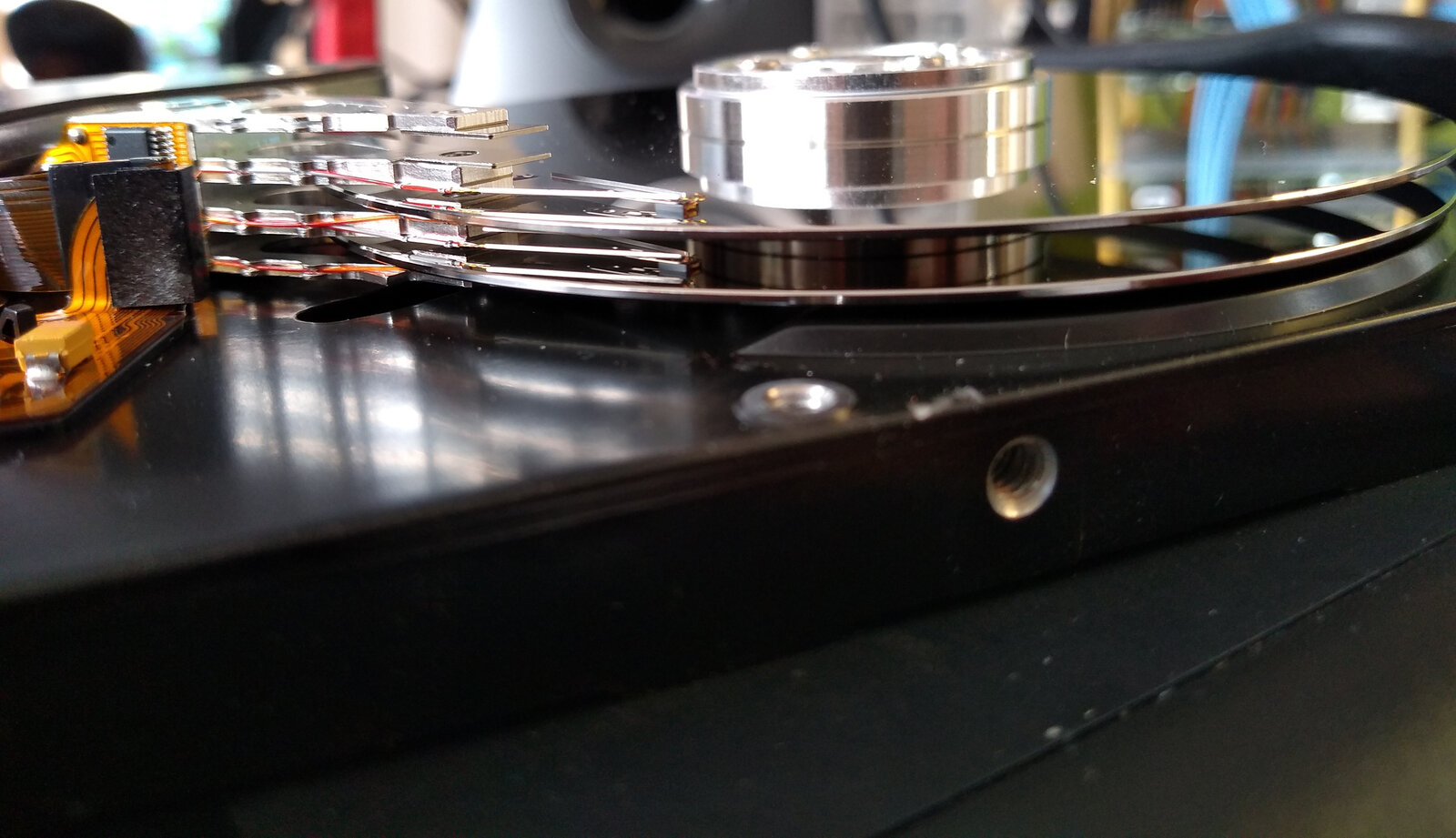
| + | 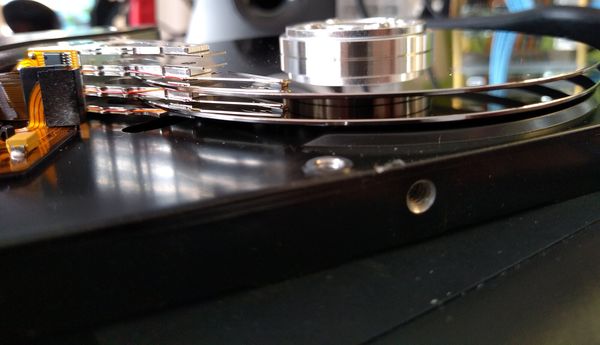 |
| *An opened Samsung 8.4 GB HDD — two platters and four read/write heads. Image by Gunnar Wolf, [CC BY-SA 4.0](https://creativecommons.org/licenses/by-sa/4.0/), via [Wikimedia Commons](https://commons.wikimedia.org/wiki/File:3.5%20inch%20hard%20disk%20drive%2C%20side%20view.jpg).* | |
| @@ 94,7 94,7 @@ | |
| ### GPU | |
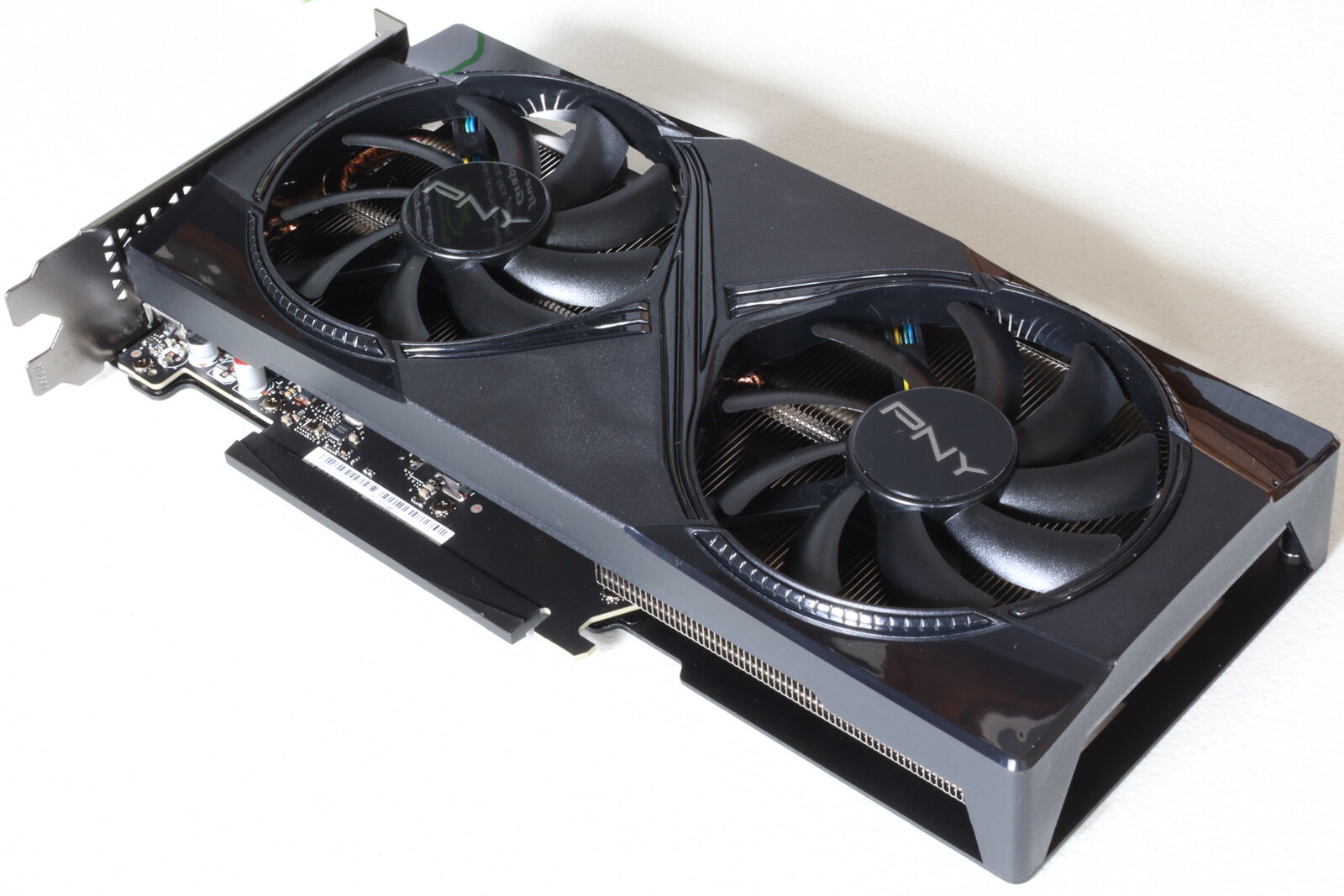
| - |  |
| + | 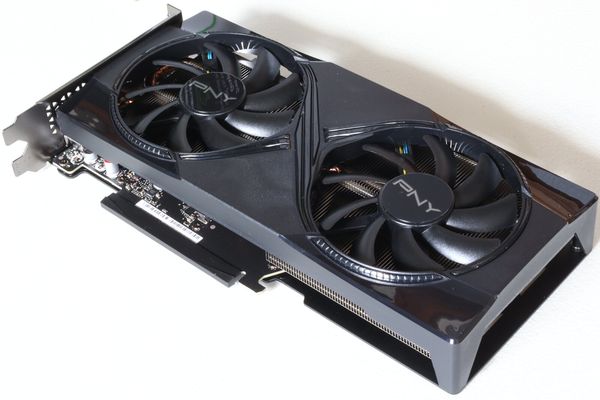 |
| *A PNY NVIDIA GeForce RTX 5060 Ti 16GB, front view. Image by FreeMediaKid!, [CC BY-SA 4.0](https://creativecommons.org/licenses/by-sa/4.0/), via [Wikimedia Commons](https://commons.wikimedia.org/wiki/File:Nvidia%20GeForce%20RTX%205060%20Ti%2016GB%2C%20PNY%20Overclocked%20Dual%20Fan%2C%20front.jpg).* | |
| @@ 102,7 102,7 @@ | |
| ### Motherboard | |
| - |  |
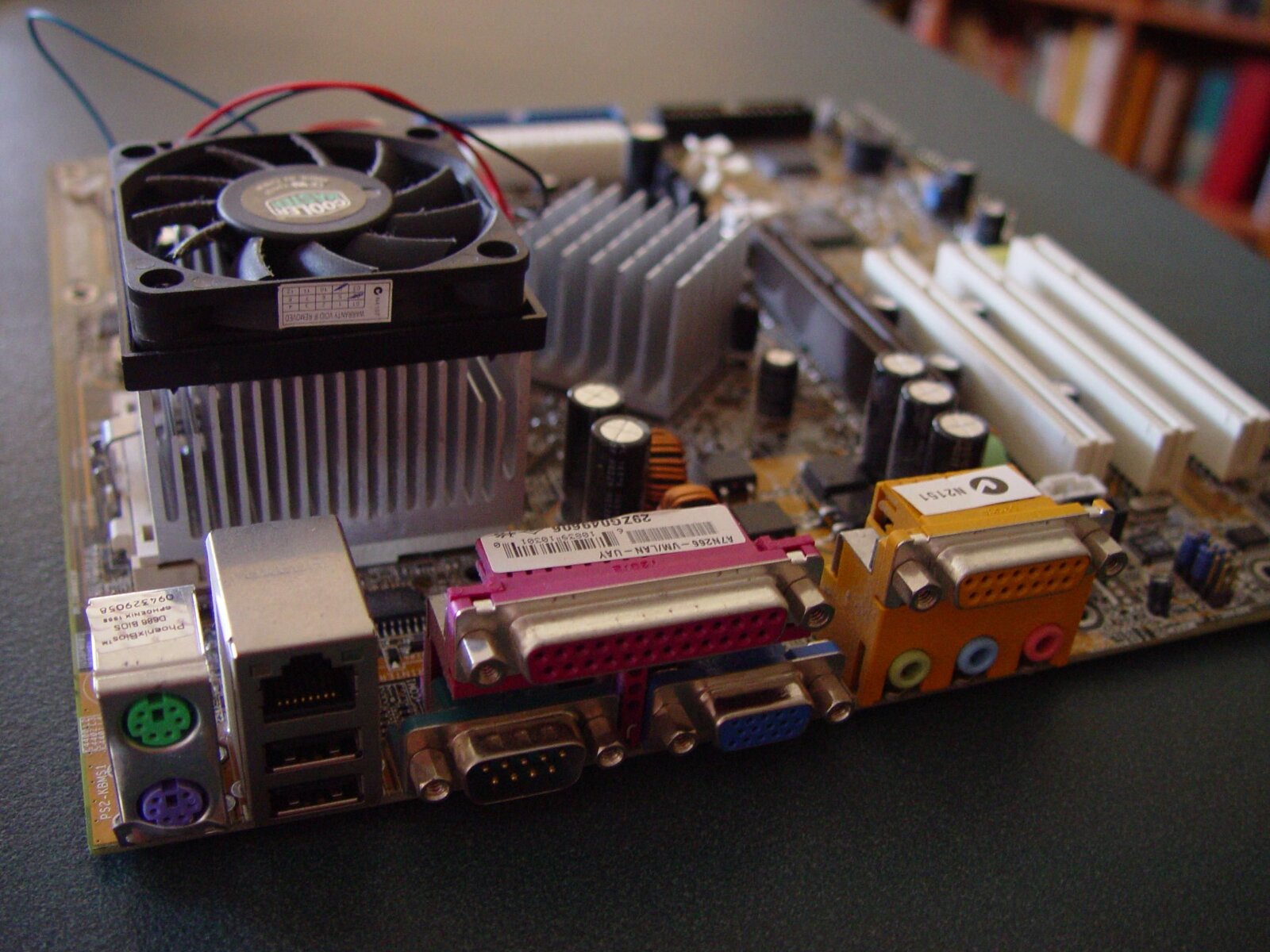
| + | 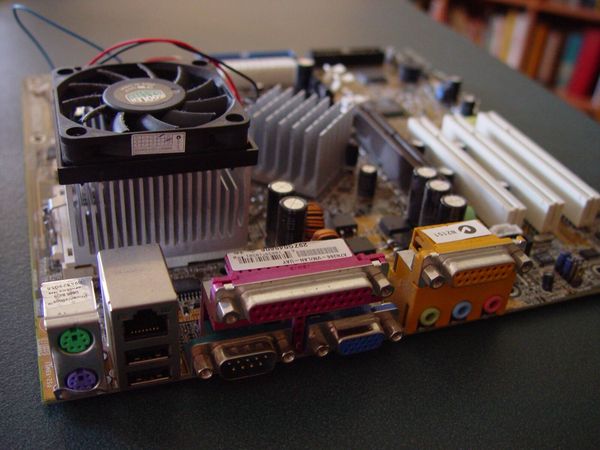 |
| *An ATX-format motherboard with CPU and fan installed. Image by Leon Brooks, public domain, via [Wikimedia Commons](https://commons.wikimedia.org/wiki/File:Atx%20computer%20motherboard%20with%20cpu%20and%20fan.jpg).* | |
| @@ 165,3 165,6 @@ | |
| --- | |
| *Last updated: April 2026. Questions? Ask your teacher.* | |
| + | |
| + | |
| + | ← Back to [[dt7/Year 7 Hub|Year 7 Hub]] |
| Workshop 1 Hardware and Networks/cpu-intel-i9.jpg .. dt7/Workshop 1 Hardware and Networks/cpu-intel-i9.jpg | |
| Workshop 1 Hardware and Networks/gpu-rtx-5060ti.jpg .. dt7/Workshop 1 Hardware and Networks/gpu-rtx-5060ti.jpg | |
| Workshop 1 Hardware and Networks/hdd-3.5-open.jpg .. dt7/Workshop 1 Hardware and Networks/hdd-3.5-open.jpg | |
| Workshop 1 Hardware and Networks/motherboard-atx.jpg .. dt7/Workshop 1 Hardware and Networks/motherboard-atx.jpg | |
| Workshop 1 Hardware and Networks/ram-ddr4.jpg .. dt7/Workshop 1 Hardware and Networks/ram-ddr4.jpg | |
| Workshop 1 Hardware and Networks/ssd-m2-nvme.jpg .. dt7/Workshop 1 Hardware and Networks/ssd-m2-nvme.jpg | |
| /dev/null .. dt7/Year 7 Hub.md | |
| @@ 0,0 1,42 @@ | |
| + | # 🔍 Year 7 Digital Technologies — Hub |
| + | |
| + | Hamilton College · 2026 · Term 2 |
| + | |
| + | This is your home for everything Year 7 Digi Tech online. Bookmark this page. |
| + | |
| + | --- |
| + | |
| + | ## This term |
| + | |
| + | - **[[dt7/2026 Digital Technologies - Year 7 - Term 2|Term 2 overview]]** — what we're doing across all 4 workshops, week by week. |
| + | |
| + | ## Workshop 1 — Hardware & Networks |
| + | |
| + | The booklet companion has video explainers, interactive tools, hardware photos, deeper Q&A, and the binary practice answers. |
| + | |
| + | - **[[dt7/Workshop 1 Hardware and Networks|Workshop 1 booklet companion]]** ← start here |
| + | |
| + | ### Inspiration video companions |
| + | |
| + | Each video referenced in the printed booklet has its own page with "what to watch for" prompts and Have-a-Go questions: |
| + | |
| + | - **[[dt7/Tom Scott - Fetch Execute Cycle]]** *(way2.cc/ca7)* — Hear the CPU clack on a wardrobe-sized relay computer. |
| + | - **[[dt7/Crash Course - Binary]]** *(way2.cc/ca8)* — Carrie Anne Philbin: from "two states" to ASCII, RGB, and kilobyte trivia. |
| + | - **[[dt7/Vox - Undersea Cables]]** *(way2.cc/ca9)* — 99% of the world's internet runs through cables thinner than a garden hose. |
| + | - **[[dt7/Raspberry Pi Foundation - What Is A Raspberry Pi]]** *(way2.cc/caa)* — The official 4-minute Pi tour. |
| + | |
| + | ### Deeper-dive pages |
| + | |
| + | Optional. Open if you want to know more. |
| + | |
| + | - **[[dt7/GPU vs CPU]]** — Why AI runs on GPUs, with a paintball-gun demo. |
| + | - **[[dt7/FreeCAD Extension]]** — For students who've outgrown TinkerCAD (links into Workshop 2). |
| + | - **[[dt7/Robot Marathon]]** — Fun robotics videos, ties to Workshop 2. |
| + | |
| + | ## Workshops 2, 3, 4 |
| + | |
| + | Pages will appear here as we get to each workshop. For now, see the [[dt7/2026 Digital Technologies - Year 7 - Term 2|term overview]] for what's coming. |
| + | |
| + | --- |
| + | |
| + | *Wiki maintained by Jeremy Chen and Cloudy. Suggestions welcome — ask your teacher.* |
| SAT/C01-1-Checkpoint-Proposal.md .. sd/C01-1-Checkpoint-Proposal.md | |
| SAT/C01-2-Checkpoint-Proposal.md .. sd/C01-2-Checkpoint-Proposal.md | |
| SAT/C01-3-Checkpoint-Proposal.md .. sd/C01-3-Checkpoint-Proposal.md | |
| SAT/C01-Overflow.md .. sd/C01-Overflow.md | |
| SAT/C01-Readiness-Report.md .. sd/C01-Readiness-Report.md | |
| SAT/C01/Effective Functional Requirements in Gantt Chart and Design Brief/image-1776048409024.png .. sd/C01/Effective Functional Requirements in Gantt Chart and Design Brief/image-1776048409024.png | |
| SAT/Resources/C01-Resources.md .. sd/Resources/C01-Resources.md | |
| SAT/Resources/C02-Resources.md .. sd/Resources/C02-Resources.md | |
| SAT/Resources/C03-Resources.md .. sd/Resources/C03-Resources.md | |
| SAT/Resources/C04-Resources.md .. sd/Resources/C04-Resources.md | |
| SAT/Resources/C05-Resources.md .. sd/Resources/C05-Resources.md | |
| SAT/Resources/C06-Resources.md .. sd/Resources/C06-Resources.md | |
| SAT/Resources/C07-Resources.md .. sd/Resources/C07-Resources.md | |
| SAT/Resources/C08-Resources.md .. sd/Resources/C08-Resources.md | |
| SAT/Resources/C09-Resources.md .. sd/Resources/C09-Resources.md | |
| SAT/Resources/C10-Resources.md .. sd/Resources/C10-Resources.md | |
| /dev/null .. sd/VCE Software Development Hub.md | |
| @@ 0,0 1,31 @@ | |
| + | # 💻 VCE Software Development — Hub |
| + | |
| + | Hamilton College · Year 12 · 2026 |
| + | |
| + | Your central page for VCE Software Development resources, SAT checkpoints, and coursework references. |
| + | |
| + | --- |
| + | |
| + | ## SAT (School-Assessed Task) — Checkpoints |
| + | |
| + | The 4-checkpoint SAT structure for 2026: |
| + | |
| + | - **C01 — Proposal** |
| + | - [[sd/C01-1-Checkpoint-Proposal|C01-1 Proposal]] |
| + | - [[sd/C01-2-Checkpoint-Proposal|C01-2 Proposal]] |
| + | - [[sd/C01-3-Checkpoint-Proposal|C01-3 Proposal]] |
| + | - [[sd/C01-Overflow|C01 Overflow]] |
| + | - [[sd/C01-Readiness-Report|C01 Readiness Report]] |
| + | |
| + | ## Resources |
| + | |
| + | Per-checkpoint reading and reference material: |
| + | |
| + | - [[sd/Resources/C01-Resources|C01 Resources]] |
| + | - [[sd/Resources/C02-Resources|C02 Resources]] |
| + | - [[sd/Resources/C03-Resources|C03 Resources]] |
| + | - [[sd/Resources/C04-Resources|C04 Resources]] |
| + | |
| + | --- |
| + | |
| + | *Wiki maintained by Jeremy Chen and Cloudy. Suggestions welcome — ask Mr Chen.* |