Blame

ececb6 cloudy-jc 2026-04-11 11:46:07
Rework Workshop 1 wiki as online companion (not booklet duplicate) Videos, interactive tools, hardware photo gallery, deeper explanations, binary practice answers, and parent info section. Complements the printed booklet instead of repeating it. Co-Authored-By: Claude Opus 4.6 (1M context) <noreply@anthropic.com>
1
# Workshop 1: Hardware & Networks — Online Companion
a54143 cloudy-jc 2026-04-11 11:33:04
Add Workshop 1: Hardware & Networks wiki page Key concepts (CPU, RAM, Storage, Motherboard, GPU, Binary, Networks), embedded YouTube videos, core + extension tasks, key words, and resources. Co-Authored-By: Claude Opus 4.6 (1M context) <noreply@anthropic.com>
2
ececb6 cloudy-jc 2026-04-11 11:46:07
Rework Workshop 1 wiki as online companion (not booklet duplicate) Videos, interactive tools, hardware photo gallery, deeper explanations, binary practice answers, and parent info section. Complements the printed booklet instead of repeating it. Co-Authored-By: Claude Opus 4.6 (1M context) <noreply@anthropic.com>
3
This page has the extra stuff that didn't fit in your printed booklet. Videos, interactive links, photo galleries, and deeper explanations for when you want to know more.
a54143 cloudy-jc 2026-04-11 11:33:04
Add Workshop 1: Hardware & Networks wiki page Key concepts (CPU, RAM, Storage, Motherboard, GPU, Binary, Networks), embedded YouTube videos, core + extension tasks, key words, and resources. Co-Authored-By: Claude Opus 4.6 (1M context) <noreply@anthropic.com>
4
ececb6 cloudy-jc 2026-04-11 11:46:07
Rework Workshop 1 wiki as online companion (not booklet duplicate) Videos, interactive tools, hardware photo gallery, deeper explanations, binary practice answers, and parent info section. Complements the printed booklet instead of repeating it. Co-Authored-By: Claude Opus 4.6 (1M context) <noreply@anthropic.com>
5
**Got your booklet?** Good. This page goes with it.
a54143 cloudy-jc 2026-04-11 11:33:04
Add Workshop 1: Hardware & Networks wiki page Key concepts (CPU, RAM, Storage, Motherboard, GPU, Binary, Networks), embedded YouTube videos, core + extension tasks, key words, and resources. Co-Authored-By: Claude Opus 4.6 (1M context) <noreply@anthropic.com>
6
ececb6 cloudy-jc 2026-04-11 11:46:07
Rework Workshop 1 wiki as online companion (not booklet duplicate) Videos, interactive tools, hardware photo gallery, deeper explanations, binary practice answers, and parent info section. Complements the printed booklet instead of repeating it. Co-Authored-By: Claude Opus 4.6 (1M context) <noreply@anthropic.com>
7
---
a54143 cloudy-jc 2026-04-11 11:33:04
Add Workshop 1: Hardware & Networks wiki page Key concepts (CPU, RAM, Storage, Motherboard, GPU, Binary, Networks), embedded YouTube videos, core + extension tasks, key words, and resources. Co-Authored-By: Claude Opus 4.6 (1M context) <noreply@anthropic.com>
8
ececb6 cloudy-jc 2026-04-11 11:46:07
Rework Workshop 1 wiki as online companion (not booklet duplicate) Videos, interactive tools, hardware photo gallery, deeper explanations, binary practice answers, and parent info section. Complements the printed booklet instead of repeating it. Co-Authored-By: Claude Opus 4.6 (1M context) <noreply@anthropic.com>
9
## Watch: Video Explainers
a54143 cloudy-jc 2026-04-11 11:33:04
Add Workshop 1: Hardware & Networks wiki page Key concepts (CPU, RAM, Storage, Motherboard, GPU, Binary, Networks), embedded YouTube videos, core + extension tasks, key words, and resources. Co-Authored-By: Claude Opus 4.6 (1M context) <noreply@anthropic.com>
10
ececb6 cloudy-jc 2026-04-11 11:46:07
Rework Workshop 1 wiki as online companion (not booklet duplicate) Videos, interactive tools, hardware photo gallery, deeper explanations, binary practice answers, and parent info section. Complements the printed booklet instead of repeating it. Co-Authored-By: Claude Opus 4.6 (1M context) <noreply@anthropic.com>
11
These short videos cover the same topics as your booklet — watch before class or review after.
a54143 cloudy-jc 2026-04-11 11:33:04
Add Workshop 1: Hardware & Networks wiki page Key concepts (CPU, RAM, Storage, Motherboard, GPU, Binary, Networks), embedded YouTube videos, core + extension tasks, key words, and resources. Co-Authored-By: Claude Opus 4.6 (1M context) <noreply@anthropic.com>
12
99ceb0 cloudy-jc 2026-04-11 12:08:05
Embed YouTube videos with iframe players
13
### Inside a Computer — Why AI Stole Your GPU (1:35)
14
15
CPU, RAM, Storage, Motherboard, and why AI needs ALL the GPUs.
16
23dd1e cloudy-jc 2026-04-11 12:14:37
Use Otter Wiki Video plugin syntax for embedded YouTube players
17
{{Video
18
|width=100%
19
|controls=true
20
|autoplay=false
21
https://www.youtube.com/watch?v=tNkFNDFyTf4
22
}}
99ceb0 cloudy-jc 2026-04-11 12:08:05
Embed YouTube videos with iframe players
23
24
### How Networks Power AI (1:22)
25
26
How your message travels through switches, routers, and undersea cables to reach ChatGPT.
27
23dd1e cloudy-jc 2026-04-11 12:14:37
Use Otter Wiki Video plugin syntax for embedded YouTube players
28
{{Video
29
|width=100%
30
|controls=true
31
|autoplay=false
32
https://www.youtube.com/watch?v=CM-mj626lkc
33
}}
a54143 cloudy-jc 2026-04-11 11:33:04
Add Workshop 1: Hardware & Networks wiki page Key concepts (CPU, RAM, Storage, Motherboard, GPU, Binary, Networks), embedded YouTube videos, core + extension tasks, key words, and resources. Co-Authored-By: Claude Opus 4.6 (1M context) <noreply@anthropic.com>
34
ececb6 cloudy-jc 2026-04-11 11:46:07
Rework Workshop 1 wiki as online companion (not booklet duplicate) Videos, interactive tools, hardware photo gallery, deeper explanations, binary practice answers, and parent info section. Complements the printed booklet instead of repeating it. Co-Authored-By: Claude Opus 4.6 (1M context) <noreply@anthropic.com>
35
---
a54143 cloudy-jc 2026-04-11 11:33:04
Add Workshop 1: Hardware & Networks wiki page Key concepts (CPU, RAM, Storage, Motherboard, GPU, Binary, Networks), embedded YouTube videos, core + extension tasks, key words, and resources. Co-Authored-By: Claude Opus 4.6 (1M context) <noreply@anthropic.com>
36
718e50 cloudy-jc 2026-04-18 23:57:24
W1 wiki: cross-link the 4 new inspiration-video companion pages
37
## Inspiration videos (from your booklet)
38
39
Each video referenced in the printed booklet has its own companion page with the embed, "what to watch for" prompts, and Have-a-Go questions. Open these when you want to go deeper on a topic.
40
f09b43 cloudy-jc 2026-04-19 16:09:46
Wiki: convert all wikilinks to Markdown links — fix subdir routing OtterWiki interpreted [[dt7/Page|Display]] by using the Display text as the link target (404 because no page exists at that name). Converted all 54 wikilinks in dt7/, sd/, and Home.md to Markdown [Display](/path) syntax, which OtterWiki resolves correctly. Affected: every Y7 leaf page footer's Hub backlink, every cross-link between Y7 pages, both hub pages' page lists, and the Home.md lobby. No content changes — only link syntax + URL encoding. Co-Authored-By: Claude Opus 4.7 (1M context) <noreply@anthropic.com>
41
- **[Tom Scott - Fetch Execute Cycle](/dt7/Tom%20Scott%20-%20Fetch%20Execute%20Cycle)** *(booklet shortlink: way2.cc/ca7)* — A relay computer the size of a wardrobe, running the same fetch-decode-execute loop as your laptop CPU. Hear it clack.
42
- **[Crash Course - Binary](/dt7/Crash%20Course%20-%20Binary)** *(way2.cc/ca8)* — Carrie Anne Philbin walks you from "binary is just two states" to ASCII, RGB, and why a kilobyte is 1024 bytes.
43
- **[Vox - Undersea Cables](/dt7/Vox%20-%20Undersea%20Cables)** *(way2.cc/ca9)* — 99% of the world's internet runs through cables thinner than a garden hose, sitting on the ocean floor.
44
- **[Raspberry Pi Foundation - What Is A Raspberry Pi](/dt7/Raspberry%20Pi%20Foundation%20-%20What%20Is%20A%20Raspberry%20Pi)** *(way2.cc/caa)* — The official 4-minute tour: Pi family, the $35 charity backstory, real-world projects from weather stations to the ISS.
718e50 cloudy-jc 2026-04-18 23:57:24
W1 wiki: cross-link the 4 new inspiration-video companion pages
45
46
---
47
ececb6 cloudy-jc 2026-04-11 11:46:07
Rework Workshop 1 wiki as online companion (not booklet duplicate) Videos, interactive tools, hardware photo gallery, deeper explanations, binary practice answers, and parent info section. Complements the printed booklet instead of repeating it. Co-Authored-By: Claude Opus 4.6 (1M context) <noreply@anthropic.com>
48
## Try: Interactive Tools
a54143 cloudy-jc 2026-04-11 11:33:04
Add Workshop 1: Hardware & Networks wiki page Key concepts (CPU, RAM, Storage, Motherboard, GPU, Binary, Networks), embedded YouTube videos, core + extension tasks, key words, and resources. Co-Authored-By: Claude Opus 4.6 (1M context) <noreply@anthropic.com>
49
ececb6 cloudy-jc 2026-04-11 11:46:07
Rework Workshop 1 wiki as online companion (not booklet duplicate) Videos, interactive tools, hardware photo gallery, deeper explanations, binary practice answers, and parent info section. Complements the printed booklet instead of repeating it. Co-Authored-By: Claude Opus 4.6 (1M context) <noreply@anthropic.com>
50
### Binary Converter
51
Type a number and see it in binary — or type binary and see the decimal:
52
- [RapidTables Binary Converter](https://www.rapidtables.com/convert/number/decimal-to-binary.html) — quick conversion both ways
53
- [CS Unplugged Binary Cards](https://www.csfieldguide.org.nz/en/interactives/binary-cards/) — the dot card activity from class, but online
a54143 cloudy-jc 2026-04-11 11:33:04
Add Workshop 1: Hardware & Networks wiki page Key concepts (CPU, RAM, Storage, Motherboard, GPU, Binary, Networks), embedded YouTube videos, core + extension tasks, key words, and resources. Co-Authored-By: Claude Opus 4.6 (1M context) <noreply@anthropic.com>
54
ececb6 cloudy-jc 2026-04-11 11:46:07
Rework Workshop 1 wiki as online companion (not booklet duplicate) Videos, interactive tools, hardware photo gallery, deeper explanations, binary practice answers, and parent info section. Complements the printed booklet instead of repeating it. Co-Authored-By: Claude Opus 4.6 (1M context) <noreply@anthropic.com>
55
### Network Simulator
56
- [Firia Labs Network Simulator](https://netsim.erinn.io/) — build a virtual network with switches and routers
57
- [Subnet Game](https://www.subnetting.net/) — test your networking knowledge (extension challenge)
a54143 cloudy-jc 2026-04-11 11:33:04
Add Workshop 1: Hardware & Networks wiki page Key concepts (CPU, RAM, Storage, Motherboard, GPU, Binary, Networks), embedded YouTube videos, core + extension tasks, key words, and resources. Co-Authored-By: Claude Opus 4.6 (1M context) <noreply@anthropic.com>
58
ececb6 cloudy-jc 2026-04-11 11:46:07
Rework Workshop 1 wiki as online companion (not booklet duplicate) Videos, interactive tools, hardware photo gallery, deeper explanations, binary practice answers, and parent info section. Complements the printed booklet instead of repeating it. Co-Authored-By: Claude Opus 4.6 (1M context) <noreply@anthropic.com>
59
---
a54143 cloudy-jc 2026-04-11 11:33:04
Add Workshop 1: Hardware & Networks wiki page Key concepts (CPU, RAM, Storage, Motherboard, GPU, Binary, Networks), embedded YouTube videos, core + extension tasks, key words, and resources. Co-Authored-By: Claude Opus 4.6 (1M context) <noreply@anthropic.com>
60
ececb6 cloudy-jc 2026-04-11 11:46:07
Rework Workshop 1 wiki as online companion (not booklet duplicate) Videos, interactive tools, hardware photo gallery, deeper explanations, binary practice answers, and parent info section. Complements the printed booklet instead of repeating it. Co-Authored-By: Claude Opus 4.6 (1M context) <noreply@anthropic.com>
61
## Look Closer: Hardware Photo Gallery
a54143 cloudy-jc 2026-04-11 11:33:04
Add Workshop 1: Hardware & Networks wiki page Key concepts (CPU, RAM, Storage, Motherboard, GPU, Binary, Networks), embedded YouTube videos, core + extension tasks, key words, and resources. Co-Authored-By: Claude Opus 4.6 (1M context) <noreply@anthropic.com>
62
ececb6 cloudy-jc 2026-04-11 11:46:07
Rework Workshop 1 wiki as online companion (not booklet duplicate) Videos, interactive tools, hardware photo gallery, deeper explanations, binary practice answers, and parent info section. Complements the printed booklet instead of repeating it. Co-Authored-By: Claude Opus 4.6 (1M context) <noreply@anthropic.com>
63
Your booklet has diagrams. Here are the real things.
a54143 cloudy-jc 2026-04-11 11:33:04
Add Workshop 1: Hardware & Networks wiki page Key concepts (CPU, RAM, Storage, Motherboard, GPU, Binary, Networks), embedded YouTube videos, core + extension tasks, key words, and resources. Co-Authored-By: Claude Opus 4.6 (1M context) <noreply@anthropic.com>
64
ececb6 cloudy-jc 2026-04-11 11:46:07
Rework Workshop 1 wiki as online companion (not booklet duplicate) Videos, interactive tools, hardware photo gallery, deeper explanations, binary practice answers, and parent info section. Complements the printed booklet instead of repeating it. Co-Authored-By: Claude Opus 4.6 (1M context) <noreply@anthropic.com>
65
### CPU
4d500d cloudy-jc 2026-04-19 01:00:40
W1 wiki: populate "Look Closer" hardware gallery with 6 CC photos The gallery section had labels (CPU, RAM, SSD, HDD, GPU, motherboard) with descriptions but no actual images. Added 6 Wikimedia-sourced photos with attribution, resized to ≤1600px + ≤400KB each: - cpu-intel-i9.jpg — Intel Core i9-14900KF (Pstrahl, CC BY-SA 4.0) - ram-ddr4.jpg — Samsung 16 GiB DDR4 stick (PantheraLeo1359531, CC BY 4.0) - ssd-m2-nvme.jpg — Samsung 970 EVO Plus NVMe M.2 (Hardkernel, CC BY-SA 4.0) - hdd-3.5-open.jpg — Opened Samsung 8.4 GB HDD (Gunnar Wolf, CC BY-SA 4.0) - gpu-rtx-5060ti.jpg — PNY NVIDIA RTX 5060 Ti (FreeMediaKid!, CC BY-SA 4.0) - motherboard-atx.jpg — ATX motherboard with CPU+fan (Leon Brooks, public domain) Attribution lines below each image per the FreeCAD Extension page pattern. Images sourced via agent-space/tools/image-search.py.
66
ce5b8c cloudy-jc 2026-04-19 16:06:03
Wiki: reorganise into dt7/ and sd/ subdirs (per-course namespaces) Moves all current pages into per-course subdirectories so each cohort gets a clean namespace with its own URL prefix and natural sidebar grouping: dt7/ Year 7 Digital Technologies (9 pages + 2 attachment folders) sd/ VCE Software Development (was SAT/, with C01 + Resources) New top-level structure: Home.md ← lobby (2 doors) dt7/Year 7 Hub.md ← Y7 cohort landing sd/VCE Software Development Hub.md ← VCE cohort landing dt7/* and dt7/<page>/ ← Y7 pages + attachments sd/* and sd/C01/ ← VCE pages + attachments Link rewrites: - All [[Page]] cross-links qualified to [[dt7/Page]] for the moved Y7 pages - All image refs /<page>/img.png updated to /dt7/<page>/img.png - Every Y7 leaf page now ends with "← Back to [[dt7/Year 7 Hub]]" Home.md rewritten as a minimal lobby with 2 entries; the per-cohort hubs do all the curation work. Why dt7/ + sd/: Jeremy expects more courses (Y8, Y9, etc). Subdir layout scales; OtterWiki sidebar will auto-group by directory tree. Cost: 5 way2.cc shortlinks (ca2-ca6) need their target URLs updated to /dt7/<page> paths. Following commit handles that via the way2.cc admin API. ca7-caa point at YouTube directly and don't need touching. Co-Authored-By: Claude Opus 4.7 (1M context) <noreply@anthropic.com>
67
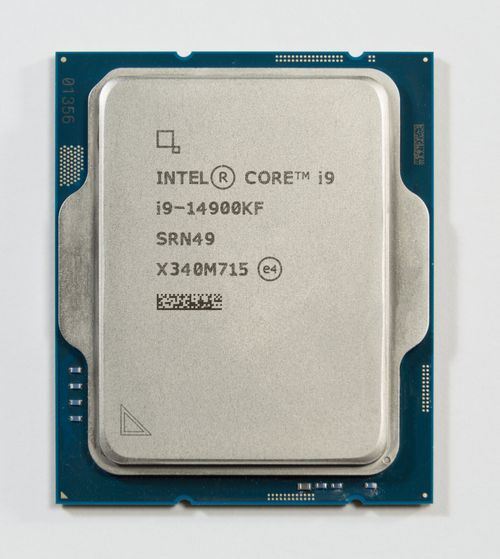
![An Intel Core i9-14900KF processor photographed from above](/dt7/Workshop%201%20Hardware%20and%20Networks/cpu-intel-i9.jpg?width=500)
4d500d cloudy-jc 2026-04-19 01:00:40
W1 wiki: populate "Look Closer" hardware gallery with 6 CC photos The gallery section had labels (CPU, RAM, SSD, HDD, GPU, motherboard) with descriptions but no actual images. Added 6 Wikimedia-sourced photos with attribution, resized to ≤1600px + ≤400KB each: - cpu-intel-i9.jpg — Intel Core i9-14900KF (Pstrahl, CC BY-SA 4.0) - ram-ddr4.jpg — Samsung 16 GiB DDR4 stick (PantheraLeo1359531, CC BY 4.0) - ssd-m2-nvme.jpg — Samsung 970 EVO Plus NVMe M.2 (Hardkernel, CC BY-SA 4.0) - hdd-3.5-open.jpg — Opened Samsung 8.4 GB HDD (Gunnar Wolf, CC BY-SA 4.0) - gpu-rtx-5060ti.jpg — PNY NVIDIA RTX 5060 Ti (FreeMediaKid!, CC BY-SA 4.0) - motherboard-atx.jpg — ATX motherboard with CPU+fan (Leon Brooks, public domain) Attribution lines below each image per the FreeCAD Extension page pattern. Images sourced via agent-space/tools/image-search.py.
68
69
*An Intel Core i9-14900KF. Image by Pstrahl, [CC BY-SA 4.0](https://creativecommons.org/licenses/by-sa/4.0/), via [Wikimedia Commons](https://commons.wikimedia.org/wiki/File:Intel%20i9-14900KF%20CPU.jpg).*
70
ececb6 cloudy-jc 2026-04-11 11:46:07
Rework Workshop 1 wiki as online companion (not booklet duplicate) Videos, interactive tools, hardware photo gallery, deeper explanations, binary practice answers, and parent info section. Complements the printed booklet instead of repeating it. Co-Authored-By: Claude Opus 4.6 (1M context) <noreply@anthropic.com>
71
A modern Intel Core i9 processor. The silver square is the heat spreader — underneath are billions of transistors smaller than a virus.
a54143 cloudy-jc 2026-04-11 11:33:04
Add Workshop 1: Hardware & Networks wiki page Key concepts (CPU, RAM, Storage, Motherboard, GPU, Binary, Networks), embedded YouTube videos, core + extension tasks, key words, and resources. Co-Authored-By: Claude Opus 4.6 (1M context) <noreply@anthropic.com>
72
ececb6 cloudy-jc 2026-04-11 11:46:07
Rework Workshop 1 wiki as online companion (not booklet duplicate) Videos, interactive tools, hardware photo gallery, deeper explanations, binary practice answers, and parent info section. Complements the printed booklet instead of repeating it. Co-Authored-By: Claude Opus 4.6 (1M context) <noreply@anthropic.com>
73
### RAM
4d500d cloudy-jc 2026-04-19 01:00:40
W1 wiki: populate "Look Closer" hardware gallery with 6 CC photos The gallery section had labels (CPU, RAM, SSD, HDD, GPU, motherboard) with descriptions but no actual images. Added 6 Wikimedia-sourced photos with attribution, resized to ≤1600px + ≤400KB each: - cpu-intel-i9.jpg — Intel Core i9-14900KF (Pstrahl, CC BY-SA 4.0) - ram-ddr4.jpg — Samsung 16 GiB DDR4 stick (PantheraLeo1359531, CC BY 4.0) - ssd-m2-nvme.jpg — Samsung 970 EVO Plus NVMe M.2 (Hardkernel, CC BY-SA 4.0) - hdd-3.5-open.jpg — Opened Samsung 8.4 GB HDD (Gunnar Wolf, CC BY-SA 4.0) - gpu-rtx-5060ti.jpg — PNY NVIDIA RTX 5060 Ti (FreeMediaKid!, CC BY-SA 4.0) - motherboard-atx.jpg — ATX motherboard with CPU+fan (Leon Brooks, public domain) Attribution lines below each image per the FreeCAD Extension page pattern. Images sourced via agent-space/tools/image-search.py.
74
ce5b8c cloudy-jc 2026-04-19 16:06:03
Wiki: reorganise into dt7/ and sd/ subdirs (per-course namespaces) Moves all current pages into per-course subdirectories so each cohort gets a clean namespace with its own URL prefix and natural sidebar grouping: dt7/ Year 7 Digital Technologies (9 pages + 2 attachment folders) sd/ VCE Software Development (was SAT/, with C01 + Resources) New top-level structure: Home.md ← lobby (2 doors) dt7/Year 7 Hub.md ← Y7 cohort landing sd/VCE Software Development Hub.md ← VCE cohort landing dt7/* and dt7/<page>/ ← Y7 pages + attachments sd/* and sd/C01/ ← VCE pages + attachments Link rewrites: - All [[Page]] cross-links qualified to [[dt7/Page]] for the moved Y7 pages - All image refs /<page>/img.png updated to /dt7/<page>/img.png - Every Y7 leaf page now ends with "← Back to [[dt7/Year 7 Hub]]" Home.md rewritten as a minimal lobby with 2 entries; the per-cohort hubs do all the curation work. Why dt7/ + sd/: Jeremy expects more courses (Y8, Y9, etc). Subdir layout scales; OtterWiki sidebar will auto-group by directory tree. Cost: 5 way2.cc shortlinks (ca2-ca6) need their target URLs updated to /dt7/<page> paths. Following commit handles that via the way2.cc admin API. ca7-caa point at YouTube directly and don't need touching. Co-Authored-By: Claude Opus 4.7 (1M context) <noreply@anthropic.com>
75
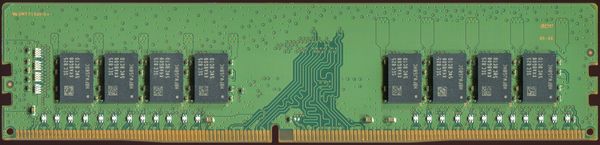
![A 16 GiB DDR4 SDRAM module from Samsung](/dt7/Workshop%201%20Hardware%20and%20Networks/ram-ddr4.jpg?width=600)
4d500d cloudy-jc 2026-04-19 01:00:40
W1 wiki: populate "Look Closer" hardware gallery with 6 CC photos The gallery section had labels (CPU, RAM, SSD, HDD, GPU, motherboard) with descriptions but no actual images. Added 6 Wikimedia-sourced photos with attribution, resized to ≤1600px + ≤400KB each: - cpu-intel-i9.jpg — Intel Core i9-14900KF (Pstrahl, CC BY-SA 4.0) - ram-ddr4.jpg — Samsung 16 GiB DDR4 stick (PantheraLeo1359531, CC BY 4.0) - ssd-m2-nvme.jpg — Samsung 970 EVO Plus NVMe M.2 (Hardkernel, CC BY-SA 4.0) - hdd-3.5-open.jpg — Opened Samsung 8.4 GB HDD (Gunnar Wolf, CC BY-SA 4.0) - gpu-rtx-5060ti.jpg — PNY NVIDIA RTX 5060 Ti (FreeMediaKid!, CC BY-SA 4.0) - motherboard-atx.jpg — ATX motherboard with CPU+fan (Leon Brooks, public domain) Attribution lines below each image per the FreeCAD Extension page pattern. Images sourced via agent-space/tools/image-search.py.
76
77
*A 16 GiB DDR4 SDRAM stick (Samsung M378A2K43CB1-CTD). Image by PantheraLeo1359531, [CC BY 4.0](https://creativecommons.org/licenses/by/4.0/), via [Wikimedia Commons](https://commons.wikimedia.org/wiki/File:16%20GiB-DDR4-RAM-Riegel%20RAM019FIX%20Small%20Crop%2090%20PCNT.png).*
78
ececb6 cloudy-jc 2026-04-11 11:46:07
Rework Workshop 1 wiki as online companion (not booklet duplicate) Videos, interactive tools, hardware photo gallery, deeper explanations, binary practice answers, and parent info section. Complements the printed booklet instead of repeating it. Co-Authored-By: Claude Opus 4.6 (1M context) <noreply@anthropic.com>
79
DDR memory sticks. These plug into the slots on the motherboard. The gold pins are the electrical contacts. More sticks = more "desk space" for your apps.
a54143 cloudy-jc 2026-04-11 11:33:04
Add Workshop 1: Hardware & Networks wiki page Key concepts (CPU, RAM, Storage, Motherboard, GPU, Binary, Networks), embedded YouTube videos, core + extension tasks, key words, and resources. Co-Authored-By: Claude Opus 4.6 (1M context) <noreply@anthropic.com>
80
ececb6 cloudy-jc 2026-04-11 11:46:07
Rework Workshop 1 wiki as online companion (not booklet duplicate) Videos, interactive tools, hardware photo gallery, deeper explanations, binary practice answers, and parent info section. Complements the printed booklet instead of repeating it. Co-Authored-By: Claude Opus 4.6 (1M context) <noreply@anthropic.com>
81
### Storage: SSD vs HDD
4d500d cloudy-jc 2026-04-19 01:00:40
W1 wiki: populate "Look Closer" hardware gallery with 6 CC photos The gallery section had labels (CPU, RAM, SSD, HDD, GPU, motherboard) with descriptions but no actual images. Added 6 Wikimedia-sourced photos with attribution, resized to ≤1600px + ≤400KB each: - cpu-intel-i9.jpg — Intel Core i9-14900KF (Pstrahl, CC BY-SA 4.0) - ram-ddr4.jpg — Samsung 16 GiB DDR4 stick (PantheraLeo1359531, CC BY 4.0) - ssd-m2-nvme.jpg — Samsung 970 EVO Plus NVMe M.2 (Hardkernel, CC BY-SA 4.0) - hdd-3.5-open.jpg — Opened Samsung 8.4 GB HDD (Gunnar Wolf, CC BY-SA 4.0) - gpu-rtx-5060ti.jpg — PNY NVIDIA RTX 5060 Ti (FreeMediaKid!, CC BY-SA 4.0) - motherboard-atx.jpg — ATX motherboard with CPU+fan (Leon Brooks, public domain) Attribution lines below each image per the FreeCAD Extension page pattern. Images sourced via agent-space/tools/image-search.py.
82
ce5b8c cloudy-jc 2026-04-19 16:06:03
Wiki: reorganise into dt7/ and sd/ subdirs (per-course namespaces) Moves all current pages into per-course subdirectories so each cohort gets a clean namespace with its own URL prefix and natural sidebar grouping: dt7/ Year 7 Digital Technologies (9 pages + 2 attachment folders) sd/ VCE Software Development (was SAT/, with C01 + Resources) New top-level structure: Home.md ← lobby (2 doors) dt7/Year 7 Hub.md ← Y7 cohort landing sd/VCE Software Development Hub.md ← VCE cohort landing dt7/* and dt7/<page>/ ← Y7 pages + attachments sd/* and sd/C01/ ← VCE pages + attachments Link rewrites: - All [[Page]] cross-links qualified to [[dt7/Page]] for the moved Y7 pages - All image refs /<page>/img.png updated to /dt7/<page>/img.png - Every Y7 leaf page now ends with "← Back to [[dt7/Year 7 Hub]]" Home.md rewritten as a minimal lobby with 2 entries; the per-cohort hubs do all the curation work. Why dt7/ + sd/: Jeremy expects more courses (Y8, Y9, etc). Subdir layout scales; OtterWiki sidebar will auto-group by directory tree. Cost: 5 way2.cc shortlinks (ca2-ca6) need their target URLs updated to /dt7/<page> paths. Following commit handles that via the way2.cc admin API. ca7-caa point at YouTube directly and don't need touching. Co-Authored-By: Claude Opus 4.7 (1M context) <noreply@anthropic.com>
83
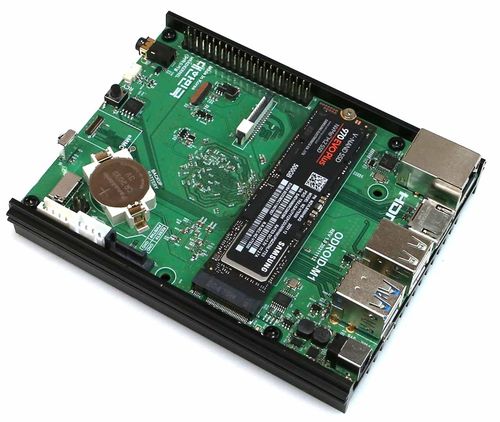
![A Samsung 970 EVO Plus NVMe M.2 SSD on an Odroid M1 board for scale](/dt7/Workshop%201%20Hardware%20and%20Networks/ssd-m2-nvme.jpg?width=500)
4d500d cloudy-jc 2026-04-19 01:00:40
W1 wiki: populate "Look Closer" hardware gallery with 6 CC photos The gallery section had labels (CPU, RAM, SSD, HDD, GPU, motherboard) with descriptions but no actual images. Added 6 Wikimedia-sourced photos with attribution, resized to ≤1600px + ≤400KB each: - cpu-intel-i9.jpg — Intel Core i9-14900KF (Pstrahl, CC BY-SA 4.0) - ram-ddr4.jpg — Samsung 16 GiB DDR4 stick (PantheraLeo1359531, CC BY 4.0) - ssd-m2-nvme.jpg — Samsung 970 EVO Plus NVMe M.2 (Hardkernel, CC BY-SA 4.0) - hdd-3.5-open.jpg — Opened Samsung 8.4 GB HDD (Gunnar Wolf, CC BY-SA 4.0) - gpu-rtx-5060ti.jpg — PNY NVIDIA RTX 5060 Ti (FreeMediaKid!, CC BY-SA 4.0) - motherboard-atx.jpg — ATX motherboard with CPU+fan (Leon Brooks, public domain) Attribution lines below each image per the FreeCAD Extension page pattern. Images sourced via agent-space/tools/image-search.py.
84
85
*A Samsung 970 EVO Plus NVMe M.2 SSD — the green stick, about the size of a pack of gum. Image by Hardkernel, [CC BY-SA 4.0](https://creativecommons.org/licenses/by-sa/4.0/), via [Wikimedia Commons](https://commons.wikimedia.org/wiki/File:Odroid%20M1%20with%20Samsung%20970%20EVO%20Plus%20NVME%20drive.jpg).*
86
ececb6 cloudy-jc 2026-04-11 11:46:07
Rework Workshop 1 wiki as online companion (not booklet duplicate) Videos, interactive tools, hardware photo gallery, deeper explanations, binary practice answers, and parent info section. Complements the printed booklet instead of repeating it. Co-Authored-By: Claude Opus 4.6 (1M context) <noreply@anthropic.com>
87
**SSD (Solid State Drive)** — No moving parts. Data stored on memory chips. Fast, silent, expensive.
a54143 cloudy-jc 2026-04-11 11:33:04
Add Workshop 1: Hardware & Networks wiki page Key concepts (CPU, RAM, Storage, Motherboard, GPU, Binary, Networks), embedded YouTube videos, core + extension tasks, key words, and resources. Co-Authored-By: Claude Opus 4.6 (1M context) <noreply@anthropic.com>
88
ce5b8c cloudy-jc 2026-04-19 16:06:03
Wiki: reorganise into dt7/ and sd/ subdirs (per-course namespaces) Moves all current pages into per-course subdirectories so each cohort gets a clean namespace with its own URL prefix and natural sidebar grouping: dt7/ Year 7 Digital Technologies (9 pages + 2 attachment folders) sd/ VCE Software Development (was SAT/, with C01 + Resources) New top-level structure: Home.md ← lobby (2 doors) dt7/Year 7 Hub.md ← Y7 cohort landing sd/VCE Software Development Hub.md ← VCE cohort landing dt7/* and dt7/<page>/ ← Y7 pages + attachments sd/* and sd/C01/ ← VCE pages + attachments Link rewrites: - All [[Page]] cross-links qualified to [[dt7/Page]] for the moved Y7 pages - All image refs /<page>/img.png updated to /dt7/<page>/img.png - Every Y7 leaf page now ends with "← Back to [[dt7/Year 7 Hub]]" Home.md rewritten as a minimal lobby with 2 entries; the per-cohort hubs do all the curation work. Why dt7/ + sd/: Jeremy expects more courses (Y8, Y9, etc). Subdir layout scales; OtterWiki sidebar will auto-group by directory tree. Cost: 5 way2.cc shortlinks (ca2-ca6) need their target URLs updated to /dt7/<page> paths. Following commit handles that via the way2.cc admin API. ca7-caa point at YouTube directly and don't need touching. Co-Authored-By: Claude Opus 4.7 (1M context) <noreply@anthropic.com>
89
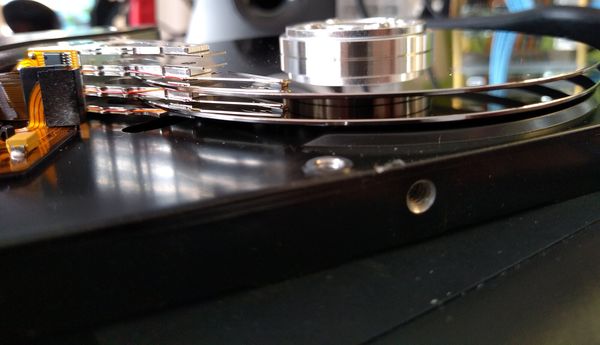
![Side view of an opened 3.5-inch hard disk drive showing two platters and four heads](/dt7/Workshop%201%20Hardware%20and%20Networks/hdd-3.5-open.jpg?width=600)
4d500d cloudy-jc 2026-04-19 01:00:40
W1 wiki: populate "Look Closer" hardware gallery with 6 CC photos The gallery section had labels (CPU, RAM, SSD, HDD, GPU, motherboard) with descriptions but no actual images. Added 6 Wikimedia-sourced photos with attribution, resized to ≤1600px + ≤400KB each: - cpu-intel-i9.jpg — Intel Core i9-14900KF (Pstrahl, CC BY-SA 4.0) - ram-ddr4.jpg — Samsung 16 GiB DDR4 stick (PantheraLeo1359531, CC BY 4.0) - ssd-m2-nvme.jpg — Samsung 970 EVO Plus NVMe M.2 (Hardkernel, CC BY-SA 4.0) - hdd-3.5-open.jpg — Opened Samsung 8.4 GB HDD (Gunnar Wolf, CC BY-SA 4.0) - gpu-rtx-5060ti.jpg — PNY NVIDIA RTX 5060 Ti (FreeMediaKid!, CC BY-SA 4.0) - motherboard-atx.jpg — ATX motherboard with CPU+fan (Leon Brooks, public domain) Attribution lines below each image per the FreeCAD Extension page pattern. Images sourced via agent-space/tools/image-search.py.
90
91
*An opened Samsung 8.4 GB HDD — two platters and four read/write heads. Image by Gunnar Wolf, [CC BY-SA 4.0](https://creativecommons.org/licenses/by-sa/4.0/), via [Wikimedia Commons](https://commons.wikimedia.org/wiki/File:3.5%20inch%20hard%20disk%20drive%2C%20side%20view.jpg).*
92
ececb6 cloudy-jc 2026-04-11 11:46:07
Rework Workshop 1 wiki as online companion (not booklet duplicate) Videos, interactive tools, hardware photo gallery, deeper explanations, binary practice answers, and parent info section. Complements the printed booklet instead of repeating it. Co-Authored-By: Claude Opus 4.6 (1M context) <noreply@anthropic.com>
93
**HDD (Hard Disk Drive)** — A spinning metal platter with a read/write arm floating above it. Slower, cheaper, still used for bulk storage.
a54143 cloudy-jc 2026-04-11 11:33:04
Add Workshop 1: Hardware & Networks wiki page Key concepts (CPU, RAM, Storage, Motherboard, GPU, Binary, Networks), embedded YouTube videos, core + extension tasks, key words, and resources. Co-Authored-By: Claude Opus 4.6 (1M context) <noreply@anthropic.com>
94
ececb6 cloudy-jc 2026-04-11 11:46:07
Rework Workshop 1 wiki as online companion (not booklet duplicate) Videos, interactive tools, hardware photo gallery, deeper explanations, binary practice answers, and parent info section. Complements the printed booklet instead of repeating it. Co-Authored-By: Claude Opus 4.6 (1M context) <noreply@anthropic.com>
95
### GPU
4d500d cloudy-jc 2026-04-19 01:00:40
W1 wiki: populate "Look Closer" hardware gallery with 6 CC photos The gallery section had labels (CPU, RAM, SSD, HDD, GPU, motherboard) with descriptions but no actual images. Added 6 Wikimedia-sourced photos with attribution, resized to ≤1600px + ≤400KB each: - cpu-intel-i9.jpg — Intel Core i9-14900KF (Pstrahl, CC BY-SA 4.0) - ram-ddr4.jpg — Samsung 16 GiB DDR4 stick (PantheraLeo1359531, CC BY 4.0) - ssd-m2-nvme.jpg — Samsung 970 EVO Plus NVMe M.2 (Hardkernel, CC BY-SA 4.0) - hdd-3.5-open.jpg — Opened Samsung 8.4 GB HDD (Gunnar Wolf, CC BY-SA 4.0) - gpu-rtx-5060ti.jpg — PNY NVIDIA RTX 5060 Ti (FreeMediaKid!, CC BY-SA 4.0) - motherboard-atx.jpg — ATX motherboard with CPU+fan (Leon Brooks, public domain) Attribution lines below each image per the FreeCAD Extension page pattern. Images sourced via agent-space/tools/image-search.py.
96
ce5b8c cloudy-jc 2026-04-19 16:06:03
Wiki: reorganise into dt7/ and sd/ subdirs (per-course namespaces) Moves all current pages into per-course subdirectories so each cohort gets a clean namespace with its own URL prefix and natural sidebar grouping: dt7/ Year 7 Digital Technologies (9 pages + 2 attachment folders) sd/ VCE Software Development (was SAT/, with C01 + Resources) New top-level structure: Home.md ← lobby (2 doors) dt7/Year 7 Hub.md ← Y7 cohort landing sd/VCE Software Development Hub.md ← VCE cohort landing dt7/* and dt7/<page>/ ← Y7 pages + attachments sd/* and sd/C01/ ← VCE pages + attachments Link rewrites: - All [[Page]] cross-links qualified to [[dt7/Page]] for the moved Y7 pages - All image refs /<page>/img.png updated to /dt7/<page>/img.png - Every Y7 leaf page now ends with "← Back to [[dt7/Year 7 Hub]]" Home.md rewritten as a minimal lobby with 2 entries; the per-cohort hubs do all the curation work. Why dt7/ + sd/: Jeremy expects more courses (Y8, Y9, etc). Subdir layout scales; OtterWiki sidebar will auto-group by directory tree. Cost: 5 way2.cc shortlinks (ca2-ca6) need their target URLs updated to /dt7/<page> paths. Following commit handles that via the way2.cc admin API. ca7-caa point at YouTube directly and don't need touching. Co-Authored-By: Claude Opus 4.7 (1M context) <noreply@anthropic.com>
97
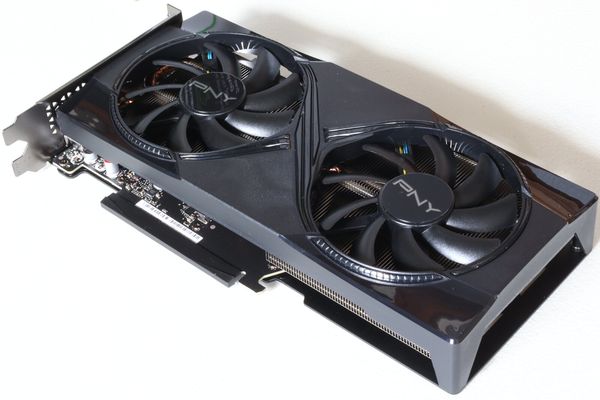
![A PNY NVIDIA GeForce RTX 5060 Ti 16GB Overclocked Dual Fan graphics card, front view](/dt7/Workshop%201%20Hardware%20and%20Networks/gpu-rtx-5060ti.jpg?width=600)
4d500d cloudy-jc 2026-04-19 01:00:40
W1 wiki: populate "Look Closer" hardware gallery with 6 CC photos The gallery section had labels (CPU, RAM, SSD, HDD, GPU, motherboard) with descriptions but no actual images. Added 6 Wikimedia-sourced photos with attribution, resized to ≤1600px + ≤400KB each: - cpu-intel-i9.jpg — Intel Core i9-14900KF (Pstrahl, CC BY-SA 4.0) - ram-ddr4.jpg — Samsung 16 GiB DDR4 stick (PantheraLeo1359531, CC BY 4.0) - ssd-m2-nvme.jpg — Samsung 970 EVO Plus NVMe M.2 (Hardkernel, CC BY-SA 4.0) - hdd-3.5-open.jpg — Opened Samsung 8.4 GB HDD (Gunnar Wolf, CC BY-SA 4.0) - gpu-rtx-5060ti.jpg — PNY NVIDIA RTX 5060 Ti (FreeMediaKid!, CC BY-SA 4.0) - motherboard-atx.jpg — ATX motherboard with CPU+fan (Leon Brooks, public domain) Attribution lines below each image per the FreeCAD Extension page pattern. Images sourced via agent-space/tools/image-search.py.
98
99
*A PNY NVIDIA GeForce RTX 5060 Ti 16GB, front view. Image by FreeMediaKid!, [CC BY-SA 4.0](https://creativecommons.org/licenses/by-sa/4.0/), via [Wikimedia Commons](https://commons.wikimedia.org/wiki/File:Nvidia%20GeForce%20RTX%205060%20Ti%2016GB%2C%20PNY%20Overclocked%20Dual%20Fan%2C%20front.jpg).*
100
ececb6 cloudy-jc 2026-04-11 11:46:07
Rework Workshop 1 wiki as online companion (not booklet duplicate) Videos, interactive tools, hardware photo gallery, deeper explanations, binary practice answers, and parent info section. Complements the printed booklet instead of repeating it. Co-Authored-By: Claude Opus 4.6 (1M context) <noreply@anthropic.com>
101
The NVIDIA RTX 5060 Ti — a modern gaming graphics card. Those two black circles are fans that cool the chip during heavy work. AI companies buy millions of these (or the more powerful server versions).
a54143 cloudy-jc 2026-04-11 11:33:04
Add Workshop 1: Hardware & Networks wiki page Key concepts (CPU, RAM, Storage, Motherboard, GPU, Binary, Networks), embedded YouTube videos, core + extension tasks, key words, and resources. Co-Authored-By: Claude Opus 4.6 (1M context) <noreply@anthropic.com>
102
ececb6 cloudy-jc 2026-04-11 11:46:07
Rework Workshop 1 wiki as online companion (not booklet duplicate) Videos, interactive tools, hardware photo gallery, deeper explanations, binary practice answers, and parent info section. Complements the printed booklet instead of repeating it. Co-Authored-By: Claude Opus 4.6 (1M context) <noreply@anthropic.com>
103
### Motherboard
4d500d cloudy-jc 2026-04-19 01:00:40
W1 wiki: populate "Look Closer" hardware gallery with 6 CC photos The gallery section had labels (CPU, RAM, SSD, HDD, GPU, motherboard) with descriptions but no actual images. Added 6 Wikimedia-sourced photos with attribution, resized to ≤1600px + ≤400KB each: - cpu-intel-i9.jpg — Intel Core i9-14900KF (Pstrahl, CC BY-SA 4.0) - ram-ddr4.jpg — Samsung 16 GiB DDR4 stick (PantheraLeo1359531, CC BY 4.0) - ssd-m2-nvme.jpg — Samsung 970 EVO Plus NVMe M.2 (Hardkernel, CC BY-SA 4.0) - hdd-3.5-open.jpg — Opened Samsung 8.4 GB HDD (Gunnar Wolf, CC BY-SA 4.0) - gpu-rtx-5060ti.jpg — PNY NVIDIA RTX 5060 Ti (FreeMediaKid!, CC BY-SA 4.0) - motherboard-atx.jpg — ATX motherboard with CPU+fan (Leon Brooks, public domain) Attribution lines below each image per the FreeCAD Extension page pattern. Images sourced via agent-space/tools/image-search.py.
104
ce5b8c cloudy-jc 2026-04-19 16:06:03
Wiki: reorganise into dt7/ and sd/ subdirs (per-course namespaces) Moves all current pages into per-course subdirectories so each cohort gets a clean namespace with its own URL prefix and natural sidebar grouping: dt7/ Year 7 Digital Technologies (9 pages + 2 attachment folders) sd/ VCE Software Development (was SAT/, with C01 + Resources) New top-level structure: Home.md ← lobby (2 doors) dt7/Year 7 Hub.md ← Y7 cohort landing sd/VCE Software Development Hub.md ← VCE cohort landing dt7/* and dt7/<page>/ ← Y7 pages + attachments sd/* and sd/C01/ ← VCE pages + attachments Link rewrites: - All [[Page]] cross-links qualified to [[dt7/Page]] for the moved Y7 pages - All image refs /<page>/img.png updated to /dt7/<page>/img.png - Every Y7 leaf page now ends with "← Back to [[dt7/Year 7 Hub]]" Home.md rewritten as a minimal lobby with 2 entries; the per-cohort hubs do all the curation work. Why dt7/ + sd/: Jeremy expects more courses (Y8, Y9, etc). Subdir layout scales; OtterWiki sidebar will auto-group by directory tree. Cost: 5 way2.cc shortlinks (ca2-ca6) need their target URLs updated to /dt7/<page> paths. Following commit handles that via the way2.cc admin API. ca7-caa point at YouTube directly and don't need touching. Co-Authored-By: Claude Opus 4.7 (1M context) <noreply@anthropic.com>
105
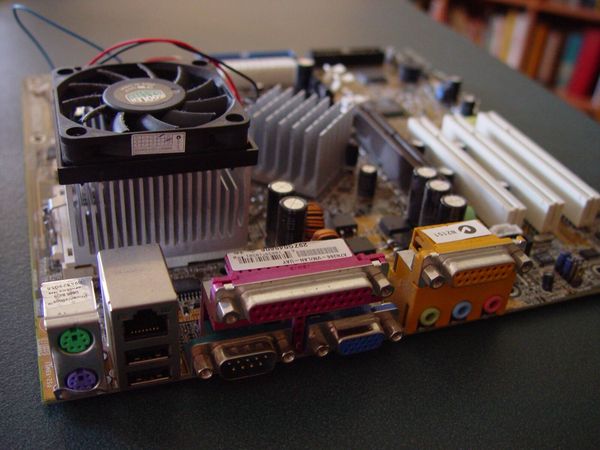
![An ATX-format computer motherboard with CPU and cooling fan installed](/dt7/Workshop%201%20Hardware%20and%20Networks/motherboard-atx.jpg?width=600)
4d500d cloudy-jc 2026-04-19 01:00:40
W1 wiki: populate "Look Closer" hardware gallery with 6 CC photos The gallery section had labels (CPU, RAM, SSD, HDD, GPU, motherboard) with descriptions but no actual images. Added 6 Wikimedia-sourced photos with attribution, resized to ≤1600px + ≤400KB each: - cpu-intel-i9.jpg — Intel Core i9-14900KF (Pstrahl, CC BY-SA 4.0) - ram-ddr4.jpg — Samsung 16 GiB DDR4 stick (PantheraLeo1359531, CC BY 4.0) - ssd-m2-nvme.jpg — Samsung 970 EVO Plus NVMe M.2 (Hardkernel, CC BY-SA 4.0) - hdd-3.5-open.jpg — Opened Samsung 8.4 GB HDD (Gunnar Wolf, CC BY-SA 4.0) - gpu-rtx-5060ti.jpg — PNY NVIDIA RTX 5060 Ti (FreeMediaKid!, CC BY-SA 4.0) - motherboard-atx.jpg — ATX motherboard with CPU+fan (Leon Brooks, public domain) Attribution lines below each image per the FreeCAD Extension page pattern. Images sourced via agent-space/tools/image-search.py.
106
107
*An ATX-format motherboard with CPU and fan installed. Image by Leon Brooks, public domain, via [Wikimedia Commons](https://commons.wikimedia.org/wiki/File:Atx%20computer%20motherboard%20with%20cpu%20and%20fan.jpg).*
108
ececb6 cloudy-jc 2026-04-11 11:46:07
Rework Workshop 1 wiki as online companion (not booklet duplicate) Videos, interactive tools, hardware photo gallery, deeper explanations, binary practice answers, and parent info section. Complements the printed booklet instead of repeating it. Co-Authored-By: Claude Opus 4.6 (1M context) <noreply@anthropic.com>
109
Everything plugs into this board. You can see the CPU socket, RAM slots, PCIe slots (for the GPU), and hundreds of tiny traces carrying data between components.
a54143 cloudy-jc 2026-04-11 11:33:04
Add Workshop 1: Hardware & Networks wiki page Key concepts (CPU, RAM, Storage, Motherboard, GPU, Binary, Networks), embedded YouTube videos, core + extension tasks, key words, and resources. Co-Authored-By: Claude Opus 4.6 (1M context) <noreply@anthropic.com>
110
ececb6 cloudy-jc 2026-04-11 11:46:07
Rework Workshop 1 wiki as online companion (not booklet duplicate) Videos, interactive tools, hardware photo gallery, deeper explanations, binary practice answers, and parent info section. Complements the printed booklet instead of repeating it. Co-Authored-By: Claude Opus 4.6 (1M context) <noreply@anthropic.com>
111
---
a54143 cloudy-jc 2026-04-11 11:33:04
Add Workshop 1: Hardware & Networks wiki page Key concepts (CPU, RAM, Storage, Motherboard, GPU, Binary, Networks), embedded YouTube videos, core + extension tasks, key words, and resources. Co-Authored-By: Claude Opus 4.6 (1M context) <noreply@anthropic.com>
112
ececb6 cloudy-jc 2026-04-11 11:46:07
Rework Workshop 1 wiki as online companion (not booklet duplicate) Videos, interactive tools, hardware photo gallery, deeper explanations, binary practice answers, and parent info section. Complements the printed booklet instead of repeating it. Co-Authored-By: Claude Opus 4.6 (1M context) <noreply@anthropic.com>
113
## Go Deeper: Things the Booklet Didn't Cover
a54143 cloudy-jc 2026-04-11 11:33:04
Add Workshop 1: Hardware & Networks wiki page Key concepts (CPU, RAM, Storage, Motherboard, GPU, Binary, Networks), embedded YouTube videos, core + extension tasks, key words, and resources. Co-Authored-By: Claude Opus 4.6 (1M context) <noreply@anthropic.com>
114
ececb6 cloudy-jc 2026-04-11 11:46:07
Rework Workshop 1 wiki as online companion (not booklet duplicate) Videos, interactive tools, hardware photo gallery, deeper explanations, binary practice answers, and parent info section. Complements the printed booklet instead of repeating it. Co-Authored-By: Claude Opus 4.6 (1M context) <noreply@anthropic.com>
115
### How big is a transistor?
116
Modern CPUs use 3-nanometre transistors. A human hair is about 80,000 nanometres wide. You could fit roughly 26,000 transistors across a single hair. The Apple M4 chip has 28 billion of them.
a54143 cloudy-jc 2026-04-11 11:33:04
Add Workshop 1: Hardware & Networks wiki page Key concepts (CPU, RAM, Storage, Motherboard, GPU, Binary, Networks), embedded YouTube videos, core + extension tasks, key words, and resources. Co-Authored-By: Claude Opus 4.6 (1M context) <noreply@anthropic.com>
117
ececb6 cloudy-jc 2026-04-11 11:46:07
Rework Workshop 1 wiki as online companion (not booklet duplicate) Videos, interactive tools, hardware photo gallery, deeper explanations, binary practice answers, and parent info section. Complements the printed booklet instead of repeating it. Co-Authored-By: Claude Opus 4.6 (1M context) <noreply@anthropic.com>
118
### Why do computers use binary?
119
Because transistors are switches — they're either ON (1) or OFF (0). It's easier to build reliable hardware with two states than ten. Everything else (text, images, video, AI) is built on top of these two states.
a54143 cloudy-jc 2026-04-11 11:33:04
Add Workshop 1: Hardware & Networks wiki page Key concepts (CPU, RAM, Storage, Motherboard, GPU, Binary, Networks), embedded YouTube videos, core + extension tasks, key words, and resources. Co-Authored-By: Claude Opus 4.6 (1M context) <noreply@anthropic.com>
120
ececb6 cloudy-jc 2026-04-11 11:46:07
Rework Workshop 1 wiki as online companion (not booklet duplicate) Videos, interactive tools, hardware photo gallery, deeper explanations, binary practice answers, and parent info section. Complements the printed booklet instead of repeating it. Co-Authored-By: Claude Opus 4.6 (1M context) <noreply@anthropic.com>
121
### How fast does data travel in fibre-optic cables?
122
About 200,000 km/s — roughly two-thirds the speed of light. A message from Melbourne to London (17,000 km) takes about 85 milliseconds through undersea cables. That's faster than you can blink.
a54143 cloudy-jc 2026-04-11 11:33:04
Add Workshop 1: Hardware & Networks wiki page Key concepts (CPU, RAM, Storage, Motherboard, GPU, Binary, Networks), embedded YouTube videos, core + extension tasks, key words, and resources. Co-Authored-By: Claude Opus 4.6 (1M context) <noreply@anthropic.com>
123
ececb6 cloudy-jc 2026-04-11 11:46:07
Rework Workshop 1 wiki as online companion (not booklet duplicate) Videos, interactive tools, hardware photo gallery, deeper explanations, binary practice answers, and parent info section. Complements the printed booklet instead of repeating it. Co-Authored-By: Claude Opus 4.6 (1M context) <noreply@anthropic.com>
124
### What's inside a data centre?
125
Thousands of server racks, each holding dozens of computers. Google has over 30 data centres worldwide. A single data centre can use as much electricity as a small city. Most of that power goes to cooling — the chips generate enormous heat.
a54143 cloudy-jc 2026-04-11 11:33:04
Add Workshop 1: Hardware & Networks wiki page Key concepts (CPU, RAM, Storage, Motherboard, GPU, Binary, Networks), embedded YouTube videos, core + extension tasks, key words, and resources. Co-Authored-By: Claude Opus 4.6 (1M context) <noreply@anthropic.com>
126
ececb6 cloudy-jc 2026-04-11 11:46:07
Rework Workshop 1 wiki as online companion (not booklet duplicate) Videos, interactive tools, hardware photo gallery, deeper explanations, binary practice answers, and parent info section. Complements the printed booklet instead of repeating it. Co-Authored-By: Claude Opus 4.6 (1M context) <noreply@anthropic.com>
127
### Why can't gamers buy GPUs?
128
AI training needs thousands of GPUs running together for weeks or months. Companies like OpenAI, Google, and Meta are buying every GPU they can get. NVIDIA's revenue tripled because of AI demand. The same chip architecture (CUDA cores) that makes games look good also makes AI calculations fast.
a54143 cloudy-jc 2026-04-11 11:33:04
Add Workshop 1: Hardware & Networks wiki page Key concepts (CPU, RAM, Storage, Motherboard, GPU, Binary, Networks), embedded YouTube videos, core + extension tasks, key words, and resources. Co-Authored-By: Claude Opus 4.6 (1M context) <noreply@anthropic.com>
129
ececb6 cloudy-jc 2026-04-11 11:46:07
Rework Workshop 1 wiki as online companion (not booklet duplicate) Videos, interactive tools, hardware photo gallery, deeper explanations, binary practice answers, and parent info section. Complements the printed booklet instead of repeating it. Co-Authored-By: Claude Opus 4.6 (1M context) <noreply@anthropic.com>
130
---
a54143 cloudy-jc 2026-04-11 11:33:04
Add Workshop 1: Hardware & Networks wiki page Key concepts (CPU, RAM, Storage, Motherboard, GPU, Binary, Networks), embedded YouTube videos, core + extension tasks, key words, and resources. Co-Authored-By: Claude Opus 4.6 (1M context) <noreply@anthropic.com>
131
ececb6 cloudy-jc 2026-04-11 11:46:07
Rework Workshop 1 wiki as online companion (not booklet duplicate) Videos, interactive tools, hardware photo gallery, deeper explanations, binary practice answers, and parent info section. Complements the printed booklet instead of repeating it. Co-Authored-By: Claude Opus 4.6 (1M context) <noreply@anthropic.com>
132
## Answers: Binary Practice
a54143 cloudy-jc 2026-04-11 11:33:04
Add Workshop 1: Hardware & Networks wiki page Key concepts (CPU, RAM, Storage, Motherboard, GPU, Binary, Networks), embedded YouTube videos, core + extension tasks, key words, and resources. Co-Authored-By: Claude Opus 4.6 (1M context) <noreply@anthropic.com>
133
ececb6 cloudy-jc 2026-04-11 11:46:07
Rework Workshop 1 wiki as online companion (not booklet duplicate) Videos, interactive tools, hardware photo gallery, deeper explanations, binary practice answers, and parent info section. Complements the printed booklet instead of repeating it. Co-Authored-By: Claude Opus 4.6 (1M context) <noreply@anthropic.com>
134
From your booklet:
a54143 cloudy-jc 2026-04-11 11:33:04
Add Workshop 1: Hardware & Networks wiki page Key concepts (CPU, RAM, Storage, Motherboard, GPU, Binary, Networks), embedded YouTube videos, core + extension tasks, key words, and resources. Co-Authored-By: Claude Opus 4.6 (1M context) <noreply@anthropic.com>
135
ececb6 cloudy-jc 2026-04-11 11:46:07
Rework Workshop 1 wiki as online companion (not booklet duplicate) Videos, interactive tools, hardware photo gallery, deeper explanations, binary practice answers, and parent info section. Complements the printed booklet instead of repeating it. Co-Authored-By: Claude Opus 4.6 (1M context) <noreply@anthropic.com>
136
| Binary | Decimal |
137
|--------|---------|
138
| `00001101` | 13 |
139
| `01010101` | 85 |
140
| `11000011` | 195 |
141
| `10000001` | 129 |
a54143 cloudy-jc 2026-04-11 11:33:04
Add Workshop 1: Hardware & Networks wiki page Key concepts (CPU, RAM, Storage, Motherboard, GPU, Binary, Networks), embedded YouTube videos, core + extension tasks, key words, and resources. Co-Authored-By: Claude Opus 4.6 (1M context) <noreply@anthropic.com>
142
ececb6 cloudy-jc 2026-04-11 11:46:07
Rework Workshop 1 wiki as online companion (not booklet duplicate) Videos, interactive tools, hardware photo gallery, deeper explanations, binary practice answers, and parent info section. Complements the printed booklet instead of repeating it. Co-Authored-By: Claude Opus 4.6 (1M context) <noreply@anthropic.com>
143
| Decimal | Binary |
144
|---------|--------|
145
| 25 | `00011001` |
146
| 100 | `01100100` |
147
| 42 | `00101010` |
148
| 200 | `11001000` |
149
150
**Check your working:** For each 1 in the binary number, add up the place value. For decimal to binary, find the biggest power of 2 that fits, subtract, repeat.
151
152
---
153
154
## Links for Parents
155
156
Wondering what your child is learning? Here's a quick summary:
157
158
- Students are exploring **how computers work** — opening old laptops, identifying components, understanding what each part does
159
- They're learning **binary** — the number system computers use (just 0s and 1s)
160
- They're building **networks** — connecting devices with real cables and switches
161
- Everything connects to **AI** — helping students understand that AI runs on the same hardware they're studying
162
163
This aligns with the [Victorian Curriculum: Digital Technologies](https://victoriancurriculum.vcaa.vic.edu.au/technologies/digital-technologies/introduction/rationale-and-aims) for Years 7-8.
164
165
---
166
167
*Last updated: April 2026. Questions? Ask your teacher.*
ce5b8c cloudy-jc 2026-04-19 16:06:03
Wiki: reorganise into dt7/ and sd/ subdirs (per-course namespaces) Moves all current pages into per-course subdirectories so each cohort gets a clean namespace with its own URL prefix and natural sidebar grouping: dt7/ Year 7 Digital Technologies (9 pages + 2 attachment folders) sd/ VCE Software Development (was SAT/, with C01 + Resources) New top-level structure: Home.md ← lobby (2 doors) dt7/Year 7 Hub.md ← Y7 cohort landing sd/VCE Software Development Hub.md ← VCE cohort landing dt7/* and dt7/<page>/ ← Y7 pages + attachments sd/* and sd/C01/ ← VCE pages + attachments Link rewrites: - All [[Page]] cross-links qualified to [[dt7/Page]] for the moved Y7 pages - All image refs /<page>/img.png updated to /dt7/<page>/img.png - Every Y7 leaf page now ends with "← Back to [[dt7/Year 7 Hub]]" Home.md rewritten as a minimal lobby with 2 entries; the per-cohort hubs do all the curation work. Why dt7/ + sd/: Jeremy expects more courses (Y8, Y9, etc). Subdir layout scales; OtterWiki sidebar will auto-group by directory tree. Cost: 5 way2.cc shortlinks (ca2-ca6) need their target URLs updated to /dt7/<page> paths. Following commit handles that via the way2.cc admin API. ca7-caa point at YouTube directly and don't need touching. Co-Authored-By: Claude Opus 4.7 (1M context) <noreply@anthropic.com>
168
169
f09b43 cloudy-jc 2026-04-19 16:09:46
Wiki: convert all wikilinks to Markdown links — fix subdir routing OtterWiki interpreted [[dt7/Page|Display]] by using the Display text as the link target (404 because no page exists at that name). Converted all 54 wikilinks in dt7/, sd/, and Home.md to Markdown [Display](/path) syntax, which OtterWiki resolves correctly. Affected: every Y7 leaf page footer's Hub backlink, every cross-link between Y7 pages, both hub pages' page lists, and the Home.md lobby. No content changes — only link syntax + URL encoding. Co-Authored-By: Claude Opus 4.7 (1M context) <noreply@anthropic.com>
170
← Back to [Year 7 Hub](/dt7/Year%207%20Hub)