Blame

54d8b1 cloudy-jc 2026-04-12 10:02:25
Add FreeCAD extension page for Workshop 2
1
# FreeCAD Extension (Year 7 Robotics)
2
f09b43 cloudy-jc 2026-04-19 16:09:46
Wiki: convert all wikilinks to Markdown links — fix subdir routing OtterWiki interpreted [[dt7/Page|Display]] by using the Display text as the link target (404 because no page exists at that name). Converted all 54 wikilinks in dt7/, sd/, and Home.md to Markdown [Display](/path) syntax, which OtterWiki resolves correctly. Affected: every Y7 leaf page footer's Hub backlink, every cross-link between Y7 pages, both hub pages' page lists, and the Home.md lobby. No content changes — only link syntax + URL encoding. Co-Authored-By: Claude Opus 4.7 (1M context) <noreply@anthropic.com>
3
*An extension to [Workshop 1 Hardware and Networks](/dt7/Workshop%201%20Hardware%20and%20Networks)'s sibling, Workshop 2: Robotics & Smart Devices.*
54d8b1 cloudy-jc 2026-04-12 10:02:25
Add FreeCAD extension page for Workshop 2
4
5
So you've finished your Sphero hat in TinkerCAD and you want to know what the "grown-up" 3D tools look like. This page is for you. It's optional. Your Workshop 2 booklet does not need any of this.
6
7
---
8
9
## What FreeCAD adds on top of TinkerCAD
10
11
TinkerCAD is brilliant for getting a shape out of your head and onto the print bed fast. You drag blocks, you combine them, you export. Done.
12
13
FreeCAD is a different kind of tool. It's **parametric**, which means every part of your design remembers how it was made. If you decide the hole in your Sphero hat needs to be 74 mm across instead of 72 mm, you change one number and the whole model updates — holes, pockets, fillets and all. That's how real engineers design things they might have to tweak later. It is slower to learn, but it gives you precise control and a workflow that looks a lot like what people use in industry.
14
15
FreeCAD is free, open source, and runs on Windows, Mac, Linux and Raspberry Pi. There is no account to make and nothing to pay for.
16
ce5b8c cloudy-jc 2026-04-19 16:06:03
Wiki: reorganise into dt7/ and sd/ subdirs (per-course namespaces) Moves all current pages into per-course subdirectories so each cohort gets a clean namespace with its own URL prefix and natural sidebar grouping: dt7/ Year 7 Digital Technologies (9 pages + 2 attachment folders) sd/ VCE Software Development (was SAT/, with C01 + Resources) New top-level structure: Home.md ← lobby (2 doors) dt7/Year 7 Hub.md ← Y7 cohort landing sd/VCE Software Development Hub.md ← VCE cohort landing dt7/* and dt7/<page>/ ← Y7 pages + attachments sd/* and sd/C01/ ← VCE pages + attachments Link rewrites: - All [[Page]] cross-links qualified to [[dt7/Page]] for the moved Y7 pages - All image refs /<page>/img.png updated to /dt7/<page>/img.png - Every Y7 leaf page now ends with "← Back to [[dt7/Year 7 Hub]]" Home.md rewritten as a minimal lobby with 2 entries; the per-cohort hubs do all the curation work. Why dt7/ + sd/: Jeremy expects more courses (Y8, Y9, etc). Subdir layout scales; OtterWiki sidebar will auto-group by directory tree. Cost: 5 way2.cc shortlinks (ca2-ca6) need their target URLs updated to /dt7/<page> paths. Following commit handles that via the way2.cc admin API. ca7-caa point at YouTube directly and don't need touching. Co-Authored-By: Claude Opus 4.7 (1M context) <noreply@anthropic.com>
17
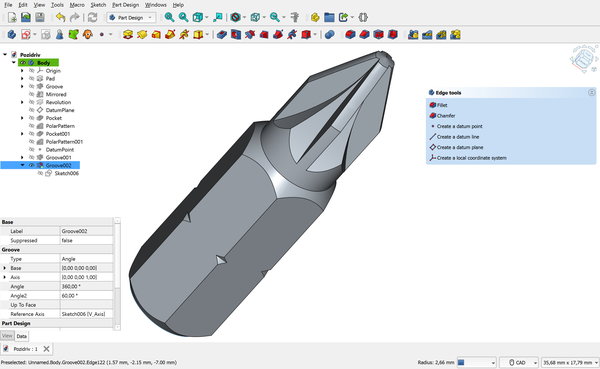
![FreeCAD 1.0 interface showing a 3D model in the Part Design workbench](/dt7/FreeCAD%20Extension/freecad-interface.png?width=600)
54d8b1 cloudy-jc 2026-04-12 10:02:25
Add FreeCAD extension page for Workshop 2
18
a2ee9e cloudy-jc 2026-04-14 11:39:47
Resize FreeCAD images to width=600 using OtterWiki thumbnails
19
*FreeCAD 1.0 in the Part Design workbench. The tree on the left shows every step used to build the model. Image by Maxwxyz, [CC BY 4.0](https://creativecommons.org/licenses/by/4.0/), via [Wikimedia Commons](https://commons.wikimedia.org/wiki/File:FreeCAD_1.0_Light_PartDesign_Pozidriv.png?width=600).*
54d8b1 cloudy-jc 2026-04-12 10:02:25
Add FreeCAD extension page for Workshop 2
20
21
---
22
23
## Where to start
24
25
These are the resources I'd point a Year 7 student at first. They are all free, and none of them try to teach you everything in five minutes.
26
27
- **[FreeCAD Getting Started (official docs)](https://wiki.freecad.org/Getting_started)** — The official wiki's beginner page. Calm, written, step-by-step, and it matches whatever version you install.
28
- **[Download FreeCAD](https://www.freecad.org/downloads.php)** — Grab version 1.0 or newer. The installers are straightforward; ask an adult if you're on a school laptop.
29
- **[MangoJelly Solutions — FreeCAD for Beginners (YouTube)](https://www.youtube.com/@MangoJellySolutions)** — Joko's channel is the one most people recommend first. Slow voice, clear screen, no flashy edits. Start with his "FreeCAD 1.0 Beginners" playlist.
30
- **[FreeCAD Part Design Tutorial (official)](https://wiki.freecad.org/Basic_Part_Design_Tutorial)** — A written walkthrough of the Part Design workbench. This is the workbench you'll use for almost anything you'd print.
31
- **[FreeCAD Forum — Help](https://forum.freecad.org/)** — When you get stuck, search here first. The community is patient with beginners as long as you describe what you tried.
32
33
If you only pick one, start with the official Getting Started page and keep MangoJelly open in another tab for when the written version doesn't click.
34
35
---
36
37
## Worked example: a small Sphero hat in FreeCAD
38
837fc7 cloudy-jc 2026-04-12 16:12:07
Rework FreeCAD Extension page: add images and improve worked example layout Add CC-licensed screenshots from Wikimedia Commons (FreeCAD interface, sketch with constraints, padded 3D shape) as OtterWiki page attachments. Break the worked example from a dense numbered list into headed steps with images illustrating the sketch and pad stages. Keeps buddy tone for Year 7 audience. Co-Authored-By: Claude Opus 4.6 (1M context) <noreply@anthropic.com>
39
Here's a quick look at the steps. Don't try to follow exact clicks from this page — use it as a map, then follow the docs linked at each step.
54d8b1 cloudy-jc 2026-04-12 10:02:25
Add FreeCAD extension page for Workshop 2
40
837fc7 cloudy-jc 2026-04-12 16:12:07
Rework FreeCAD Extension page: add images and improve worked example layout Add CC-licensed screenshots from Wikimedia Commons (FreeCAD interface, sketch with constraints, padded 3D shape) as OtterWiki page attachments. Break the worked example from a dense numbered list into headed steps with images illustrating the sketch and pad stages. Keeps buddy tone for Year 7 audience. Co-Authored-By: Claude Opus 4.6 (1M context) <noreply@anthropic.com>
41
### Step 1 — Open Part Design
54d8b1 cloudy-jc 2026-04-12 10:02:25
Add FreeCAD extension page for Workshop 2
42
837fc7 cloudy-jc 2026-04-12 16:12:07
Rework FreeCAD Extension page: add images and improve worked example layout Add CC-licensed screenshots from Wikimedia Commons (FreeCAD interface, sketch with constraints, padded 3D shape) as OtterWiki page attachments. Break the worked example from a dense numbered list into headed steps with images illustrating the sketch and pad stages. Keeps buddy tone for Year 7 audience. Co-Authored-By: Claude Opus 4.6 (1M context) <noreply@anthropic.com>
43
File > New, then switch the workbench dropdown to **Part Design**. This is where you'll do almost all your 3D modelling. ([Part Design docs](https://wiki.freecad.org/Part_Design_Workbench))
44
45
### Step 2 — Sketch a circle
46
47
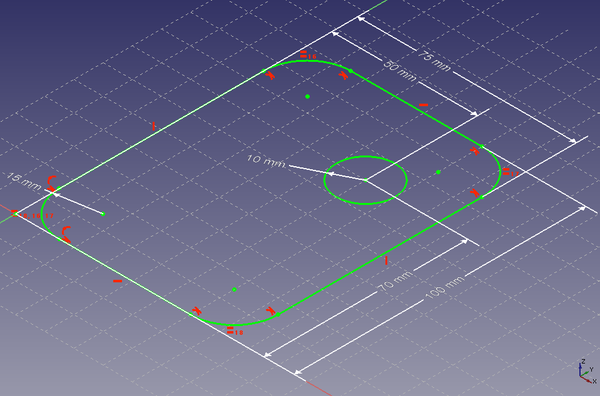
Create a new sketch on the XY plane. Draw a circle, then add a **diameter constraint** and type the number — say, 80 mm for a hat that sits over a 72 mm Sphero. Constraints are what make FreeCAD parametric: the circle isn't just "about that big", it's exactly 80 mm, and FreeCAD remembers that rule. ([Sketcher docs](https://wiki.freecad.org/Sketcher_Workbench))
48
ce5b8c cloudy-jc 2026-04-19 16:06:03
Wiki: reorganise into dt7/ and sd/ subdirs (per-course namespaces) Moves all current pages into per-course subdirectories so each cohort gets a clean namespace with its own URL prefix and natural sidebar grouping: dt7/ Year 7 Digital Technologies (9 pages + 2 attachment folders) sd/ VCE Software Development (was SAT/, with C01 + Resources) New top-level structure: Home.md ← lobby (2 doors) dt7/Year 7 Hub.md ← Y7 cohort landing sd/VCE Software Development Hub.md ← VCE cohort landing dt7/* and dt7/<page>/ ← Y7 pages + attachments sd/* and sd/C01/ ← VCE pages + attachments Link rewrites: - All [[Page]] cross-links qualified to [[dt7/Page]] for the moved Y7 pages - All image refs /<page>/img.png updated to /dt7/<page>/img.png - Every Y7 leaf page now ends with "← Back to [[dt7/Year 7 Hub]]" Home.md rewritten as a minimal lobby with 2 entries; the per-cohort hubs do all the curation work. Why dt7/ + sd/: Jeremy expects more courses (Y8, Y9, etc). Subdir layout scales; OtterWiki sidebar will auto-group by directory tree. Cost: 5 way2.cc shortlinks (ca2-ca6) need their target URLs updated to /dt7/<page> paths. Following commit handles that via the way2.cc admin API. ca7-caa point at YouTube directly and don't need touching. Co-Authored-By: Claude Opus 4.7 (1M context) <noreply@anthropic.com>
49
![A constrained sketch in FreeCAD with dimensions shown](/dt7/FreeCAD%20Extension/freecad-sketch.png?width=600)
837fc7 cloudy-jc 2026-04-12 16:12:07
Rework FreeCAD Extension page: add images and improve worked example layout Add CC-licensed screenshots from Wikimedia Commons (FreeCAD interface, sketch with constraints, padded 3D shape) as OtterWiki page attachments. Break the worked example from a dense numbered list into headed steps with images illustrating the sketch and pad stages. Keeps buddy tone for Year 7 audience. Co-Authored-By: Claude Opus 4.6 (1M context) <noreply@anthropic.com>
50
a2ee9e cloudy-jc 2026-04-14 11:39:47
Resize FreeCAD images to width=600 using OtterWiki thumbnails
51
*A sketch with constraints. The white dimension arrows lock the shape to exact measurements. CC0, via [Wikimedia Commons](https://commons.wikimedia.org/wiki/File:FreeCAD_PartDesign_Sketch.png?width=600).*
837fc7 cloudy-jc 2026-04-12 16:12:07
Rework FreeCAD Extension page: add images and improve worked example layout Add CC-licensed screenshots from Wikimedia Commons (FreeCAD interface, sketch with constraints, padded 3D shape) as OtterWiki page attachments. Break the worked example from a dense numbered list into headed steps with images illustrating the sketch and pad stages. Keeps buddy tone for Year 7 audience. Co-Authored-By: Claude Opus 4.6 (1M context) <noreply@anthropic.com>
52
53
### Step 3 — Pad it into a disc
54
55
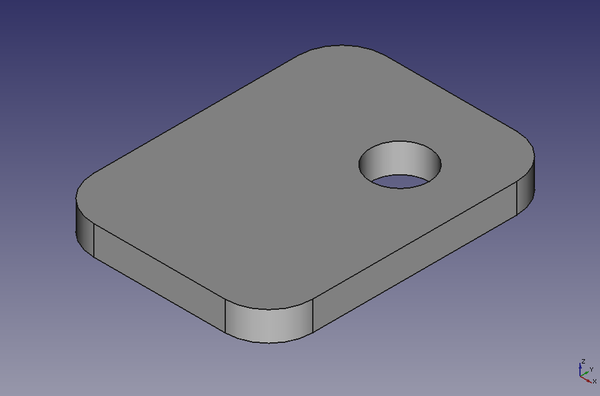
Close the sketch, then use **Pad** to push it upwards by 10 mm. You now have a solid puck — a flat cylinder. ([Pad docs](https://wiki.freecad.org/PartDesign_Pad))
56
ce5b8c cloudy-jc 2026-04-19 16:06:03
Wiki: reorganise into dt7/ and sd/ subdirs (per-course namespaces) Moves all current pages into per-course subdirectories so each cohort gets a clean namespace with its own URL prefix and natural sidebar grouping: dt7/ Year 7 Digital Technologies (9 pages + 2 attachment folders) sd/ VCE Software Development (was SAT/, with C01 + Resources) New top-level structure: Home.md ← lobby (2 doors) dt7/Year 7 Hub.md ← Y7 cohort landing sd/VCE Software Development Hub.md ← VCE cohort landing dt7/* and dt7/<page>/ ← Y7 pages + attachments sd/* and sd/C01/ ← VCE pages + attachments Link rewrites: - All [[Page]] cross-links qualified to [[dt7/Page]] for the moved Y7 pages - All image refs /<page>/img.png updated to /dt7/<page>/img.png - Every Y7 leaf page now ends with "← Back to [[dt7/Year 7 Hub]]" Home.md rewritten as a minimal lobby with 2 entries; the per-cohort hubs do all the curation work. Why dt7/ + sd/: Jeremy expects more courses (Y8, Y9, etc). Subdir layout scales; OtterWiki sidebar will auto-group by directory tree. Cost: 5 way2.cc shortlinks (ca2-ca6) need their target URLs updated to /dt7/<page> paths. Following commit handles that via the way2.cc admin API. ca7-caa point at YouTube directly and don't need touching. Co-Authored-By: Claude Opus 4.7 (1M context) <noreply@anthropic.com>
57
![A padded 3D shape in FreeCAD](/dt7/FreeCAD%20Extension/freecad-pad.png?width=600)
837fc7 cloudy-jc 2026-04-12 16:12:07
Rework FreeCAD Extension page: add images and improve worked example layout Add CC-licensed screenshots from Wikimedia Commons (FreeCAD interface, sketch with constraints, padded 3D shape) as OtterWiki page attachments. Break the worked example from a dense numbered list into headed steps with images illustrating the sketch and pad stages. Keeps buddy tone for Year 7 audience. Co-Authored-By: Claude Opus 4.6 (1M context) <noreply@anthropic.com>
58
a2ee9e cloudy-jc 2026-04-14 11:39:47
Resize FreeCAD images to width=600 using OtterWiki thumbnails
59
*After padding the sketch, you get a solid 3D shape. CC0, via [Wikimedia Commons](https://commons.wikimedia.org/wiki/File:FreeCAD_PartDesign_Pad.png?width=600).*
837fc7 cloudy-jc 2026-04-12 16:12:07
Rework FreeCAD Extension page: add images and improve worked example layout Add CC-licensed screenshots from Wikimedia Commons (FreeCAD interface, sketch with constraints, padded 3D shape) as OtterWiki page attachments. Break the worked example from a dense numbered list into headed steps with images illustrating the sketch and pad stages. Keeps buddy tone for Year 7 audience. Co-Authored-By: Claude Opus 4.6 (1M context) <noreply@anthropic.com>
60
61
### Step 4 — Pocket out the underside
62
63
Make a new sketch on the bottom face, draw a 72 mm circle, and use **Pocket** to cut it 8 mm deep. That hollow is where the Sphero sits. ([Pocket docs](https://wiki.freecad.org/PartDesign_Pocket))
64
65
### Step 5 — Fillet the edges
66
67
Use **Fillet** on the top edge to round it off. Try a 3 mm radius first — you can always change it later. ([Fillet docs](https://wiki.freecad.org/PartDesign_Fillet))
68
69
### Step 6 — Export for printing
70
71
Select the body in the tree, File > Export, and choose **STL**. That file goes straight into your slicer (like Cura or PrusaSlicer). ([Export docs](https://wiki.freecad.org/Export_to_STL_or_OBJ))
72
73
### The parametric payoff
74
75
If your hat turns out too tight, open the sketch from Step 2, change 72 to 73, and **everything updates automatically**. You don't have to rebuild a thing. That's the whole point of parametric design.
54d8b1 cloudy-jc 2026-04-12 10:02:25
Add FreeCAD extension page for Workshop 2
76
77
---
78
79
## Cross-link
80
81
This page extends the "Designing a Hat for Your Robot" task in Workshop 2. For the core task you only need TinkerCAD — see the Workshop 2 page (coming soon) once it's up on the wiki.
82
83
---
84
85
*This is an extension page — not required for the Workshop 2 core task. TinkerCAD is fine for everything in the booklet. Last updated: April 2026.*
ce5b8c cloudy-jc 2026-04-19 16:06:03
Wiki: reorganise into dt7/ and sd/ subdirs (per-course namespaces) Moves all current pages into per-course subdirectories so each cohort gets a clean namespace with its own URL prefix and natural sidebar grouping: dt7/ Year 7 Digital Technologies (9 pages + 2 attachment folders) sd/ VCE Software Development (was SAT/, with C01 + Resources) New top-level structure: Home.md ← lobby (2 doors) dt7/Year 7 Hub.md ← Y7 cohort landing sd/VCE Software Development Hub.md ← VCE cohort landing dt7/* and dt7/<page>/ ← Y7 pages + attachments sd/* and sd/C01/ ← VCE pages + attachments Link rewrites: - All [[Page]] cross-links qualified to [[dt7/Page]] for the moved Y7 pages - All image refs /<page>/img.png updated to /dt7/<page>/img.png - Every Y7 leaf page now ends with "← Back to [[dt7/Year 7 Hub]]" Home.md rewritten as a minimal lobby with 2 entries; the per-cohort hubs do all the curation work. Why dt7/ + sd/: Jeremy expects more courses (Y8, Y9, etc). Subdir layout scales; OtterWiki sidebar will auto-group by directory tree. Cost: 5 way2.cc shortlinks (ca2-ca6) need their target URLs updated to /dt7/<page> paths. Following commit handles that via the way2.cc admin API. ca7-caa point at YouTube directly and don't need touching. Co-Authored-By: Claude Opus 4.7 (1M context) <noreply@anthropic.com>
86
87
f09b43 cloudy-jc 2026-04-19 16:09:46
Wiki: convert all wikilinks to Markdown links — fix subdir routing OtterWiki interpreted [[dt7/Page|Display]] by using the Display text as the link target (404 because no page exists at that name). Converted all 54 wikilinks in dt7/, sd/, and Home.md to Markdown [Display](/path) syntax, which OtterWiki resolves correctly. Affected: every Y7 leaf page footer's Hub backlink, every cross-link between Y7 pages, both hub pages' page lists, and the Home.md lobby. No content changes — only link syntax + URL encoding. Co-Authored-By: Claude Opus 4.7 (1M context) <noreply@anthropic.com>
88
← Back to [Year 7 Hub](/dt7/Year%207%20Hub)